13
English
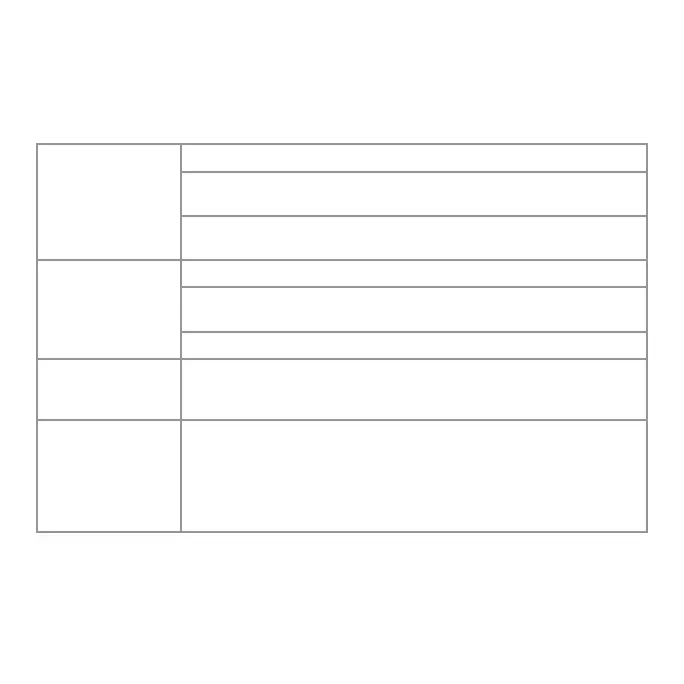
POSSIBLE CAUSE AND SOLUTIONPROBLEM
TROUBLESHOOTING
The unit fails to
power on.
Unit is not plugged in.
Unit is damaged or in need of repair. Cease usage and unplug.
Contact Consumer Service for assistance.
Fuse needs to be replaced. See IMPORTANT INSTRUCTIONS for
how to replace the fuse or contact Consumer Service.
Unit is not pro-
ducing sufficient
amount of air.
Ensure unit is set to highest setting for maximum air circulation.
Allow the unit to fully circulate the air throughout the room, this
may take several minutes.
Ensure all air inlets and outlet grille are unobstructed.
Fan Body will not
stay in desired
position.
Tighten the knob located on the Fan Body until Fan stays in the
desired position.
GFCI has tripped. Under certain conditions, it is possible for a reset GFCI (Ground
Fault Circuit Interrupter) outlet to trip when the user is changing
speeds on a fan. In this event, change to an outlet that is not
connected to a GFCI device. It could also indicate a weak or
defective GFCI outlet. Contact a qualified electrician to check
the GFCI outlet.


 To Next Page