20
2.AddCamerafromWAN
Thestepsfrom1to5aresameas“addcamerasfromthesameLAN“above,thefollowing
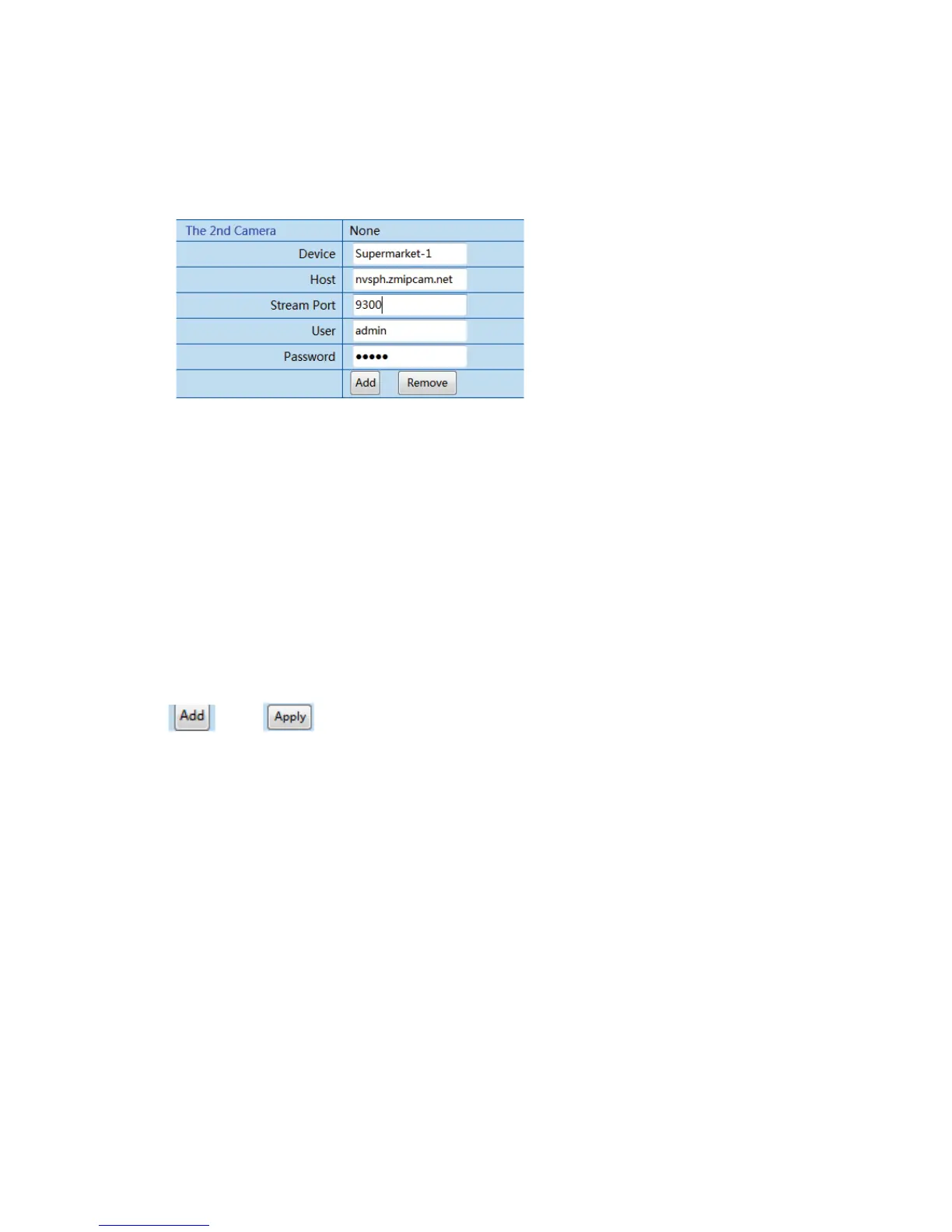
stepsafterstep5areasfollows(justfillintheinforma tionintheblankbelow)
Step6,Definethenameofdevice,suchas“SupermarketͲ1”
Step
7,FillinthesoleDomainnameofIPCamera(pleaseref ertothelabelontheCD)
suchas:nvsph.zmipcam.net
Step8,Defaultis9300orfill inthenumberrangeof“1~65535”
Step9,Defaultis“admin”
Step10,Pleaseref ertothelabelontheCD
Click
and tofinishadding
6.3.2.4AlarmSetting
(ThisfunctionofIPCameraisunderupdating)
Setthealarmingfunction.IPcamerasupportsmotiondetectionandouteralarming
input.ThemotiondetectionmeansIPcameradetectsthelivepicture.Itwillcallalarmin
casecircumstanceschange.Youcanset10class
sensitivity.Thelessclass,thehigher
sensitivity.
Alarmingactionincludespreset,alarmingoutput,mailnotificationandFTPuploading
pictures.



 To Next Page