SkyTab Support: (888) 647-8603
2
PRIOR TO INSTALLATION
Verify that the site is ready for installation prior to starting work. Always notify your service contact if the merchant is request-
ing that you install equipment in a temporary location (such as the floor, mobile carts, collapsible tables, etc.), if there is any out
of scope work, or if the site’s Ethernet, power, or construction requirements have not been met. This situation will need to be
handled on a case by case basis, and you will need approval from your service contact prior to proceeding.
SYSTEM INSTALLATION
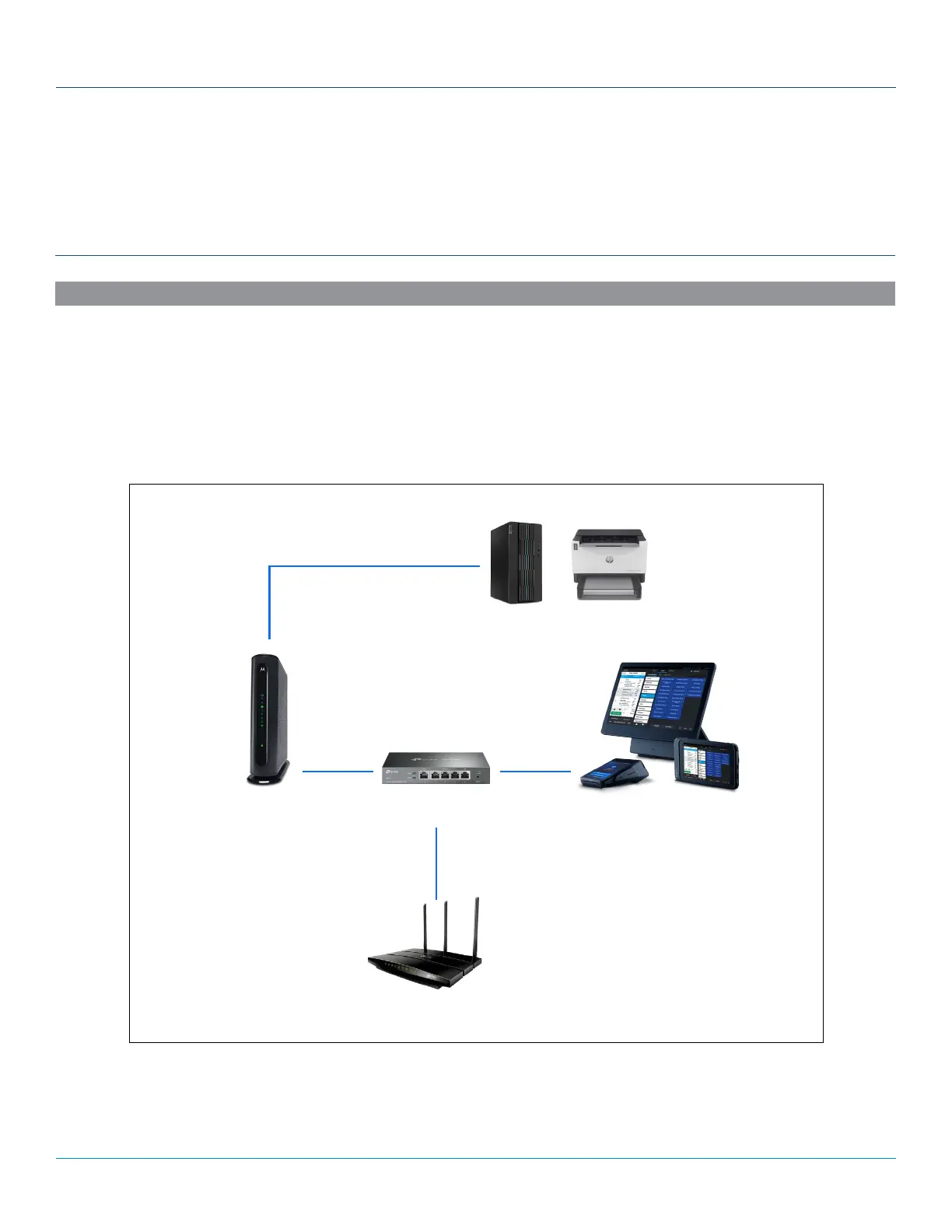
Modems can have anywhere from one to eight local area network (LAN) ports. An Ethernet cable is used to connect these ports
to your router and any network devices (personal computer, POS system, etc.). This can be set up in various configurations
depending on the number of LAN ports on the modem.
• Multiple LAN Port Modem – This modem can connect directly to both the Shift4 TP-Link router and your personal router.
• Single LAN Port Modem – This modem only allows one router to be connected directly to it and other routers may have to be
hooked up to each other.
Merchant Equipment
Cat 5e
Cat 5e
Cat 5e Cat 5e
SkyTab EquipmentTP-Link Router
Archer - only if ST Glass is used
Modem/Router
ROUTER



 To Next Page