12
メニューから設定変更できる機能の一覧は、次ページをご覧ください。
水深画面に戻る場合はメニュー画面から「水深画面へ」を選択し、決定してください。
また、モーターでの巻き上げ、もしくはハンドルで巻き上げますとメニュー画面から
水深画面に戻ります。
• All items on the LCD shown here are displayed for instructional purposes only.
Electric Winding Load Display
When Electric Winding Load Display is ON and the line is being
retrieved by motor, the estimated line tension is displayed.
Depending on the load, the number will vary between 0 and 9.
Caution: When the Electric Winding Load Display and Rig
Retrieval Time Display are ON, and the Bottom Depth Display
and Target Depth Display are ON, Bottom Depth Display and
Target Depth Display take priority in the middle row. However,
if the motor is in operation, the display automatically switches
to Electric Winding Load Display and Rig Retrieval Time Display.
When Electric Winding Load Display and Rig
Retrieval Time are ON
As shown below, the status is shown under the Current Depth display.
Indication of Current Function
Program pattern in operation:
[PGM] is displayed.
Switch to Rakuraku Mode:
The alarm beeps and (R) is displayed for 3 seconds.
Switch to Fixed Speed Mode:
The alarm beeps and (S) is displayed for 3 seconds.
Menu R/S
(Rakuraku/Fixed Speed)
Button
PICK UP/PGM (Program) Button
When Pick Up Mode is ON, the line will be wound in by motor for as
long as the button is pressed.
Winding speed can be adjusted from 0 to Hi.(Default setting is 15.)
Press
* When Pick Up Mode is ON, Program Mode is automatically turned OFF.
* After gunwale stop, Pick Up is deactivated.
When Program Mode is ON, the movement pattern will start.
Use this button also to pause and restart.
Press
* When Program Mode is ON, Pick Up Mode is automatically turned OFF.
* After gunwale stop, Program Mode is deactivated.
Spool Free Mode
When in Spool Free Mode, the brackets disappear.
Top-Down timer
Displays the elapsed time after the rig reaches the target depth
from the surface.
* Times from 0 to 59 seconds are displayed in units of 1 second, and
from 1 to 99 minutes in units of 1 minute.
When the time reaches 100 minutes, the display returns to 0
seconds.
Technical Lever Settings
Displays Rakuraku mode and Fixed Speed Mode values.
Lowering speed display
Displays the estimated lowering speed.
* “( )” will flash in the display.
0 Set/Enter Button
Zeroing the Counter
Lower the rig to the surface of the water and zero the counter.
* It may not be possible to zero the counter if Jigging Mode is ON.
Always turn Jigging Mode OFF before zeroing the counter.
Hold
Press Enter to turn ON or OFF the function selected using the Menu
button.
Press
Rig Retrieval Time
When Rig Retrieval Time is ON
and the line is being retrieved by
motor, the time remaining is
displayed.
Sets the function (or entered value)
selected by the cursor.
These buttons move the cursor up or down.
When setting values, they are used to increase or
decrease the value by 1..
For the list of functions with settings that can be changed from the Menu, see the next page of this manual.
Saved Depth
In Top-Down mode, the saved depth is displayed, and in
Bottom-Up mode, the saved depth is displayed as zero.
Low Charge Warning
If the charge is insufficient, will flash.
(Charge status can be checked any time from the
Menu Screen.)
Press to switch between Rakuraku Mode and Fixed
Speed Mode. You can press this button even when
reeling in.
The mode selected will be shown on the display.
R (Rakuraku Mode): Green Backlight
S (Fixed Speed Mode): Orange Backlight
If the motor or handle is used to wind up the line, the screen changes to the Water Depth Display
from the Menu Screen.
To return to the Water Depth Display, select RETURN from the Menu Screen and press SET.
Press
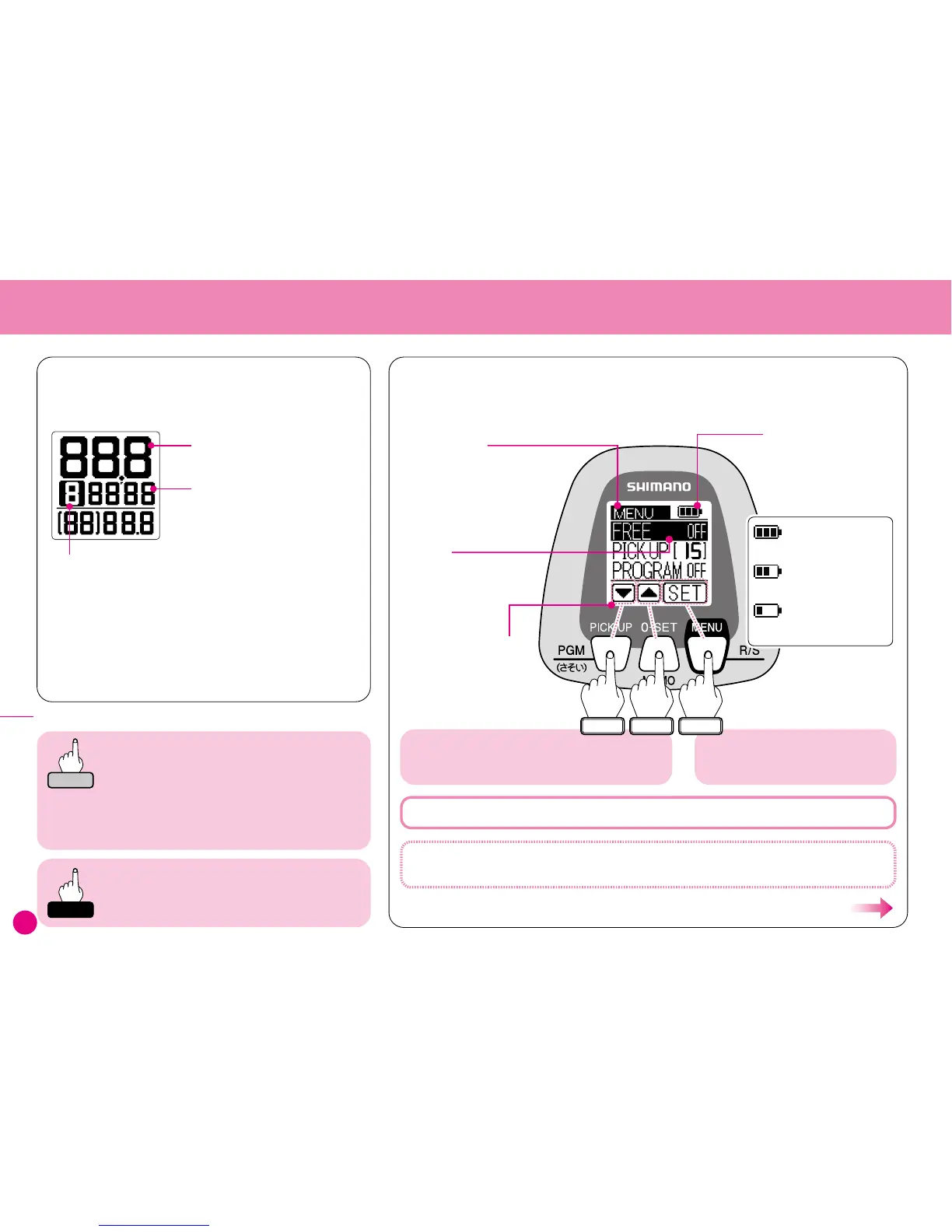
The Menu Screen is displayed.
Various settings can be changed from the Menu.
See the diagram to the right for how to operate the
Menu Screen.
Hold
Current Depth
SET
▲
▼
Press and hold the MENU button for 3 seconds and you will hear two short beeps and
the Menu Screen below will appear.
Basic Menu Screen Operation
Adequate Charge
Slightly Flat
Insufficient Charge (Flashes)
:
:
:
Menu Screen
Scroll through the list by moving
the cursor up or down. For the
list of functions with settings
that can be changed from the
Menu, see the next page of this
manual.
Cursor
Highlights the menu item.
Use the cursor to select
the function.
Charge Status
Indicates the charge of the
battery or the voltage of
the power supply as shown
below.
Displays the functions of
the buttons. Please use
this as a guide for
operation.
Present Depth
Displays depth from the surface of the water.
* Depth is shown in 10cm graduations.
Depths over 100m are shown in 1m graduations
as shown below.



 To Next Page