58
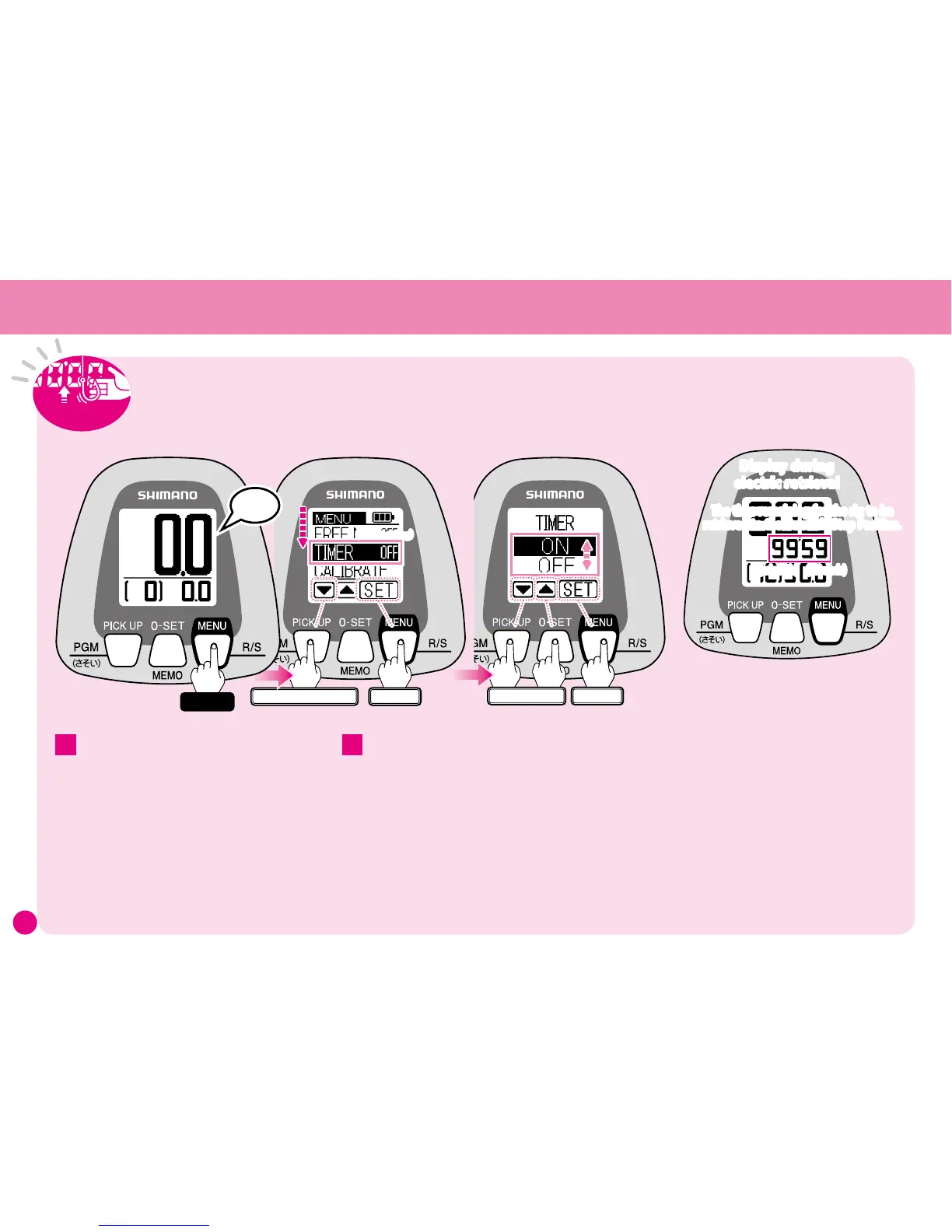
Press
▼
several times and select
TIMER.
The current setting appears to the right of the
function name.
(Settings shown here are for instructional
purposes only.)
Press SET to display the Rig Retrieval Time
menu.
Use
▼▲
to choose either ON or OFF, then
press SET to complete the setting.
When retrieving the rig under power, this
displays the time remaining for the rig to
be retrieved to the Gunwale Stop Position.
The display can show a maximum of 99’59
(99 minutes and 59 seconds). For times
longer than that the display will flash
99’59.
2
Note: All settings and values shown here are for
instructional purposes only. They are not intended
to be actual settings or values.
1
ワンタッチ
Enter
Select
The time remaining for the rig to be
retrieved to the Gunwale Stop Position.
(minutes) (seconds)
Display during
electric retrieval
Display during
electric retrieval
ワンタッチ
Enter
Press several times
(current setting)
Peep
Hold
When the power is turned on, Rig Retrieval Time
is set to OFF. The illustration shows the Water
Depth Display with Rig Retrieval Time OFF.
At the Water Depth Display press and
hold the MENU button for 3 seconds and
the Menu Screen will appear.
When retrieving the rig under power, this displays the time remaining
for the rig to be retrieved to the Gunwale Stop Position.
Use the procedure shown below to turn ON this function.



 To Next Page