47
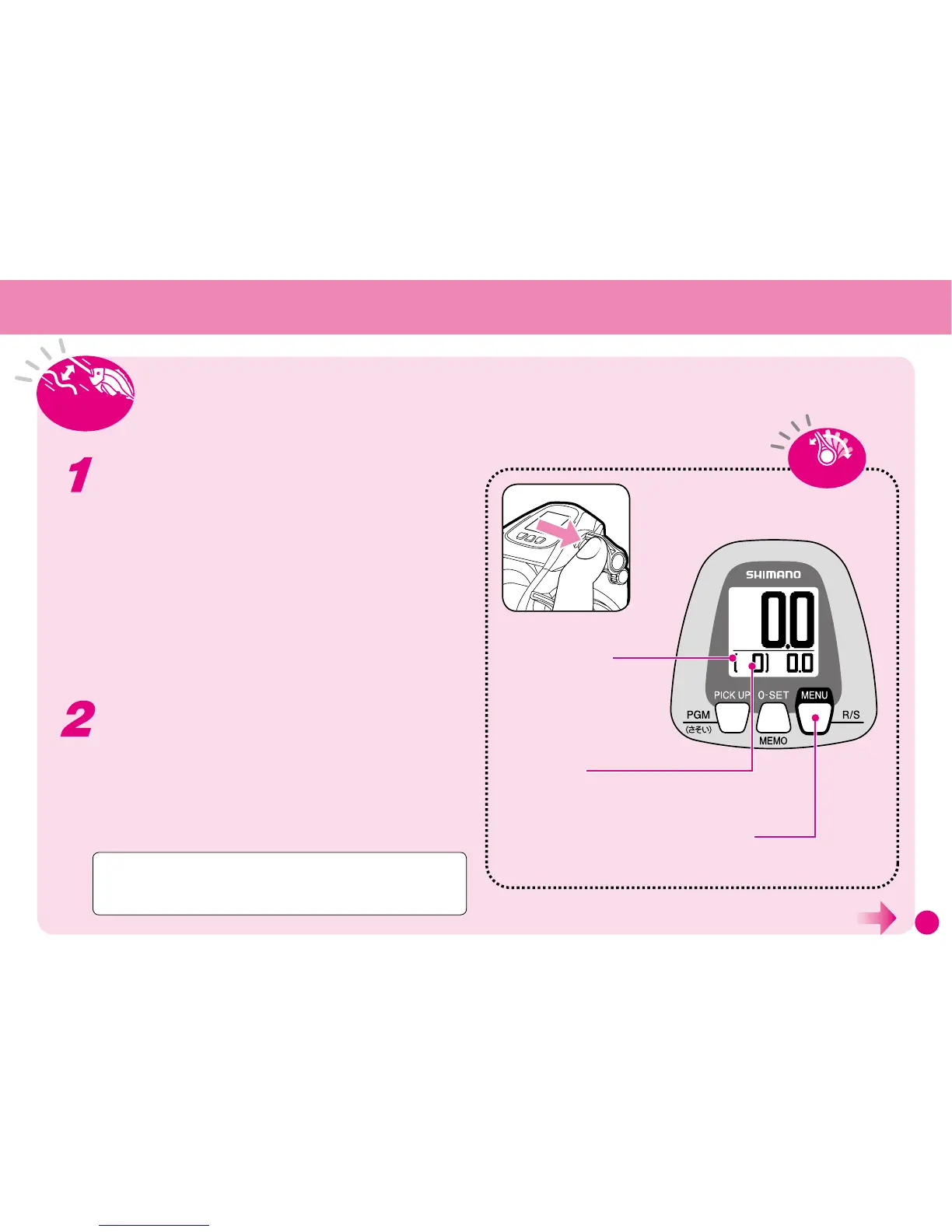
Menu | R/S
(Rakuraku/Fixed Speed)
Button
Used to change between Rakuraku
Mode and Fixed Speed Mode.
Present Mode
R (Rakuraku Mode): Green Backlight
S (Fixed Speed Mode): Orange Backlight
Technical Lever
Used to set Fixed Speed Modeand Rakuraku Mode.
Shows the position of
the Technical Lever.
7HFKQLFDO
/HYHU
(Continued on the next page.)
• Press Menu (R / S) to change between Rakuraku Mode and
Fixed Speed Mode.
You can change modes when winding in.
• The current mode is shown on the display.
R (Rakuraku Mode): Green backlight.
S (Fixed Speed Mode): Orange backlight.
Changing between Rakuraku Mode
and Fixed Speed Mode
Regardless of the size of the fish, or in other words the load
on the reel, Fixed Speed Mode adjusts motor settings to wind
in your fish at a set speed*.
* Speed is the spool rotation speed.
What is Fixed Speed Mode?
Winding In: Rakuraku Mode | Fixed Speed Mode
Caution: Settings 1~4 are for dead slow. At some tension setting the
weight of the sinker can stop the rig from being wound in. In such cases
increase the tension.



 To Next Page