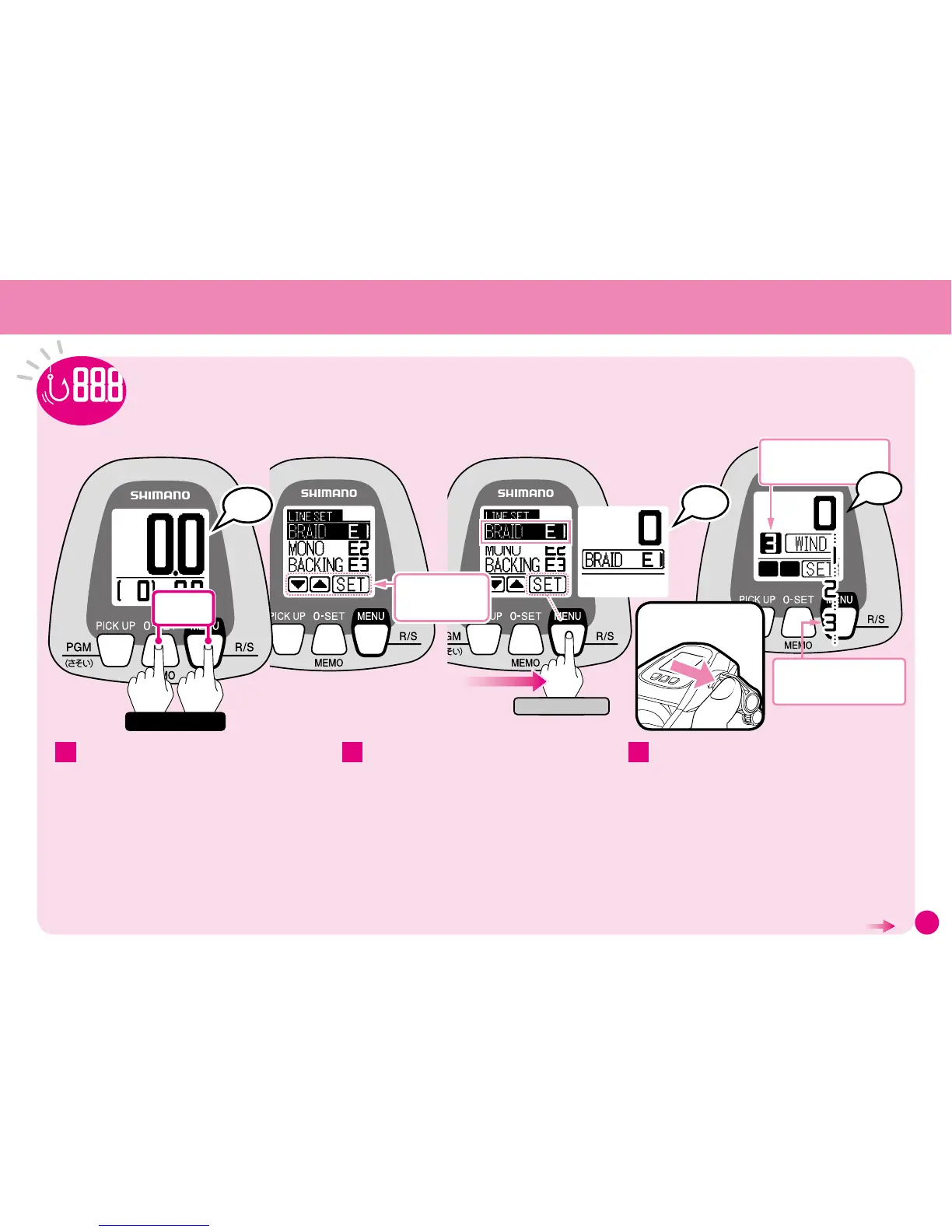
The Line Learning Menu appears.
※
The button functions change when in Line
Learning Mode, so refer to their functions shown
on the bottom row of the display.
Check that Braided Line Learning E1 is selected
and press SET.
The display changes to the one shown above.
(See pages 17–18 for details on selecting learning
methods.)
Use the Technical Lever to wind on the line.
A number corresponding to the number of spool
revolutions will be displayed.
Operate at a winding tension of 3.
This value indicates the force (line tension) applied
for winding the reel as a number. The number does
not equal kilograms. In addition, it will differ from
the value which appears in Rakuraku Mode.
When winding using the Technical Lever, the
speed can be adjusted using the Technical
Lever. To stop winding, set the Technical Lever
to the ”OFF” position.
2 31
1
Simple, convenient NEW SLS III Winding Learning
Braided Line Learning (E1)
Peep-Peep
Please ensure that
winding tension is set
at 3.
Changes in accordance
with the number of spool
revolutions.
ワンタッチ
2
決定
Enter
Peep
※
Displays the function
of the buttons in Line
Learning Mode.
1
1
Peep-Peep
Hold
Press At the
Same Time
Carry out this operation if the counter value is 6m
or less.
If the value displayed is 6.1m or more, reset the
counter. (Refer to pages 37.)
Set the clutch lever to ON.
Then, check that the power supply is
connected.
The digital display will show the following.
(When in Standard Mode)
Press the 0 SET button and the MENU
button at the same time for more than 3
seconds to enter Learning Mode.
Use the Technical Lever
to wind on the line.
(Inputting the actual value of the line use into the reel.)
Learning Methods
(Continued on the next page.)



 To Next Page