44
Changing Mode
3
2
ワンタッチ
Enter
2
Select
Hold
Peep-Peep
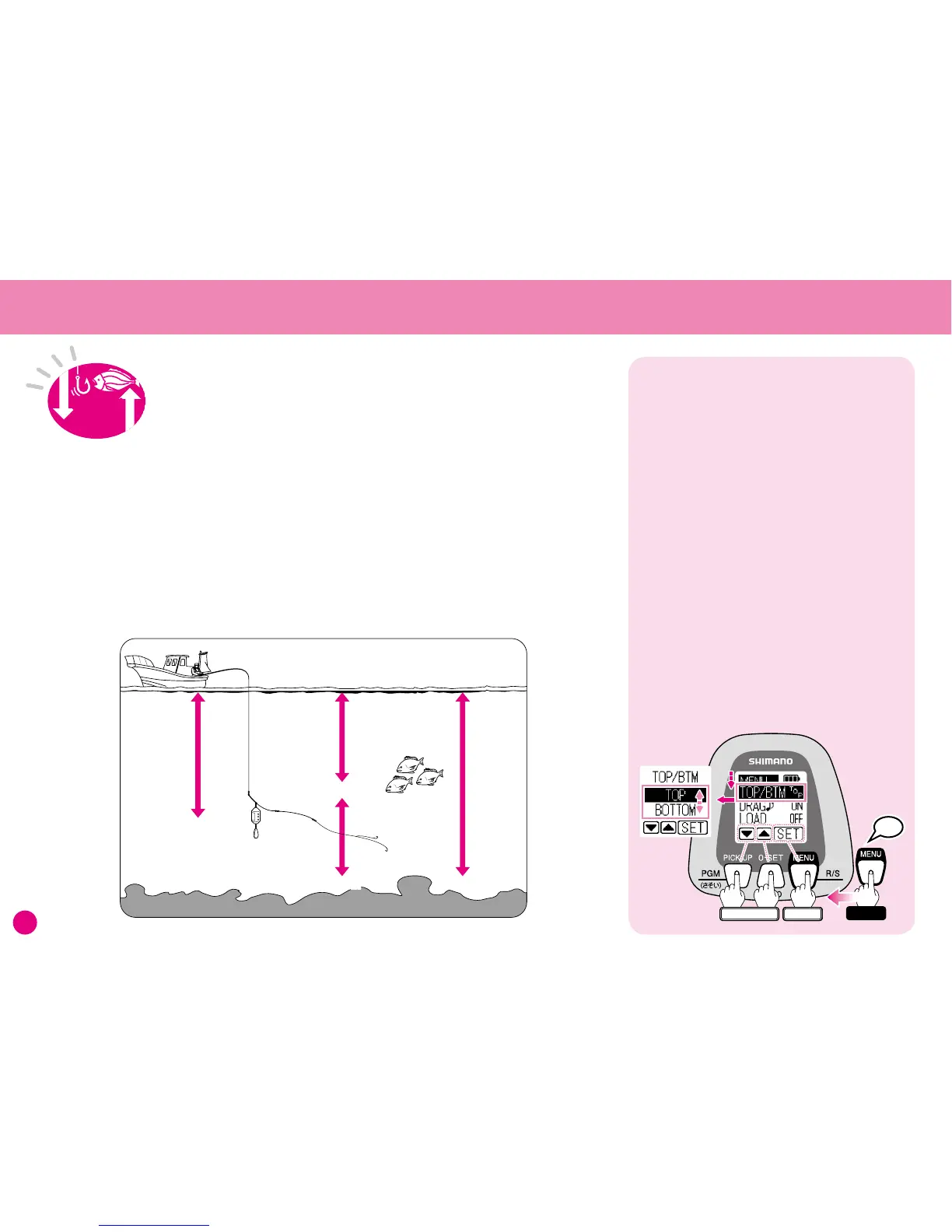
1. At the Water Depth Display press and hold
the MENU button for 3 seconds and the
Menu Screen will appear.
2. Press
▼
several times and select TOP/BTM.
The current setting appears to the right of
the function name.
(Setting shown here is for instructional
purposes only.)
Press SET and the TOP/BTM menu will appear.
3. Use
▼▲
to choose either Top-Down or
Bottom-Up, then press SET.
Choose between
Top-Down and Bottom-Up Modes
fishing technique and target species, this
position may be given as the distance from
the surface or the distance from the bottom.
This product lets you switch the depth
display method for times when you would
like to check the distance from the bottom.
Select between modes according the
situation at hand.
The secret to improving your catch is being
able to accurately position your rig at the
depth where the fish are.
With the latest high-performance fish finders
it is possible to see the exact depth that the
fish are at. The skipper of the vessel will
normally give you this information.
Depending on factors such as fishing ground,
3UHVHQW'HSWK
%RWWRP
7DUJHW=RQH
%RWWRP
Finding the Target Depth
Please see Pages 12 for details regarding
menu button operation.
When the power is turned ON the reel will
be in Top-Down Mode. Use the procedure
shown below to change modes.



 To Next Page