26
10 11
2 2
Hold
Peep-Peep
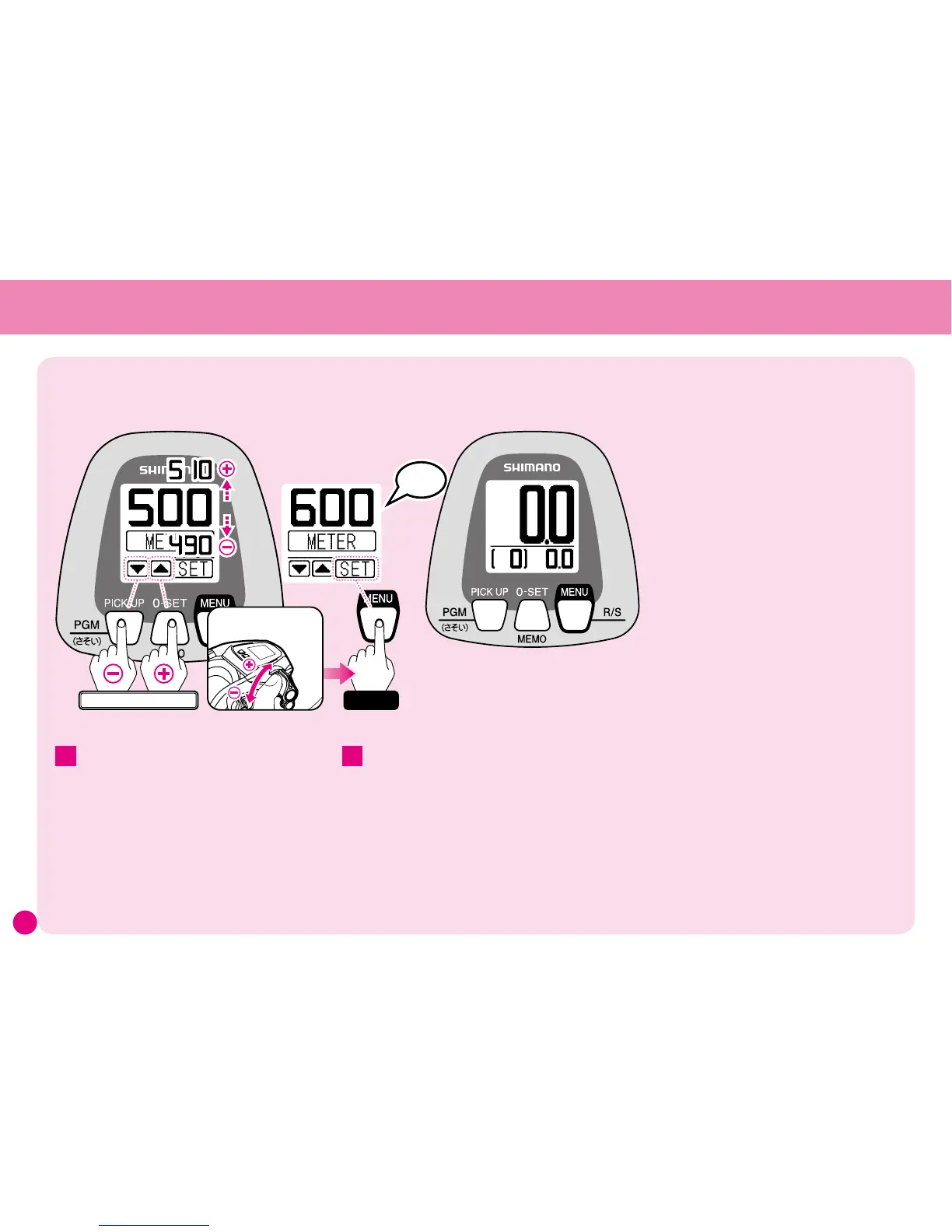
Use the Technical Lever to
set the length of the line.
Set the line length
Caution: The values and settings shown on the reel display in this manual are in some cases just examples. Actual values may differ.
The display will return to Standard Mode
and learning will be complete.
(In some cases there may be as much as a ±3%
difference between the counter value and the actual
length of the line.)
* This difference is the difference in the first cast
made after learning.
* After this when actually fishing, if you think that
the difference is too great, carry out Line Learning
Adjustment as shown on pages 61. This will
enable you to position your rig more accurately.
Use the lever to set the length of the main
line, and then press the MENU button for
more than 3 seconds.
The alarm will sound (peep-peep).
* The initial setting is 500m. (The diagram shows
the setting changed from 500m to 600m.)
* If you accidentally press the MENU button while
carrying out an input operation, the data entered
up until that point will be lost and you will
have to repeat the process once more from the
beginning.



 To Next Page