60
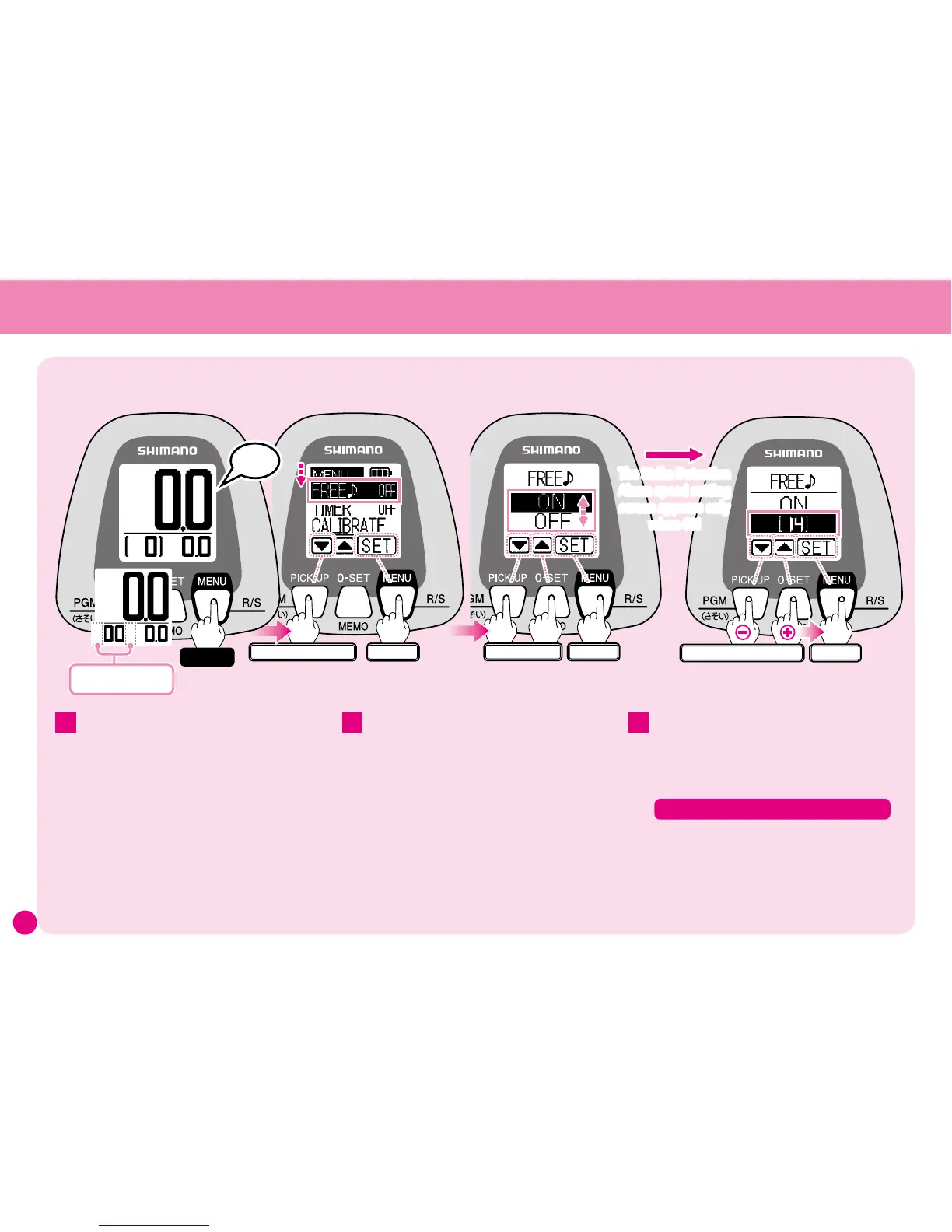
To turn Spool Free Mode ON/OFF or set the Strike Detection Alarm speed
Press
▼
several times and select
FREE
♪
.
The current setting appears to the right of the
function name.
(Settings shown here are for instructional
purposes only.)
Press SET to display the FREE
♪
menu.
Use
▼▲
to choose either ON or OFF, then
press SET.
(See Pages 12 for details regarding Menu Screen
operation.)
When set to OFF, you will return to the Menu
Screen and the setting is complete.
Only when set to ON will the screen
appear for setting the Strike Detection
Alarm speed.
2 3
Note: All settings and values shown here are for
instructional purposes only. They are not intended
to be actual settings or values.
1
Use
▼▲
to increase or decrease the
speed, then press SET.
※
Can be set from 0 to Hi. (Default setting is 14.)
Set the Strike Detection Alarm Speed
ワンタッチ
Enter
Select
2
2
ワンタッチ
Enter
Select the Strike detection speed
(0 〜 Hi)
The Strike Detection
Alarm speed setting
screen appears only
when ON
ワンタッチ
Enter
Press several times
Peep-Peep
Hold
When Spool Free Mode is
ON, the brackets disappear.
When the power is turned on, Spool Free Mode
is set to OFF. After "Fluoro Learning Mode E2"
for Line Learning is completed, Spool Free Mode
turns ON automatically.
※
When Spool Free Mode is ON, the brackets on
the Water Depth Display disappear.
At the Water Depth Display press and
hold the MENU button for 3 seconds and
the Menu Screen will appear.



 To Next Page