4
If this device is operated in any other way, than the one described in this manual, the product may suffer
damages and the warranty becomes void.
Any other operation may lead to dangers like short-circuit, burns, electric shock, lamp explosion, crash etc.
You endanger your own safety and the safety of others!
Rigging
Please follow the European and national guidelines concerning rigging, trussing and all other safety issues.
Do not attempt the installation yourself !
Always let the installation be carried out by an authorized dealer !
Procedure:
• If the projector is lowered from the ceiling or high joists, professional trussing systems have to be
used.
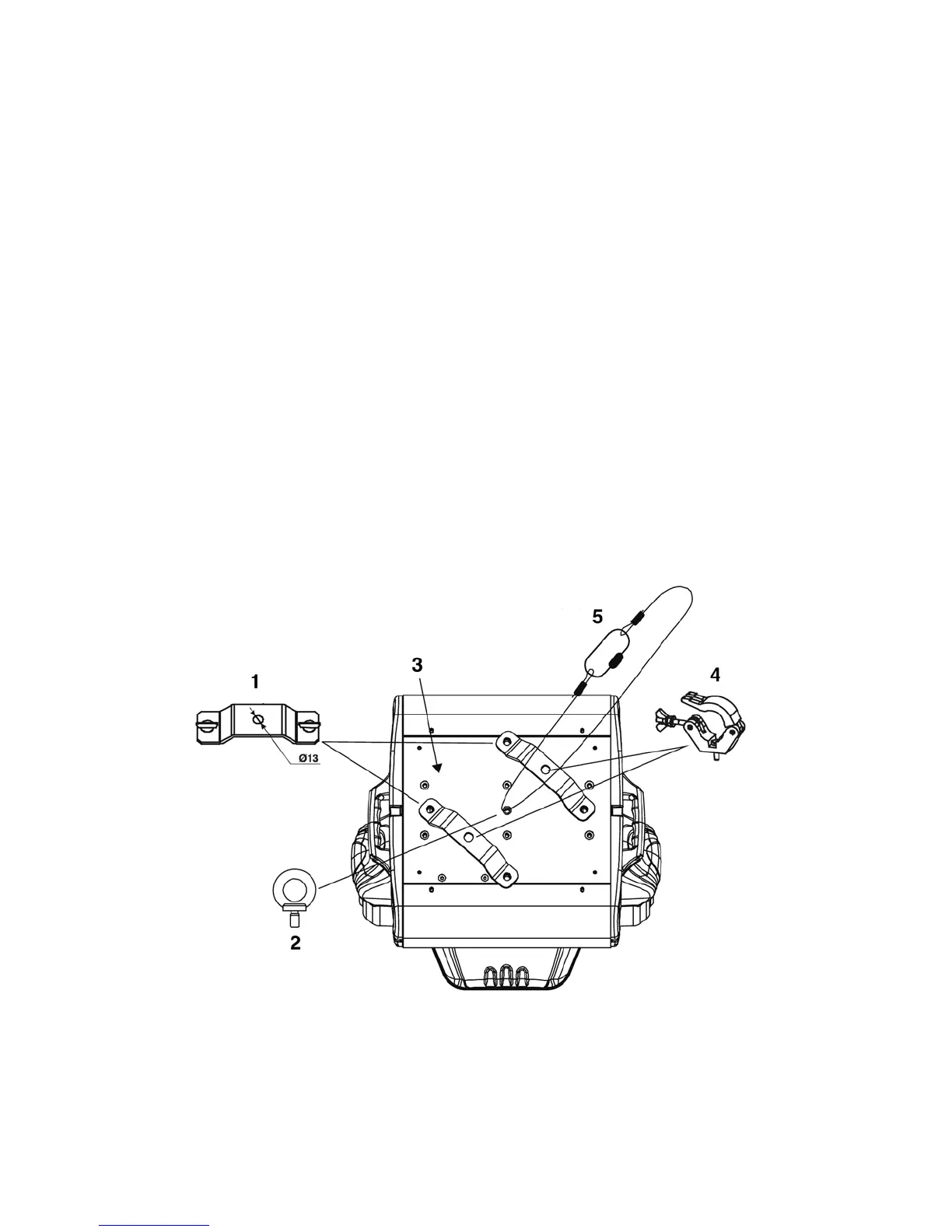
• Use a clamp to mount the projector, with the mounting-bracket, to the trussing system.
• The projector must never be fixed swinging freely in the room.
• The installation must always be secured with a safety attachment, e.g. an appropriate safety net or
safety-cable.
• When rigging, derigging or servicing the projector, always make sure, that the area below the
installation place is blocked and staying in the area is forbidden.
The Explorer can be placed on a flat stage floor or mounted to any kind of truss by a clamp.
Mounting a clamp to the underside of the Explorer moving head
1) Omega Holder
2) Eye bolt
3) Mounting plate
4) Clamp
5) Safety-cable
Improper installation can cause serious damage to people and property !













 To Next Page