16 of 34
SI-TEX Marine Electronics - SP120C Color Autopilot
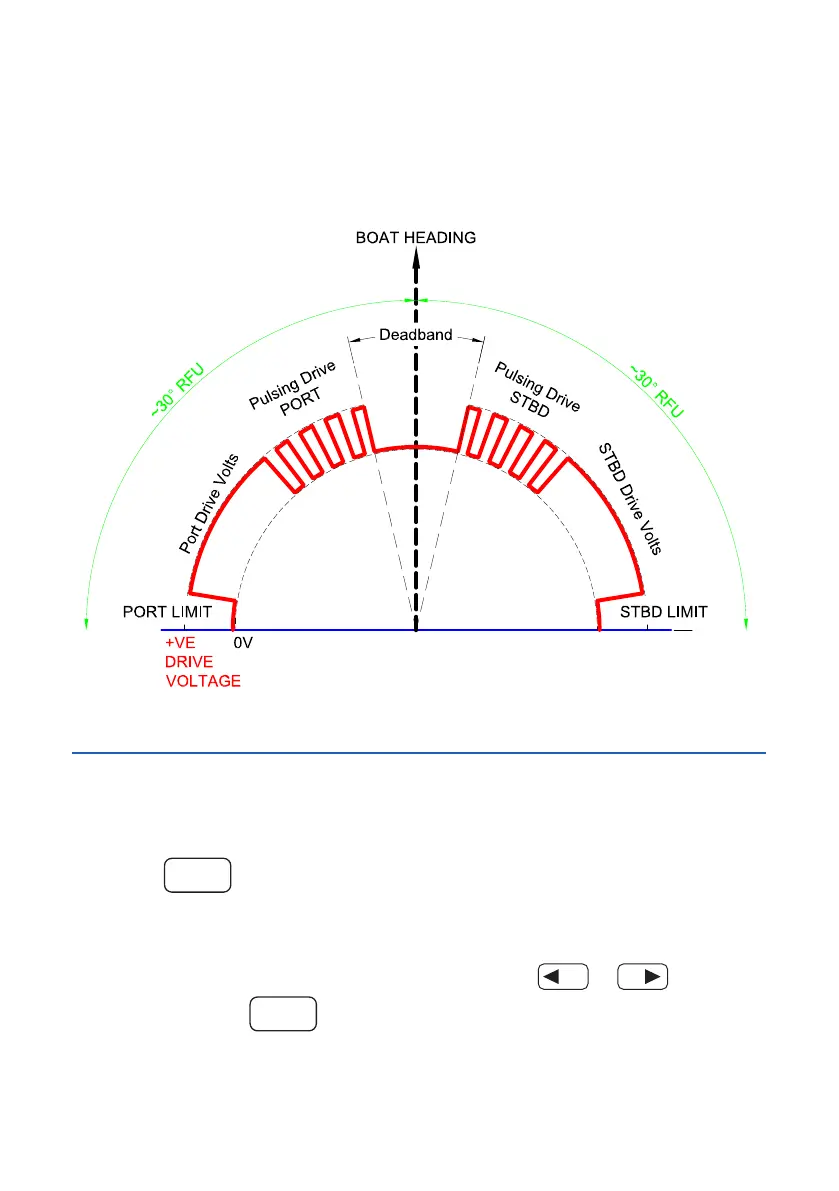
Motor Drive Concept
During AUTO or GPS modes, the system will pulse the drive motor when it
is close to the desired target heading. This allows the system to make minor
adjustments to the rudder to stay on course. Also note the dead band (relating
to the rudder sense setting) this accounts for excessive play in the rudder and
reducestherudder‘hunting’eect.
System Settings
Pilot Settings
To access the SP120C Settings menu
Press the
MODE
button.
NOTE: SP120C Settings can be modied at any time, while using any of the
modes.
To increase or decrease any SP120C settings press
or
Continuously press
MODE
to scroll between each of the SP120C Settings, or
to return to main screen (or wait 5 seconds).
NOTE: Any modied setting will be automatically saved and stored in memory.



 To Next Page