22 of 34
SI-TEX Marine Electronics - SP120C Color Autopilot
Initial Setup
Installer's Instructions
NOTE: Before powering the system for the rst time follow the initial
inspection & testing procedures.
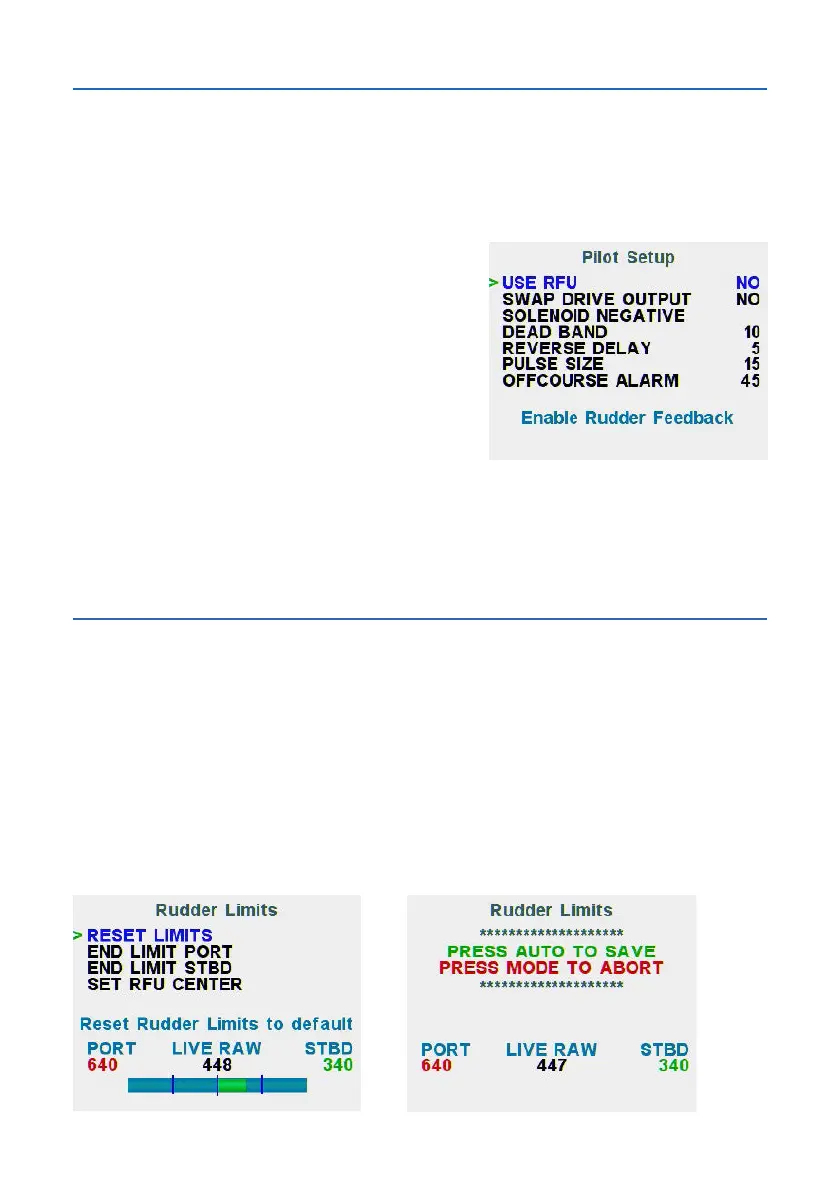
Advanced Menu - Install Options > Pilot Setup
If a RFU is installed, change USE RFU to
YES.
Return to Manual MODE and drive the motor
Port and Stbd. If the drive motor is moving
the rudder in the wrong direction, change
SWAPDRIVEOUTPUTtoYES.
If using a constant running motor, check the
solenoid common terminals are wired as per
the installation wiring Diagram (to Battery
+VE) In this case, ensure that the Solenoid
Negative setting is used.
Calibration
Rudder Feedback Calibration
Advanced Menu - Install Options > Rudder Setup
Setup and calibrate the rudder feedback positions in this order:
End Port limit > End STBD limit > Set RFU Center
To set each limit, manually steer the vessel using the helm wheel or by
pressing the < or > button. Be careful not to overdrive the rudder past the limit
as the software limits are disabled in this mode.
During Calibration also check the rudder drive direction is correct.



 To Next Page