23 of 34SI-TEX Marine Electronics - SP120C Color Autopilot
Compass Calibration
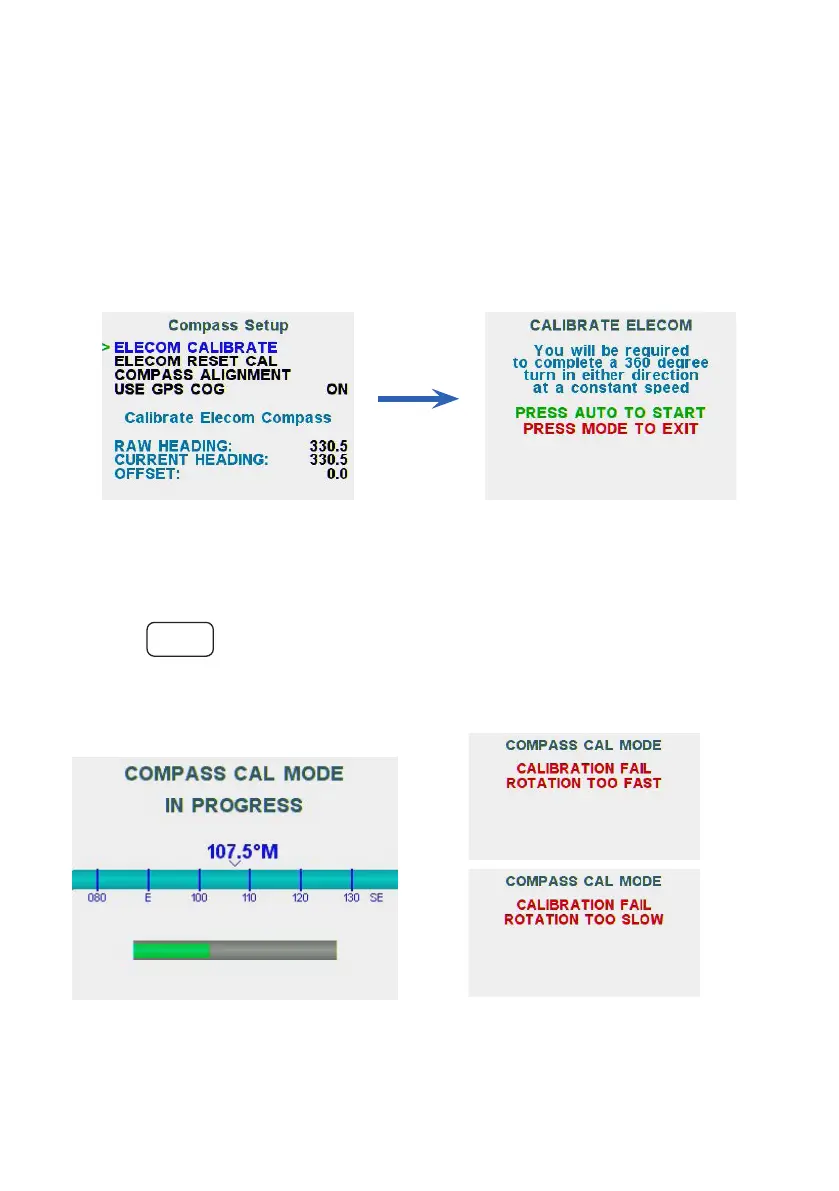
Advanced Menu - Install Options > Compass Setup
If necessary, the E-Compass can be calibrated to compensate for local
magneticinuencesofthevessel.Tocarryoutthisproceduretheboatmust
be in calm open waters and be able to safely turn around a 360º round track at
a consistent low speed.
NOTE: The standard E-compass is factory calibrated and only oset settings
should need to be changed if the installation position is ideal as per the
previous instructions
To Calibrate the E-COMPASS:
• Go to the CALIBRATE ELECOM screen in the Install Options > Compass
Setup menu
• Start turning the boat at low speed, holding the turn at a constant rate, then
press
AUTO
• A GREEN progress bar will be displayed.
• Continue turning the vessel slowly until the message ‘CALIBRATION
PASSED’ is displayed
(Above) If you are turning too fast
or too slow, a ‘CALIBRATION FAIL’
message will appear and you will be
required to start the process again.



 To Next Page