45
14 People
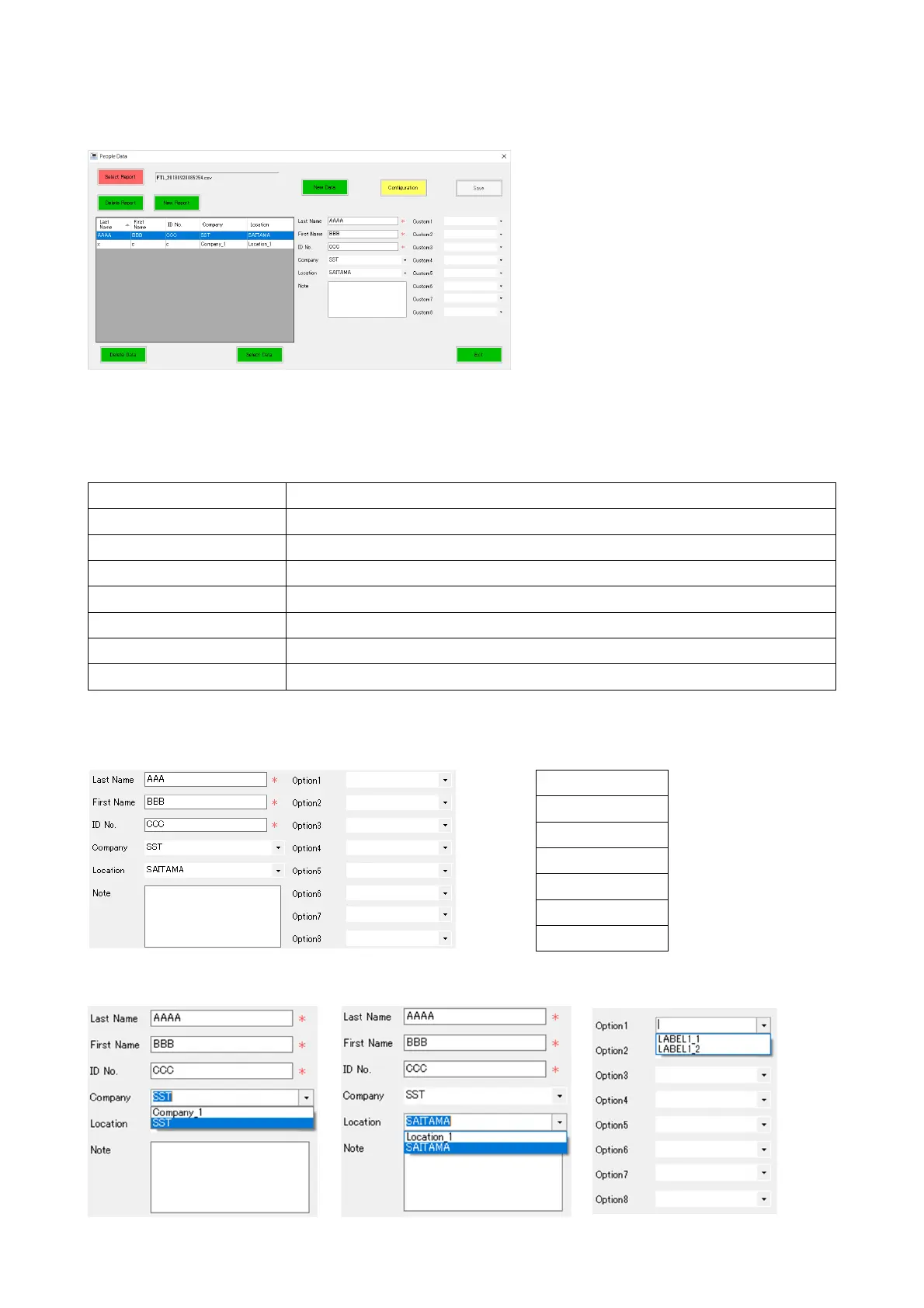
This function allows you to select and edit subject data.
Clicking the [Person] button opens the People Data window.
Edit, select, delete, and create subject data.
The function of each button
Select Report Select a data file. See “17-2 Select Report.”
New Report Create a data file. See “17-3 New Report.”
Delete Report Delete a data file. See “17-4 Delete Report.”
Select Data Select data. See “17-5 Select Data.”
Delete Data Delete data. See “17-6 Delete Data.”
New Data Enter new data. See “14-2 New Data.”
Configuration Edit the Custom/Company/Location list. See “14-1 Configuration.”
Save Save the edited data.
Enter subject data in the blank fields.
● Please be sure to input “Last Name”, “First Name”, and “ID Number”
For the Company and Location fields, you can select data from the drop-down list.
Last Name *Required
First Name *Required
ID Number *Required
Company
Location
Note
Option1~8



 To Next Page