EasyManua.ls Logo

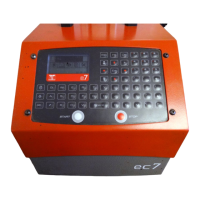
Sic Marking ec7 - User Manual

Sic Marking ec7
20 pages
Print Icon
To Next Page IconTo Next Page
Loading...
User Guide
ec7 – e7p62 – e7p122
SIC MARKING
13 route de Limonest
ZAC de la Braille
69380 LISSIEU – France
Telephone: (+33) 04.72.54.80.00
Fax: (+33) 04.78.47.39.40
E-Mail: info@sic-marking.com
http://www.sic-marking.com
NOTE7V1EC7P62P122US-R01.doc 1/46
Question and Answer IconNeed help?

Do you have a question about the Sic Marking ec7 and is the answer not in the manual?

Summary

INTRODUCTION

EQUIPMENT AND INSTALLATION

System Components and Unpacking

Lists supplied parts and describes unpacking procedures.

Installation and Setup

Details on fixing, power connection, and initial setup.

Electrical Interference Warning

Crucial safety advice regarding external interference and radiation protection.

II - USE

Safety Precautions

Covers temperature, eye protection, hearing protection, and tip protection.

Part Positioning and Securing

Instructions for immobilizing the workpiece for marking.

Stylet Distance and Marking Control

Starting and Stopping Marking

Software Introduction and Key Functions

III - STARTING UP

Opening Screen and Version Information

Displays the initial screen with version and date.

Marking Mode Screen Description

Details the elements and navigation of the marking mode screen.

Tab Functions for Navigation

Explains the purpose of different tabs for mode selection.

Creating a First Marking File

Marking File Printing Setup

Executing the Marking Process

Write Mode Function Keys

Marking Parameters: Depth, Quality, Speed

Marking Styles: Angled, Radial, Circular

IV - FILE MANAGEMENT

File Loading into Memory

Process for selecting and loading existing files.

Deleting Files from Memory

Procedure for removing unwanted files.

V - ADVANCED FUNCTIONS

Using the Adjustment Function

How to position the marking head using coordinates.

Using the Graphic View

Previewing the marking on the machine's screen.

Using Variable Fields

Time Variables and Special Characters

Sic Marking ec7 Specifications

General IconGeneral
BrandSic Marking
Modelec7
CategoryIndustrial Equipment
LanguageEnglish

Related product manuals