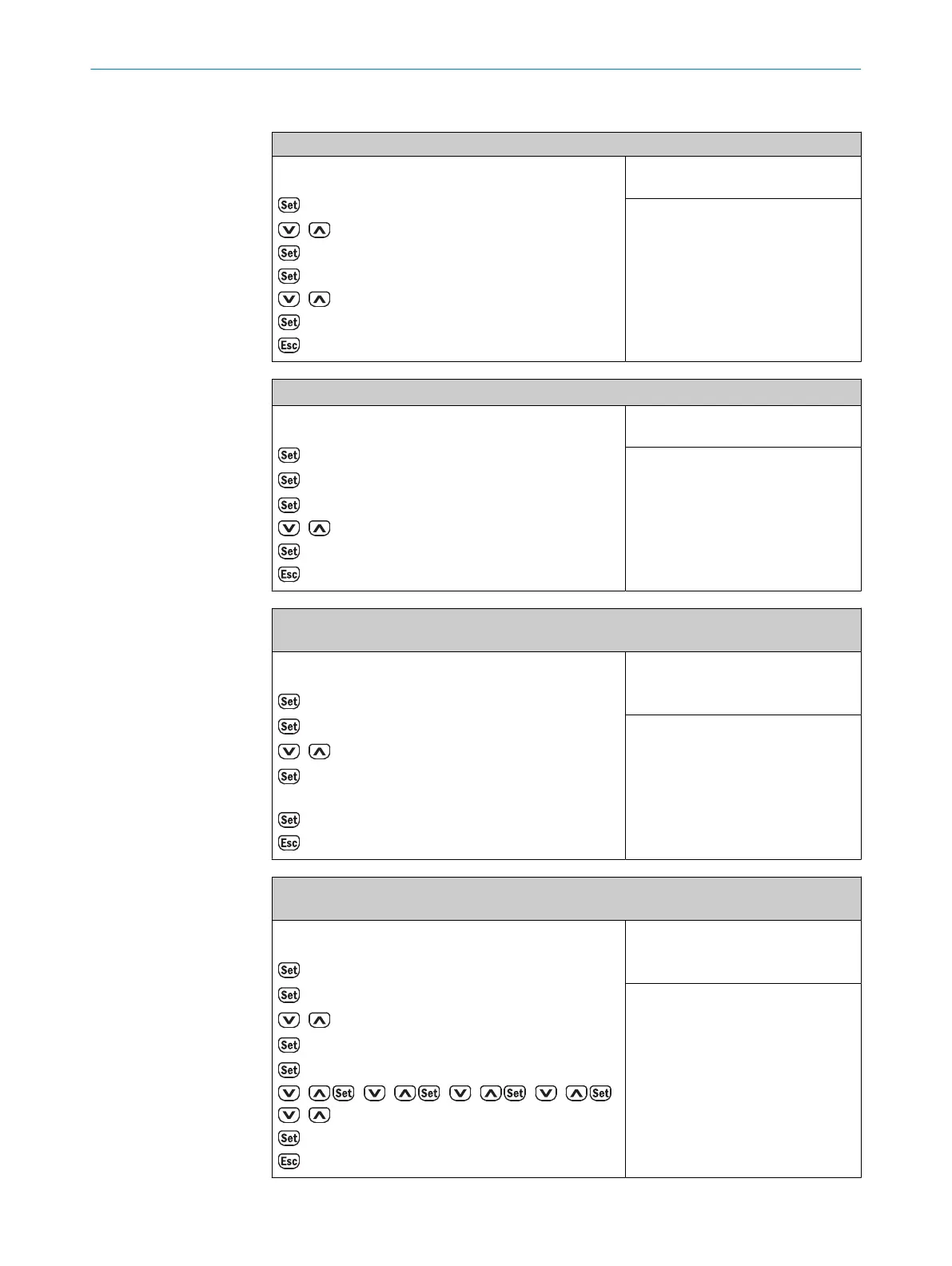
6.4.1.6.4 Operating examples via display: “Q
1
SLWarning” switching mode
Select and activate the “Advanced” user level
Operating example or steps:
RUN mode
→ Q
1
Output
/ to → Device
→ User level
→ Easy
/ to → Advanced
→ Saved
to → RUN mode
Necessary default settings:
-
Factory setting:
Easy
Select and activate the “SLWarning” switching mode for Q
1
Operating example or steps:
RUN mode
→ Q
1
Output
→ ModeQ
1
→ DtO (1point)
/ to → SLWarning
→ Saved
to → RUN mode
Necessary default settings:
User level = Advanced
Factory setting:
DtO (1point)
Teach in the current signal level as the switching point or level warning threshold for the signal
level warning via Q
1
as a switching point or level warning threshold
Operating example or steps:
RUN mode
→ Q
1
Output
→ ModeQ
1
/ to → Teach Q
1
→ SLWarning
Position the reference object
→ Saved
to → RUN mode
Necessary default settings:
User level = Advanced
Mode Q
1
= SLWarning
Factory setting:
-
Manually configure the desired signal level in the menu via Q
1
as a switching point or level
warning threshold
Operating example or steps:
RUN mode
→ Q
1
Output
→ ModeQ
1
/ to → Manual Q
1
→ Q
1
SLWarning
→ 0000 (Note: 0 = flashing 0)
/ , / , / , / ,
/ to the→ desired level warning threshold
→ Saved
to → RUN mode
Necessary default settings:
User level = Advanced
Mode Q
1
= SLWarning
Factory setting:
-
OPERATION 6
8017154/1AVV/2021-03-24 | SICK O P E R A T I N G I N S T R U C T I O N S | DT50-2 Pro
47
Subject to change without notice



 To Next Page