•
O
verload protection on OSSDs
•
Supply voltage reverse polarity protection
3.2.5 Status indicators
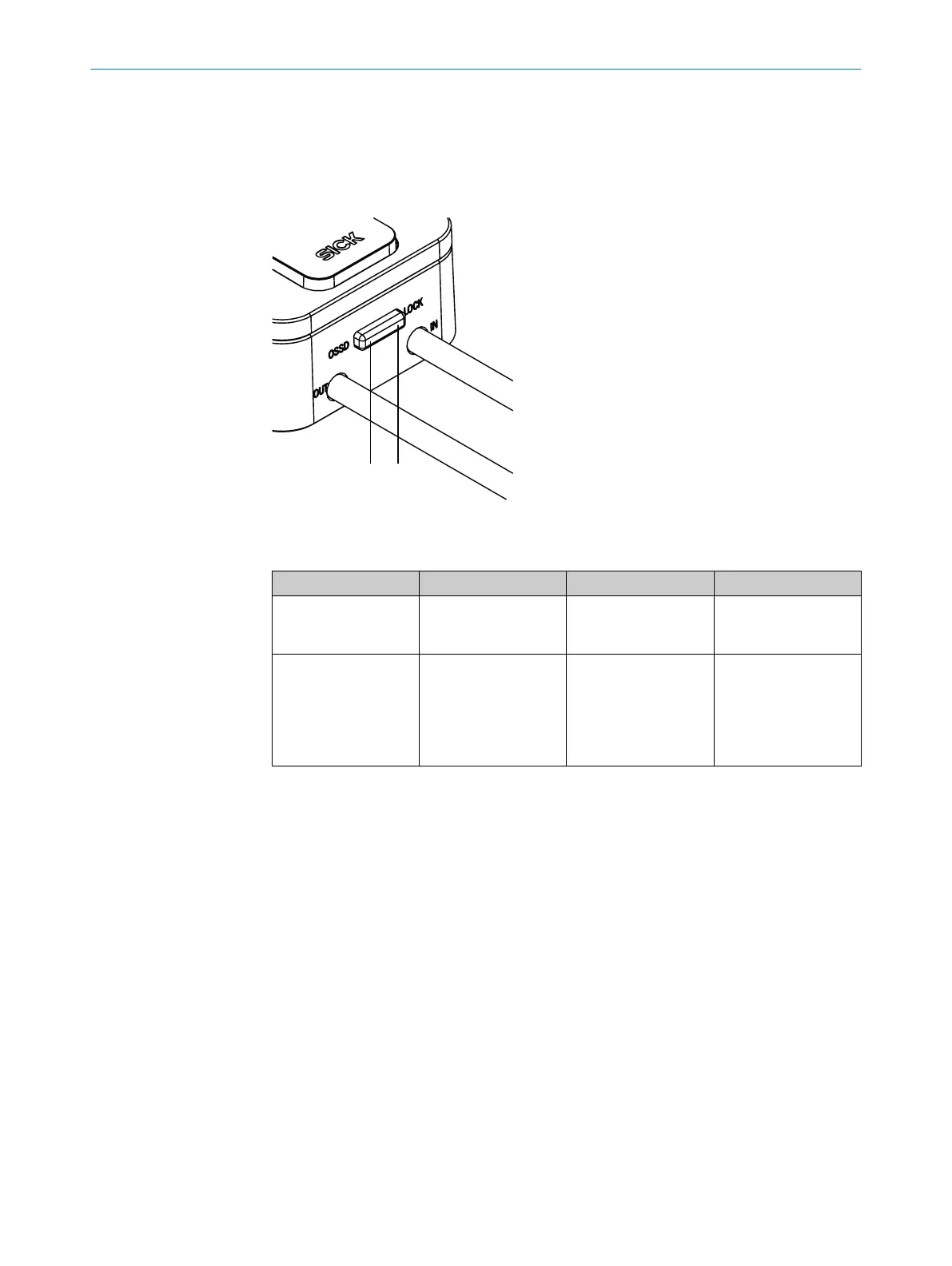
The safety switch outputs important status information using a number of LEDs.
Figure 3: Status LEDs
T
able 1: Status LEDs
No. Name Color Meaning
1
LOCK Yellow Lights up when the
ma
gnet is supplied
with voltage.
2
OSSD Red/green Lights up green when
t
he OSSD pair is in the
ON state.
Lights up red when
the OSSD pair is in the
OFF state.
1)
1)
When a too high load is applied to the application diagnostic output, the red OSSD LED remains continu‐
ousl
y lit. This will not have any effect on the actual switching behavior of the safety switch.
PRODUCT DESCRIPTION 3
8020169/ZJN1/2018-03-21 | SICK O P E R A T I N G I N S T R U C T I O N S | MLP1
11
Subject to change without notice


 To Next Page