8
Last update: 03.2014
KFVkeyless
Operating instructions
3.1.2 Deleting a keyboard code
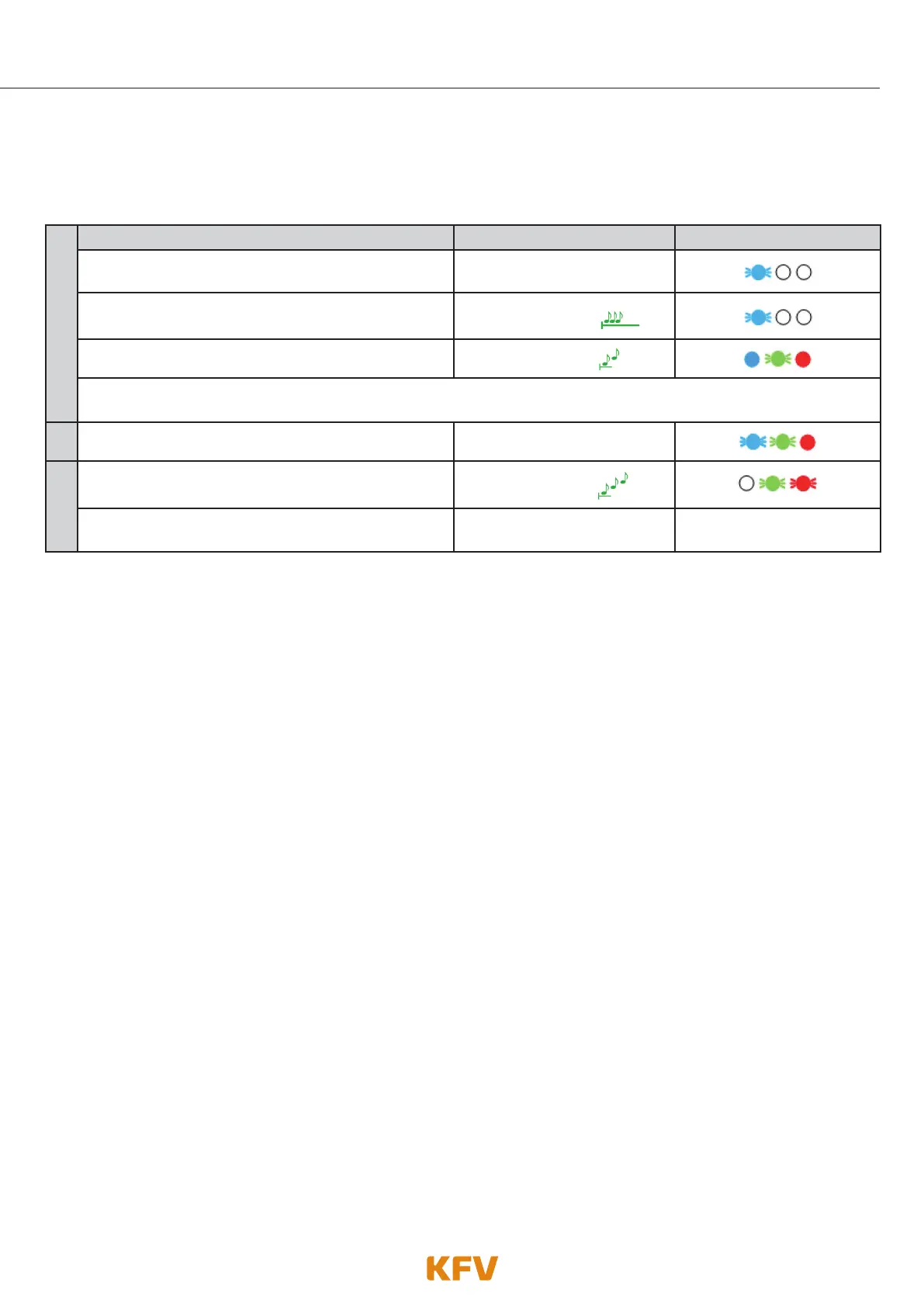
Follow the following steps to delete a keyboard code via the keyboard. To delete a keypad code via the
app, see chapter 5.4.3.
1.
Delete CODE Beeper Lighting
Enter 6-digit Door PIN on the keyboard.
Confirm procedure with OK.
Depending on the mode
selected
The programming mode initialises itself.
Single prolonged
high-pitched beep
The programming mode is activated.
2 ascending tones
IMPORTANT: Wait until a tone sequence of 2 ascending tones has been emitted and the blue LEDs stop flashing
before you enter the desired keyboard code!
2.
Enter the keyboard code to be deleted.
Beep when key is pressed
3.
Confirm procedure with OK.
The keyboard code has been successfully saved.
3 ascending tones
The programming mode has been exited automati-
cally.
----------- -----------
Note: If a keyboard code is deleted that has been assigned to a mobile phone user via the app, this mobile
phone user will continue to exist. Only the keyboard code has been deleted.
3.1.3 Assigning a keypad code to a mobile phone user
A keyboard code can only be assigned to a mobile phone used via app. See chapter 5.4.2. for further
information.



 To Next Page