20
Last update: 03.2014
KFVkeyless
Operating instructions
6 Opening procedure
6.1 With mobile phone
To successfully open doors with your mobile phone, the following criteria must be satisfied:
1. Your mobile phone must be authorised (see chapter 3.2.1).
2. The Bluetooth function on your mobile phone must be switched on.
3. The green LED on the keyboard code will flash as soon as you are outside the detection range and you
are detected by KFVkeyless.
4. The door can now be opened by touching the "OK" button on the keyboard.
Note: If the touch function is deactivated, it is not necessary to touch the "OK" button on the keypad to
finally open the door. See chapters 4 and 5 for more detailed information concerning your settings.
6.2 By entering a code
To open doors by entering a code, you only need to enter you keypad code and confirm by touching the
"OK" button.
Note: If a single prolonged low-pitched beep is emitted and the red LED lights up, a blocked or invalid
keypad has been entered.
7 Reset
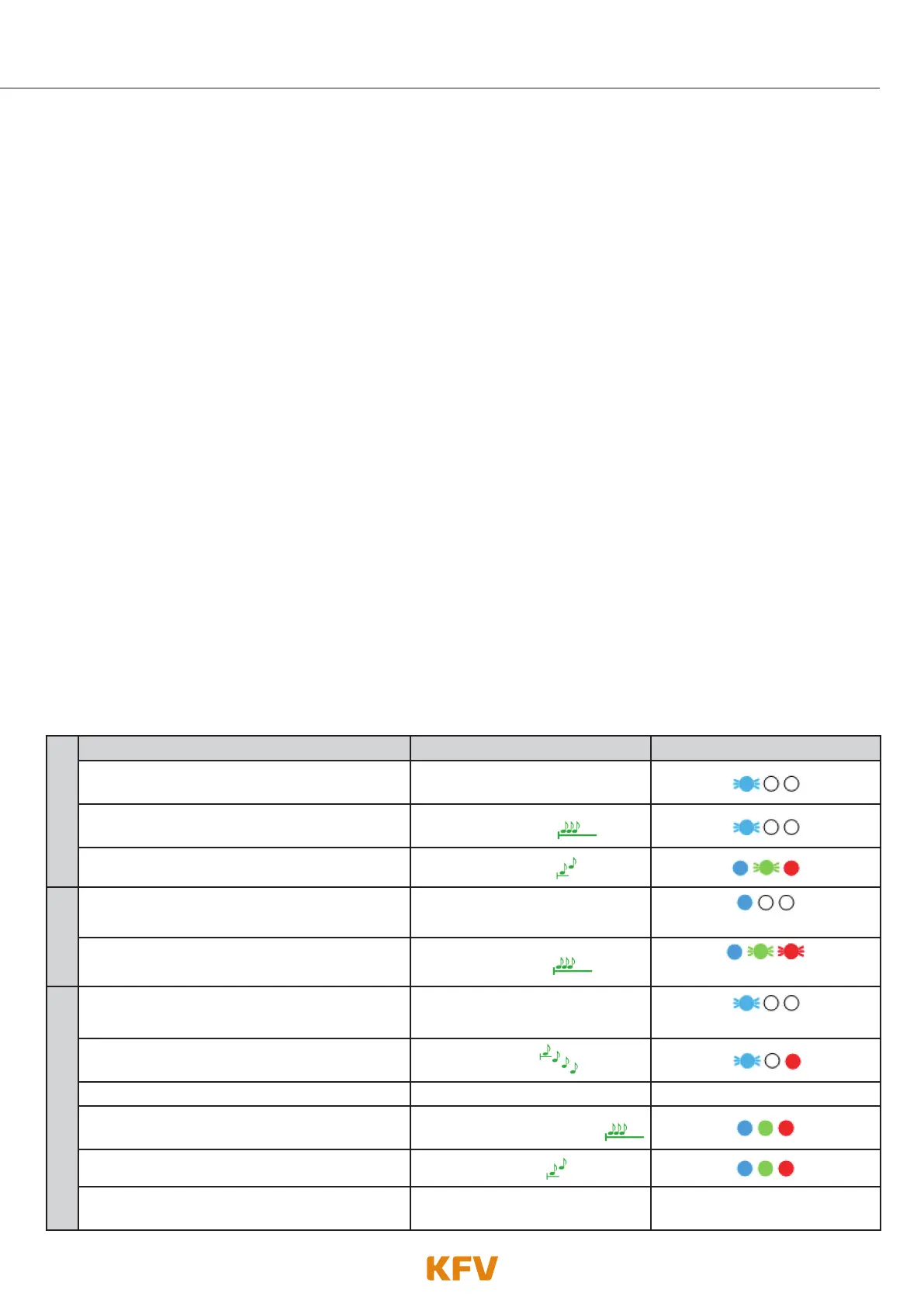
Carry out the following steps to reset the KFVkeyless to factory default settings
1.
Activating Factory Default Beeper Lighting
Enter 6-digit Door PIN on the keyboard.
Confirm procedure with OK.
Depending on the mode selected
The programming mode starts.
Single prolonged
high-pitched beep
The programming mode is activated.
2 ascending tones
2.
Enter 6-digit door PIN on the keyboard once
again.
Beep when key is pressed
when key is pressed
The "Dip Switch overwrite mode" is activated.
Single prolonged
high-pitched beep
flashes faster
3.
Enter 6-digit door PIN on the keypad code
again.
Beep when key is pressed
when key is pressed
The factory default has been activated.
Tone sequence from 4
descending tones
Your KFVkeyless has now been reset. ---------- ----------
Initialisation starts/is running
Single prolonged
high-pitched beep
Initialisation completed
2 ascending tones
Your KFVkeyless is now ready
for further use.
----------
Depending on the mode
selected mode



 To Next Page