16
Last update: 03.2014
KFVkeyless
Operating instructions
3. You can now adjust the beeper mode.
4. Confirm the procedure by clicking "Save settings".
The standard lighting mode is effective "when touched and open door".
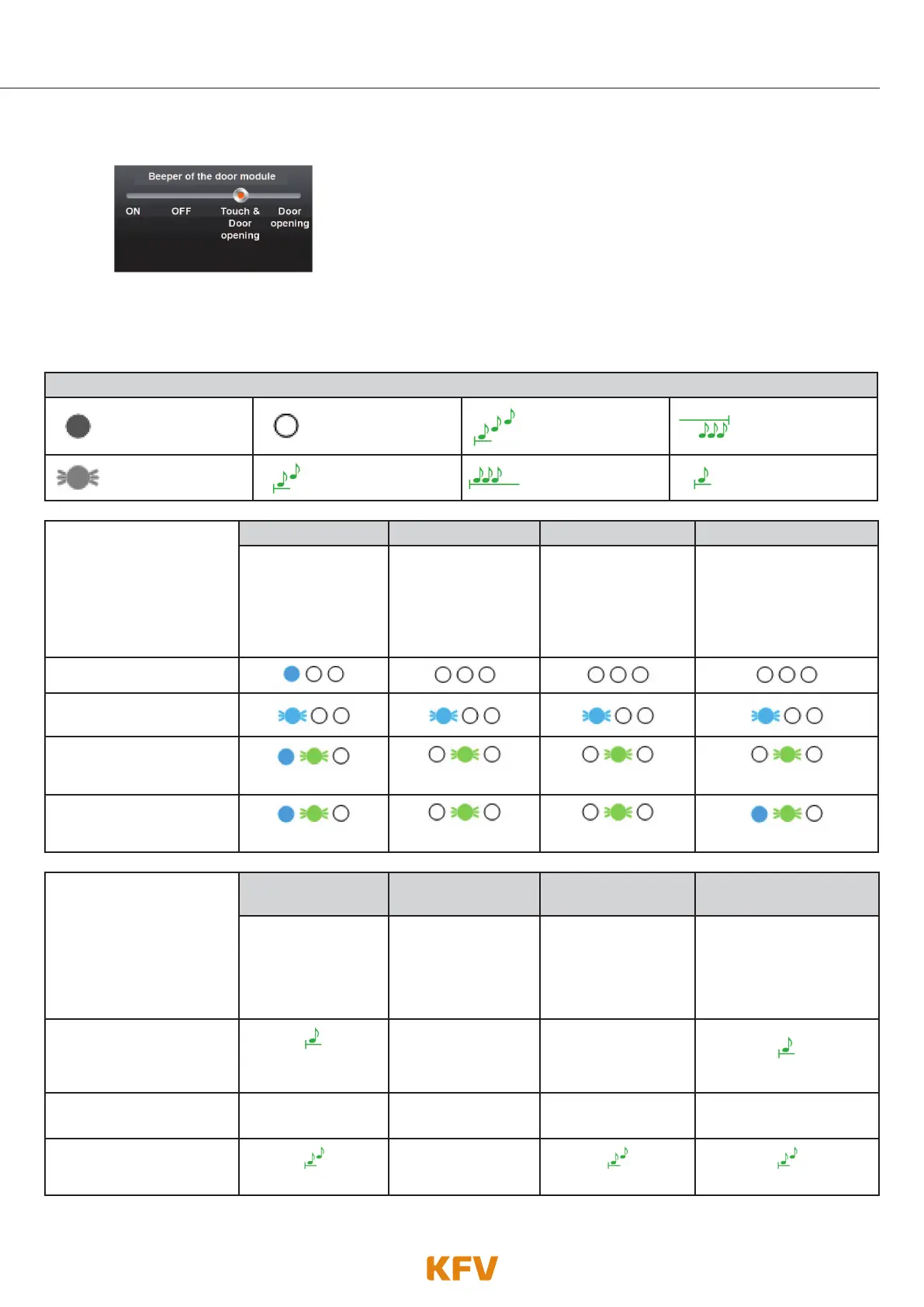
Lighting and tone signals
LED lights up LED off 3 ascending tones
A prolonged lower-
pitched tone
LED flashes or
flickers
2 ascending tones
A prolonged high-
pitched tone
A brief high-
pitched tone
Lighting modes
Note:
The lighting beeper modes
do not apply to actions
carried out in the program-
ming mode.
Always on Always off when touched on opening
The blue LEDs
always light up.
The blue LEDs light
up in event of no
activity (apart from
button activation).
The blue LEDS light
up only in event of a
keystroke.
The blue LEDS light up in
the event of a keystroke
and when the door
opens.
Normal operation
when key is pressed
Taught in mobile phone in
opening range
Flashes green
Flashes green Flashes green Flashes green
Opening the door
Flickers green
Flickers green Flickers green
Flickers green
Beeper modes
Note: The beeper modes
do not apply to actions
carried out in the program-
ming mode.
ON OFF Only on opening
when touched &
opening
The beeper emits a
signal when a key
is pressed and ac-
tion is carried out.
In everyday mode,
the beeper does
not emit any signals
independently.
The beeper only
emits a signal inde-
pendently when a
door is opened.
The beeper emits a
signal when a key is
pressed and a door is
opened.
when key is pressed
A brief high-pitched
tone
----------------------------- -----------------------------
A brief high-pitched tone
Taught in mobile phone in
opening range
----------------------------- ----------------------------- ----------------------------- -----------------------------
Opening the door
2 ascending tones
-----------------------------
2 ascending tones 2 ascending tones



 To Next Page