Control via the operator panel
4.2 Operator panel (AOP30) overview and menu structure
Cabinet Modules Operator Panel AOP30
36 Operating Instructions, 04/2014, A5E03263551A
Operator panel (AOP30) overview and menu structure
Description
The display can be used for the following activities:
● Parameterization (commissioning)
● Monitoring status variables
● Controlling the drive
● Diagnosing errors and alarms
All functions can be accessed via a menu.
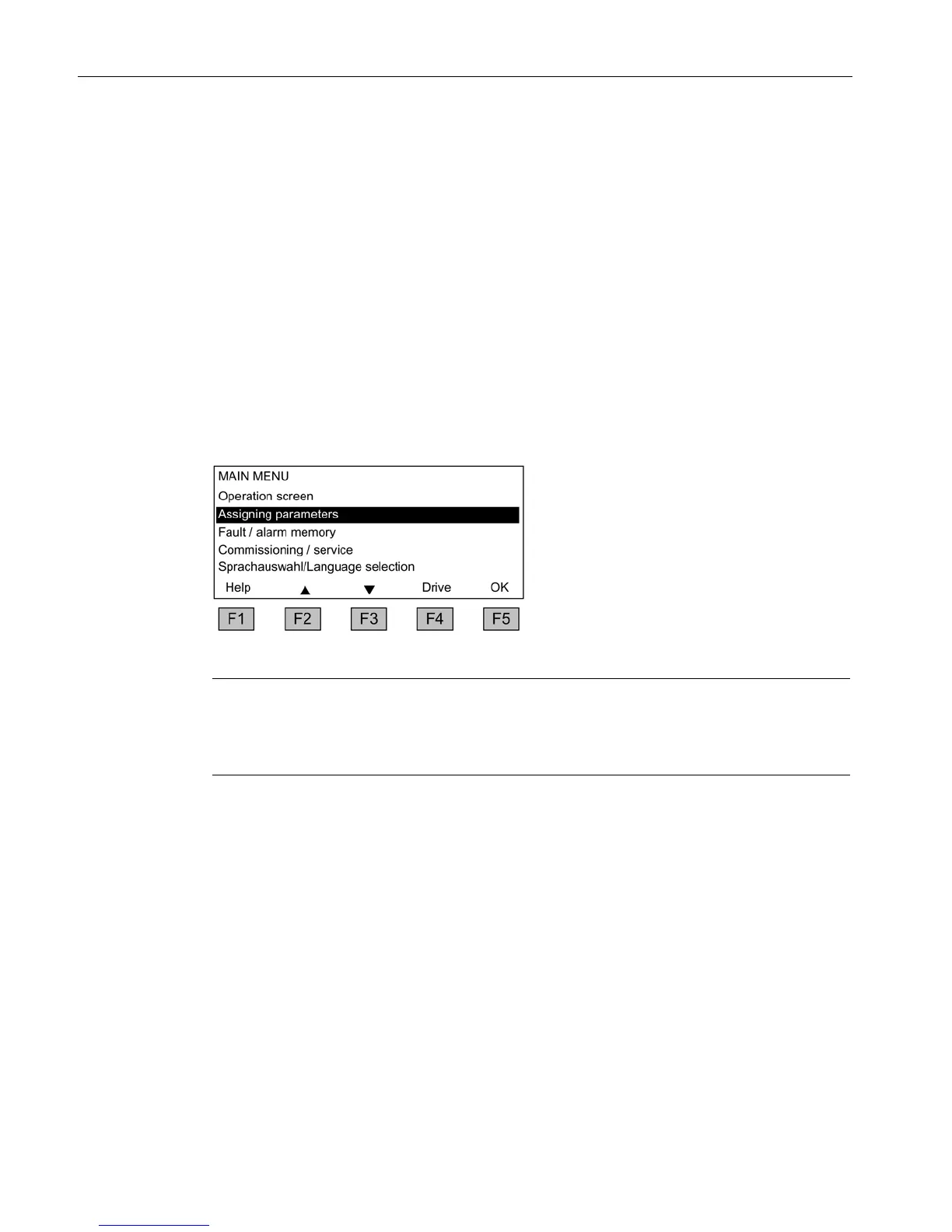
Your starting point is the main menu which you can always access using the yellow MENU
key:
Dialog screen for the main menu:
It can be accessed at any time with the
"MENU" key.
Press "F2" or "F3" to navigate through
the menu options in the
If more than one drive (DO) is confi
ured, it is possible to navigate between
them by pressing key "F4".
Note
AOP reset
If the AOP no longer responds, then the AOP can be reset by simultaneously pressing the
key and the OFF button (for lon
ger than 2 seconds) and then releasing the OFF button.







 To Next Page