Getting to know your OpenStage phone
10
Getting to know your OpenStage phone
The following sections describe the most frequently used operating ele-
ments and the displays on your OpenStage phone.
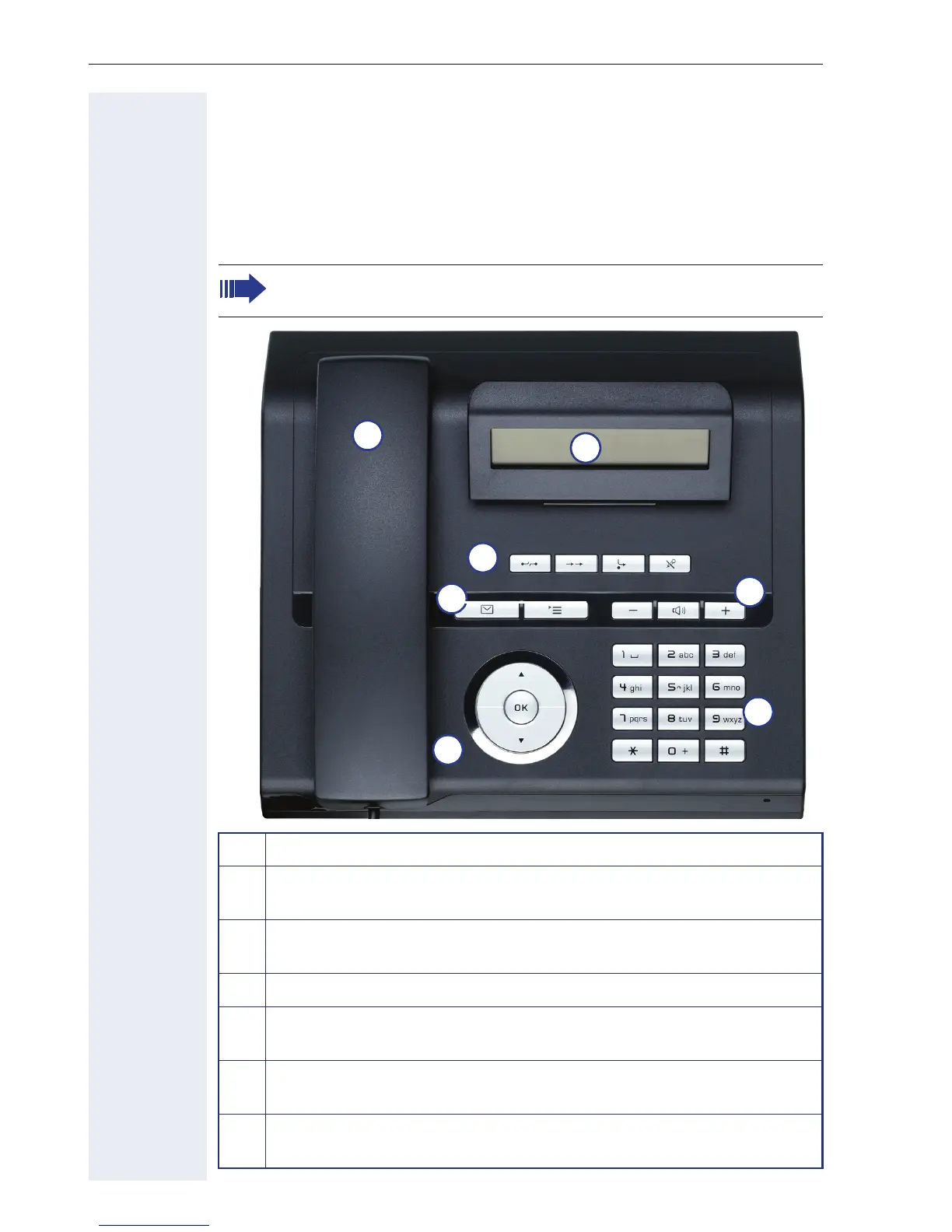
The OpenStage 20 E/20/20 G user interface
OpenStage 20 E and OpenStage 20/20 G are identical except for
the handsfree functionality on OpenStage 20/20 G.
1 You can make and receive calls as normal using the handset.
2 The tilt-and-swivel display provides intuitive support for telephone
operation (two lines with up to 33 characters each).
3 The function keys allow you to call up the most frequently used
functions during a call (e.g. Disconnect) Æ page 13.
4
O mailbox key and N menu key.
5 Audio keys are also available, allowing you to optimally configure
the audio features on your telephone Æ page 13.
6 Using the 3-way navigator, you can conveniently navigate through
the applications on your telephone Æ page 14.
7 The keypad can be used to enter phone numbers and text
Æ page 15.
7
1
5
3
4
2
6












 To Next Page