SMAC User Manual
Sify Technologies Limited, 2011 © Copyright Protected Page 28
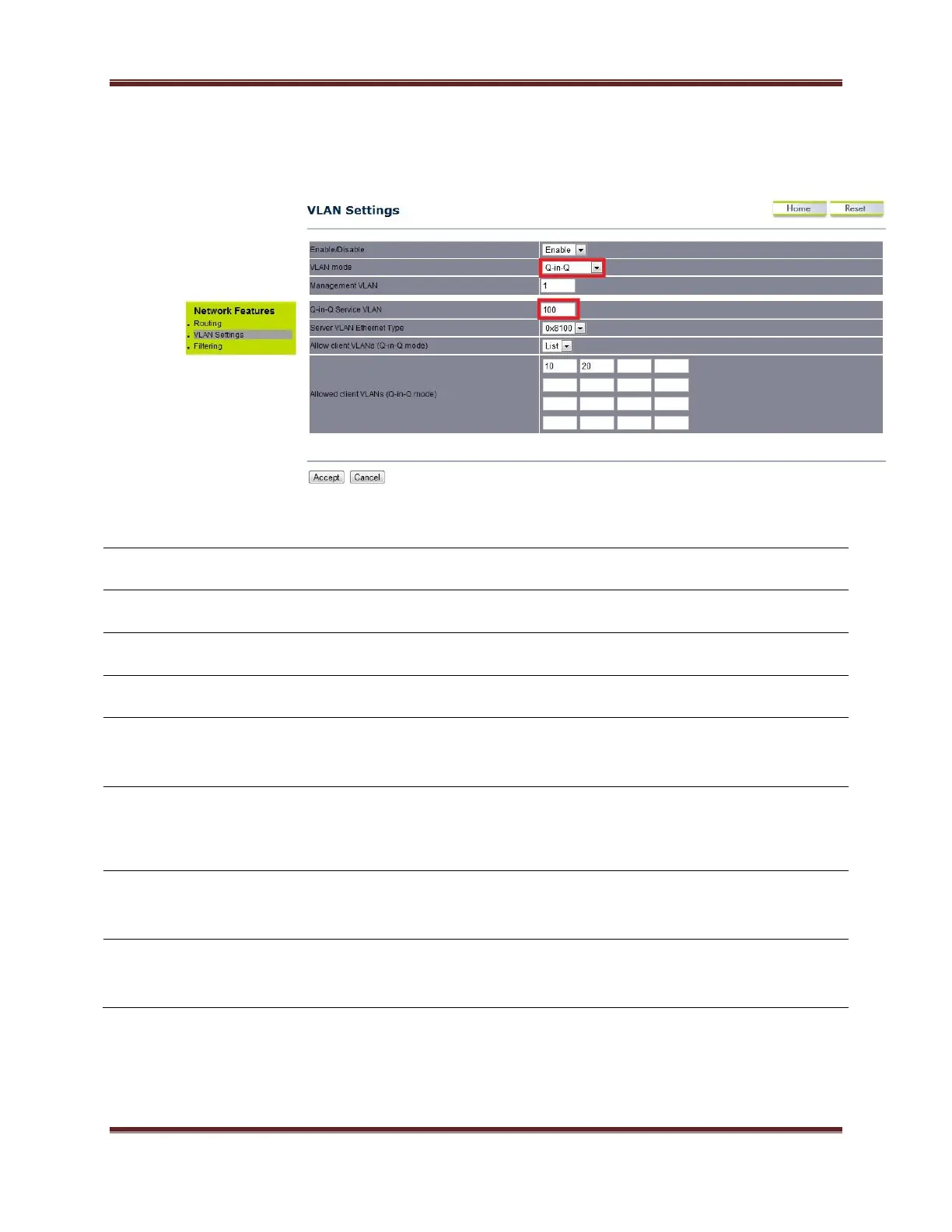
6.0.3 QinQ mode
Under the VLAN settings, select the mode as QinQ.
Select Enable or Disable function from the drop down list.
Select as QinQ for configuring in QinQ mode.
Specify the service vlan id (outer vlan id)
Server VLAN Ethernet
Type
Specify the Ethernet type
Allow client VLANs (Q-
in-Q mode)
Select ‘ALL’ option for allowing all the tagged packets.
Select ‘List’ option for allow the VLANs mentioned in the boxes
Allowed client
VLANs(Q-in-Q mode)
Specify the client VLAN IDs. (maximum 16 VLANs allowed)
All the VLAN related changes will take effect immediately after
clicking on ‘accept’ tab.



 To Next Page