EasyManua.ls Logo

Sigma FP - QUICK SET MENU

Sigma FP
160 pages
Print Icon
To Next Page IconTo Next Page
To Previous Page IconTo Previous Page
Loading...
36
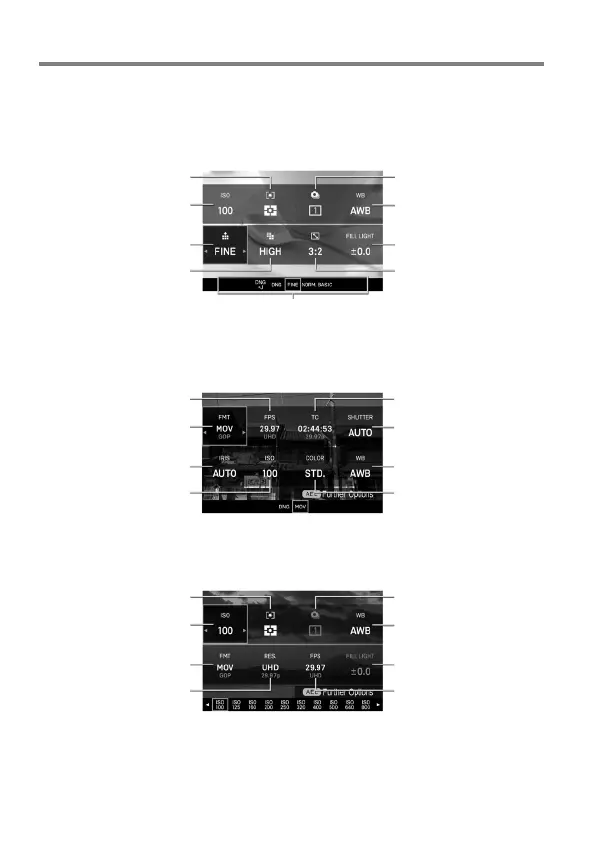
QUICK SET MENU
The following most frequently used menu items can be easily set by
pressing the QS button.
In STILL mode
AE Metering Mode
( P. 85)
Drive Mode
( P. 63)
ISO Sensitivity
( P. 68)
White Balance
( P. 87)
Image Quality
( P. 71)
Fill Light
( P. 94)
Image Size
( P. 72)
Aspect Ratio
( P. 73)
Option list display of the selected items
In CINE mode (CINE style)
Frame Rate
( P. 75)
Time Code
( P. 136)
Format
( P. 74)
Shutter Angle
( P. 47)(P.48)
Aperture
( P. 46)(P.48)
White Balance
( P. 87)
ISO Sensitivity
( P. 68)
Color Mode
( P. 91)
In CINE mode (STILL-like style)
AE Metering Mode
( P. 85)
Drive Mode
( P. 63)
ISO Sensitivity
( P. 68)
White Balance
( P. 87)
Format
( P. 74)
Fill Light
( P. 94)
Resolution
( P. 75)
Frame Rate
( P. 75)

Table of Contents

Related product manuals