55
1-POINT SELECTION
Focus with the focus frame at the desired position. This function is available
when the subject position is determined.
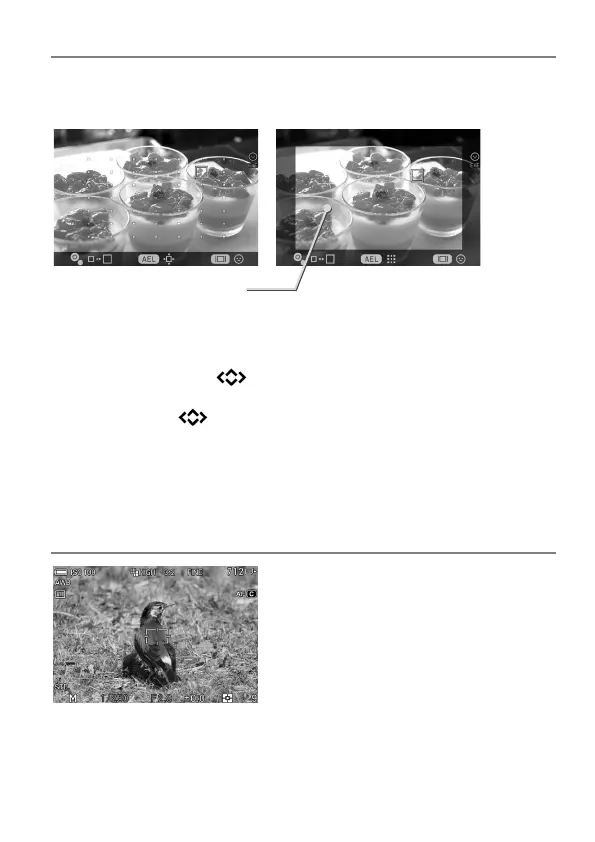
49 points select mode Free move mode
Focusing point moving area
Each time the AEL button is pressed, the mode switches between [49
points select mode] and [Free move mode].
When [49 points select mode] is selected, choose the desired focus
frame by pressing the
buttons.
When [Free move mode] is selected, move the focusing point as you like
by pressing the
buttons (focusing points can be moved inside the
focusing point moving area).
To change the size of the Focus Frame, rotate the Front or the Rear Dial.
You can move the focus frame by tapping or dragging it.
TRACKING
(STILL)
The camera automatically tracks focus-
locked subject.
Tracking can be set in AF-C mode only.
1
Adjust the subject to the focus frame, and
half-press the shutter button.
2
When the camera has focused on the subject, the frame color changes to
green. If the subject has moved, the focusing point to which it has moved
appears.



 To Next Page