AFTER SALES SUPPORT
1300 7 77 137
service@unclebills.com.au
MODEL: EA2476 PRODUCT CODE: 715222 03/2024
10
PRODUCT OVERVIEW (CONT.)
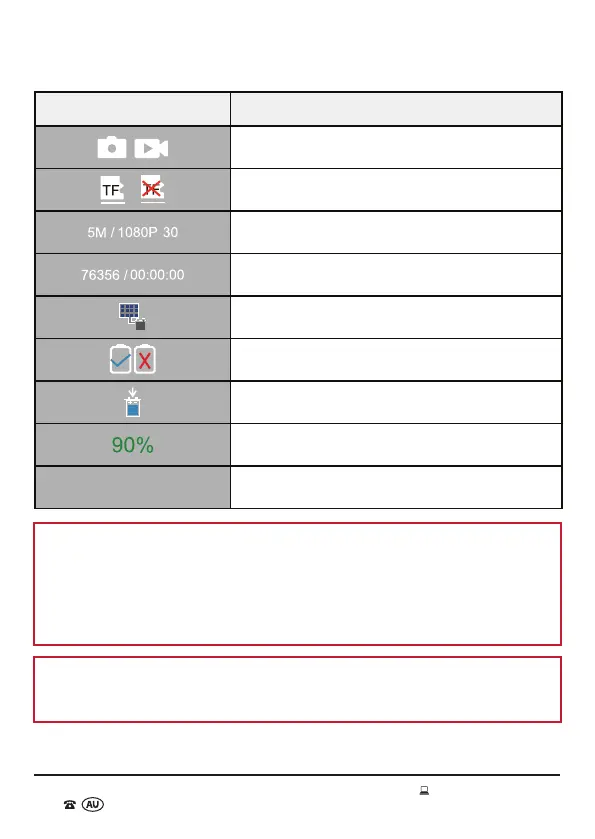
Image Function
Photo/Video Mode
Micro SD Card Status (inserted/not inserted)
Image Resolution/Video Resolution
Image/Video Capacity Left
Solar Panel Charging
AA Akaline Battery Status (inserted/not inserted)
Built-in Battery Icon
Built-in Battery Charge % Indicator
YYYY/MM/DD HH:MM:SS
Date/Time
NOTE: When the built-in battery power is low, the Wildlife Camera will
automatically switch to the AA Alkaline battery power supply (if there are AA
Alkaline batteries installed). If the AA Alkaline battery available power is less than
30%, the Wildlife Camera will stop or reduce night shooting. It is recommended to
regularly check the Alkaline battery usage icon (in SETUP mode) to ensure there is
enough AA Alkaline battery power to support operation in the situation where the
built-in battery power is too low.
NOTE: The Wildlife Camera automatically defaults to the built-in battery. It will
automatically switch to AA Alkaline battery power (if the 4 x AA LR6 batteries are
installed) once the built-in battery power drops to 10%.



 To Next Page