AFTER SALES SUPPORT
1300 7 77 137
service@unclebills.com.au
MODEL: EA2476 PRODUCT CODE: 715222 03/2024
15
GETTING STARTED (CONT.)
NOTE: The micro SD card can be formatted in the Wildlife Camera without
connecting to another device. Refer to the ‘Menu Options and Settings’ section on
pages 21-25.
NOTE: Remember, photos and video recordings cannot be taken or saved and the
menu modes and functions cannot be accessed, unless a micro SD card is inserted
into the Wildlife Camera.
Inserting the Batteries
When the built-in battery power is low, the Wildlife Camera can be powered by
4 x Alkaline (AA/LR6) batteries (not supplied) which are fitted inside the battery
compartment located inside the Wildlife Camera protective case. Refer to the below
instructions for how to insert the batteries.
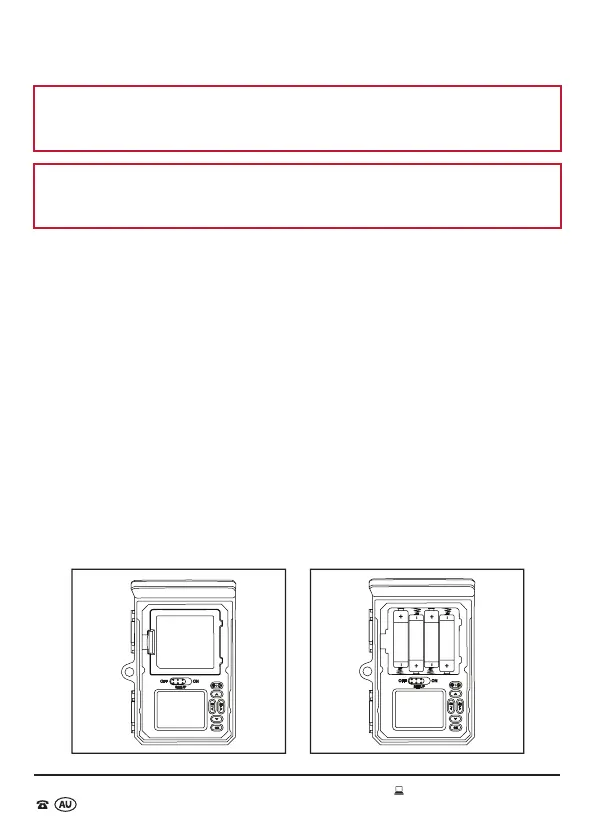
1. Release the locking tabs on the side of the Wildlife Camera and open the protective
case (Fig. 2).
2. Ensure the camera is in the OFF mode. Push the tab on the left of the battery
compartment to remove the cover. All polarities are marked inside the battery
compartment for your convenience.
3. Insert the batteries into the compartment ensuring the polarities are correct (Fig. 3)
4. Replace the battery compartment cover and make sure it ‘clicks’ into position.
5. Close the protective case and firmly press the locking tabs into position.
6. The Alkaline battery status (inserted or not inserted) will be displayed in the
bottom left hand corner of the viewing screen (when the Wildlife Camera is in the
SETUP mode).
Fig. 2 Fig. 3



 To Next Page