22 - English
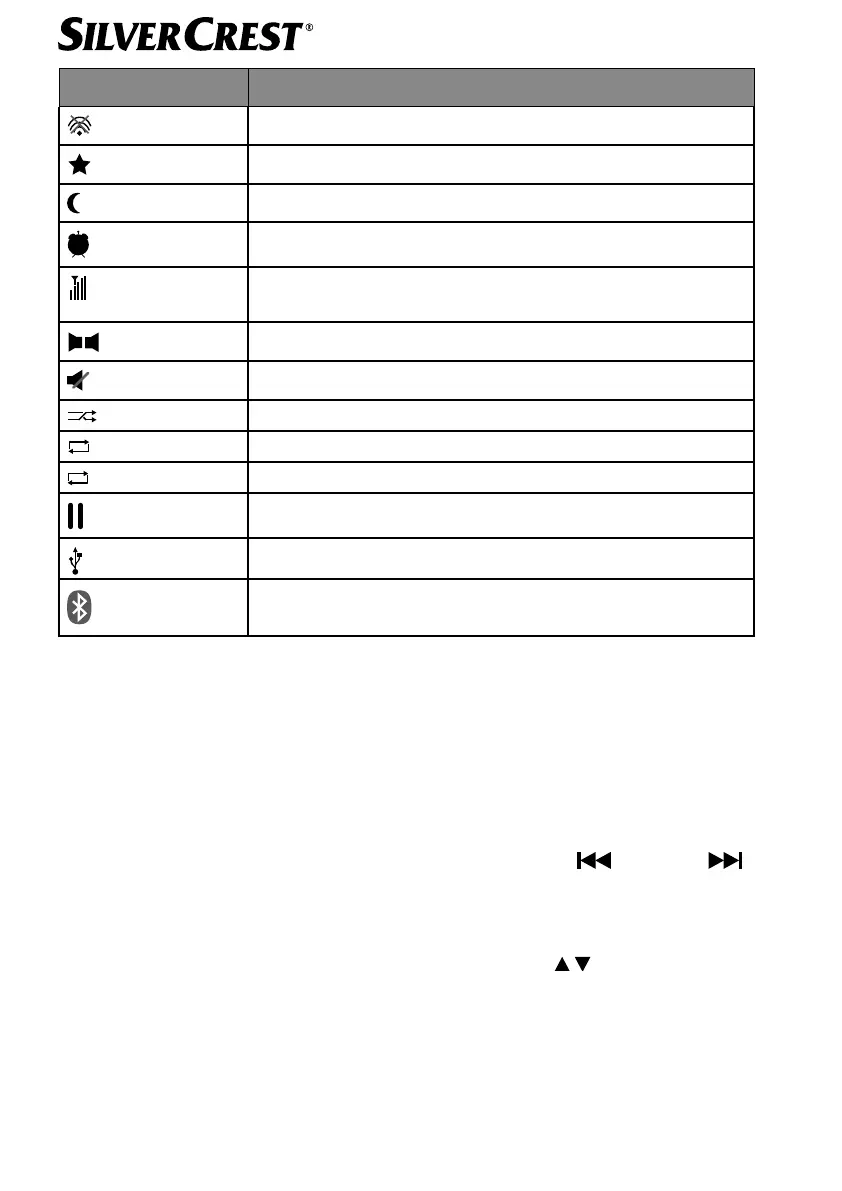
Display Description
No WLAN reception
1
Stored station and memory slot display
15
Switch-off time set on the device
1
Alarm 1 or 2 is active
DAB reception quality
FM reception quality
Stereo sound
Mute setting is active
Random playback
1
Repeat a track
Repeat all tracks
Playback is paused
USB data medium connected
Flashes: Bluetooth
®
detection is active
Continuously lit: paired with a Bluetooth
®
device
8. Operation in the menus
8.1. Operation using the remote control
All functions can be operated using both the remote control and the buttons on the device.
However, some functions can be operated more easily and directly using the remote
control:
• enter numbers and characters by pressing the number/character buttons several times
• playback functions for music playback PLAY, STOP, previous /next track
, track search.
8.2. Navigation in the menus
Turn the OK dial on the device or use the navigation buttons on the remote
control to navigate through the menus.
Press the OK dial or the SELECT button on the remote control to confirm your menu
selection.
IAN 359937 LB8-ML 5006 8137 QSG-Content final rev4 (V7).indb 22IAN 359937 LB8-ML 5006 8137 QSG-Content final rev4 (V7).indb 22 08.12.2021 13:11:1208.12.2021 13:11:12



 To Next Page