EasyManua.ls Logo

Silvercrest SRH 5 A1 - User Manual

Silvercrest SRH 5 A1
62 pages
Print Icon
To Next Page IconTo Next Page
Loading...
IAN 313609
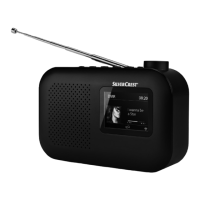
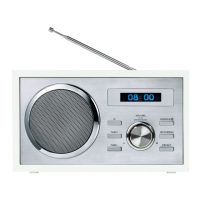
DAB+ RADIO SRH 5 A1
DAB+ RADIO
Operating instructions and safety instructions
RADIO DAB+
Bedienungsanleitung und Sicherheitshinweise

Table of Contents

Other manuals for Silvercrest SRH 5 A1

Questions and Answers

  • E
    Edward SmithAug 4, 2025
    Why is the time and date not setting automatically on my Silvercrest Radio?
    • A
      Andrew GrayAug 4, 2025
      If your Silvercrest Radio is not automatically setting the time and date, it may be due to a weak RDS signal. Fully extend the telescopic aerial 0 and try repositioning it or moving the radio to a different location to improve reception.
  • R
    Russell PowellAug 12, 2025
    What to do if the display is blank on my Silvercrest Radio?
    • A
      Amy MooreAug 12, 2025
      If there is nothing on the display of your Silvercrest Radio, ensure that the mains adapter is correctly connected to both the mains adapter connection w and a functioning mains socket. Also, check the house fuses to confirm that the mains socket is receiving power.
  • M
    Maurice LopezAug 19, 2025
    What to do if my Silvercrest SRH 5 A1 Radio has no sound?
    • O
      osmithSep 12, 2025
      If your Silvercrest Radio is producing no sound, first ensure the device is switched on by pressing the button 2. Then, check the volume level using the VOLUME | ENTER / SCAN dial 6 to increase it from minimum. If you are in AUX mode, verify that the external playback device is turned on and not muted. Finally, confirm that the audio cable is correctly connected to the AUX IN connection r.
  • A
    amy85Aug 26, 2025
    How to fix interference with radio reception on Silvercrest SRH 5 A1?
    • J
      Jeremy SwansonAug 26, 2025
      If you are experiencing interference with the radio reception on your Silvercrest Radio, the radio reception may be too weak. Fully extend the telescopic aerial 0. You can also try improving reception by repositioning the telescopic aerial 0 or moving the radio to another location.

Summary

Safety First

Electrical Safety Precautions

Critical safety guidelines to prevent electrocution hazards associated with power supply.

General Device Safety

Essential safety instructions for operation, including handling by children and environmental conditions.

Hearing Protection Advisory

Warning about potential hearing damage from prolonged exposure to high volume levels.

Device Component Overview

Front Panel Layout

Identification and description of controls and the display on the front of the radio.

Rear Panel Connections

Details of ports and connectors available on the back of the device.

Getting Started

Power and Aerial Setup

Steps for connecting the power adapter and extending the telescopic aerial.

Basic Operation

DAB+ Radio Functionality

Automatic DAB Station Scan

Guide to scanning the DAB band and automatically saving found radio stations.

Selecting DAB Stations

Methods for navigating and choosing stations from the DAB+ list.

Manual DAB Station Saving

Procedure for manually storing preferred DAB+ stations to preset memory slots.

DAB+ Station Management

FM Radio Functionality

Automatic FM Station Scan

Process for scanning the FM band and automatically saving detected radio stations.

Manual FM Station Search

Instructions for manually tuning into FM radio stations by frequency.

Manual FM Station Saving

Procedure for manually storing preferred FM radio stations to preset memory slots.

FM Station Info and Bluetooth

Pairing Bluetooth Devices

Step-by-step guide for establishing a wireless Bluetooth connection with external devices.

Bluetooth Device Management

External Audio Input

Accessing Settings Menu

Alarm Clock Features

Setting Up Alarms

Detailed steps for programming Alarm 1 and Alarm 2 with time, day, and sound options.

Clock and Date Configuration

System Configuration

Troubleshooting Guide

Technical Specifications Summary

Warranty Information and Claims

Submitting a Warranty Claim

Step-by-step process for making a warranty claim for service or repair.

Silvercrest SRH 5 A1 Specifications

General IconGeneral
BrandSilvercrest
ModelSRH 5 A1
CategoryRadio
TunerFM/AM
Frequency RangeFM: 87.5 - 108 MHz, AM: 522 - 1620 kHz
Headphone Jack3.5 mm

Related product manuals