DE
6. Basic Setup
22
Basic Setup
6.
Thermometer order, names, min. and max. ranges, and temperature units can be changed in the settings menu.
·
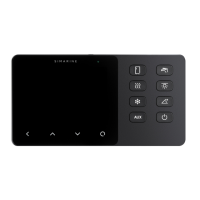
The AC button is configured on the SPDU-52 as the third button by default (K3 on the cover scheme). Pressing the button
enables the AC (air conditioning).
·
The AUX button is configured on the SPDU-52 as the fourth button by default (K4 on the cover scheme). By pressing the
button, you enable the output of an external device (e.g. speakers).
·
The water pump button , is configured on the SPDU-52 as the fifth button by default (K5 on the cover scheme). Pressing
the button enables the the water pump.
·
The lights button is configured on the SPDU-52 as the sixth button by default (K6 on the cover scheme). Pressing the
button enables the lights.
·
If you have an inclinometer installed, pitch and roll data is displayed on the screen if you press the inclinometer button .
Pitch is shown on the left side of the screen. The left side of the line represents the front of the vehicle, while the right
side of the line represents the back of the vehicle. The pitch angle in degrees is shown below the line (positive value
meaning front facing up and vice versa).
Roll is shown on the right side of the screen. The left side of the line represents the left-hand side of the vehicle. The roll
angle in degrees is shown below the line (positive value meaning left-hand side up and vice versa).
·
If you long hold the power button , the device turns ON or OFF.
You can also turn the device ON or OFF by holding the button.


 To Next Page