84
EN
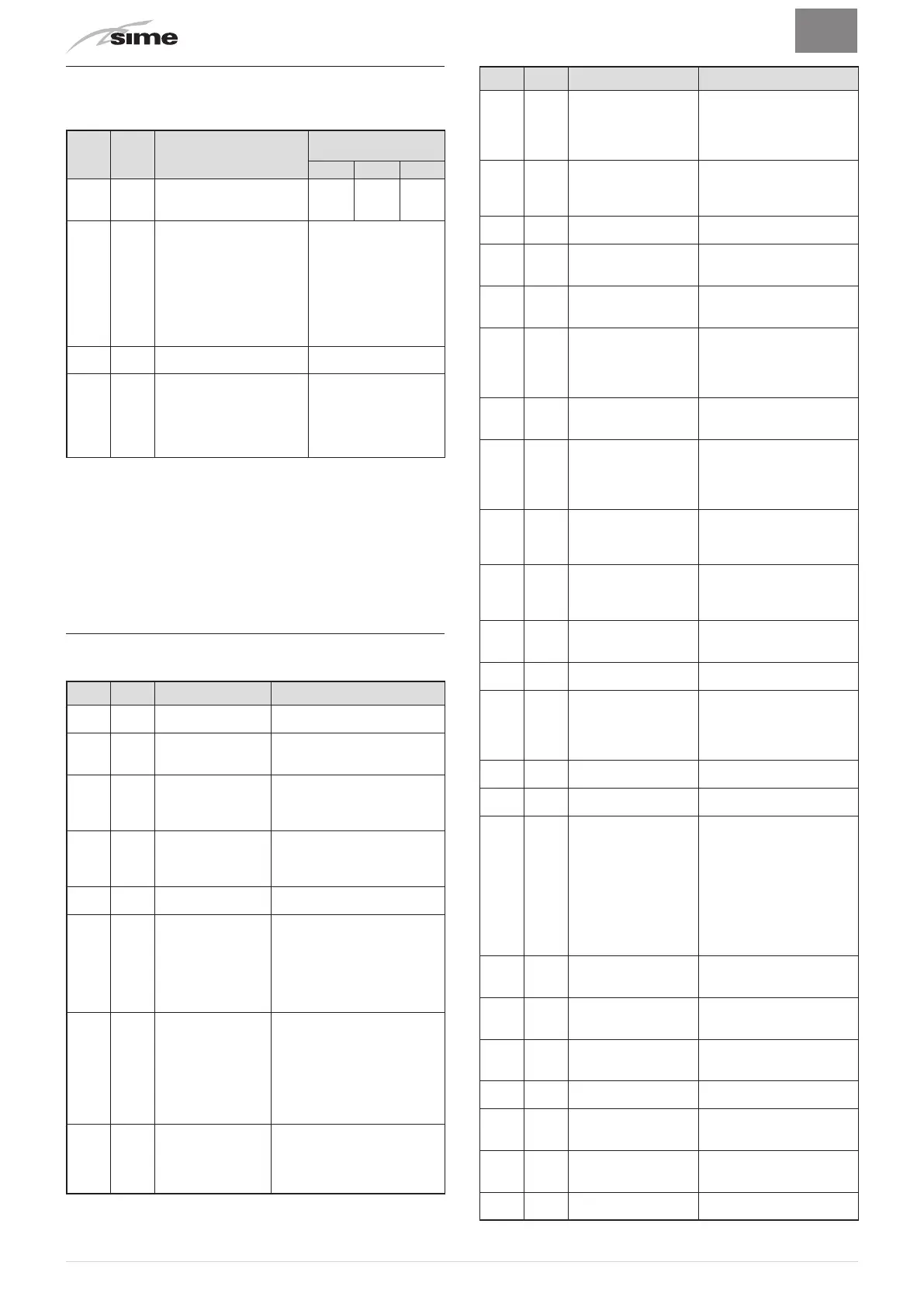
8.5 Unscheduled maintenance
If replacing the
electronic board
, the user MUST set the parame-
ters as indicated in the table and in the sequence shown.
Type No. Description
Setting for
Brava Slim
BF
25 30 40
PAR 01
Index showing boiler power
in kW
0 = 24; 1 = 30; 2 = 40
0 1 2
PAR 02
Hydraulic configuration
0 = rapid
1 = storage tank with ther-
mostat or heating only
2 = hot water t
ank with
sensor
3 = bithermic
4=instant with solar power
input
0
PAR 03
Gas Type Configuration
0 = G20; 1 = LPG
0 or 1
PAR 04
Combustion configuration
0 = sealed chamber with
combustion control
1 = open chamber with
smoke thermostat
2 = Low NOx
0
To enter "Parameter setting and display"refer to the indications
provided in the specific section.
Once the parameters in the table have been set, you must carry
out the "Automatic calibration procedure".
If the
gas valve
and/or the
ignition/detection electrode
and/or the
fan
are replaced, the user must still carry out the entire phase
of "Automatic calibration procedure" described in the specific
section.
8.6 Malfunction codes and possible solutions
LIST OF MALFUNCTION/FAULT ALARMS
Type No. Fault Solution
ALL 01 Smoke thermostat
- Contact the Technical Assis-
tance Centre
ALL 02
Low wat
er pressure
in system
- Restore pressure
- Check for any leaks in the
system
ALL 03
High water pressure
in system
- Empty the system via the
drain valve on the hydraulic
assembly and bring the pres
-
sure to approximately 1.2 bar
ALL 04
Domestic hot wat
er
sensor fault (return
sensor fault for T
models)
- Check connections
- Check the sensor is working
ALL 05 Delivery sensor fault
- Check connections
- Check the sensor is working
ALL 06 No flame detection
- Check the integrity of the
electrode and check that it is
not grounded
- Check gas availability and
pressure
- Check the integrity of the gas
valve and the card
ALL 07
Sensor or safety
thermostat inter
-
venes
-
Check the sensor or thermo
-
stat connections
-
Deaerate the system
- Check the bleed valve
- Replace the sensor or the
thermostat
- Check that the pump impeller
is not blocked
ALL 08
Fault in the flame
detection circuit
- Check the integrity of the
electrode and check that it is
not grounded
- Check the integrity of the gas
valve and the card
Type No. Fault Solution
ALL 09
No water circulating in
the system
- Check the rotation of the
pump rotor
- Check the electrical con-
nections
-
Replace the pump
ALL 10 Auxiliary sensor fault
- Check PAR 02 "hydraulic
configuration"
- Check the electrical con
-
nection
ALL 11
Gas val
ve modulator
disconnected
- Check the electrical con
-
nection
ALL 12
Domestic hot wat
er
sensor fault in tank
mode
- Set the parameter PAR 04
(Combustion configuration)
to 0
ALL 13
Smoke probe inter-
vention
-
Check the sensor is
working
- Replace the smoke probe
ALL 14 Smoke probe fault
- Replace the smoke probe
- Check the electrical con-
nection of the smoke probe
-
Contact the Technical
Assistance Centre
ALL 15
Fan check cable dis-
connected
-
Check the connection
cable between the fan and
the board
ALL 18 Condensate level fault
- Check for any clogging in
the pipe which takes the
condensate to the siphon
- Check that the siphon is
not clogged
ALL 28
Maximum number of
consecutive resets
reached
- Wait 1 hour and try un-
blocking the board again
-
Contact the Technical
Assistance Centre
ALL 30
Return sensor fault
(boiler sensor fault for
T models)
- Replace the return probe
- Check parameters
- Contact the Technical
Assistance Centre
ALL 37
Fault due to low net-
work voltage
-
Check the voltage
- Contact your network
provider
ALL 40
Incorrect network
frequency detected
- Contact your network
provider
ALL 41
Flame loss more than
6 consecutive times
- Check the ignition/detec
-
tion electrode
-
Check the gas supply
(open valve)
- Check mains gas pressure
ALL 42 Button fault
- Check that buttons are
working
ALL 43
Open Therm communi
-
cation fault
-
Check the OT electric
connection
ALL 44
No flame valve opening
time sum anomaly
- Check for the presence
of water hammer on the
hot water system and, if
present, mount a water
hammer arrestor
- Check for any abnormal
requests on the room
thermostat
- Contact the Technical
Assistance Centre
ALL 56
Lock for ∆T delivery/
return over max limit
(open vent)
- Contact the Technical
Assistance Centre
ALL 57
Lock for flow temper
-
ature (FT) check (open
vent)
-
Contact the Technical
Assistance Centre
ALL 62
Self-calibrating proce
-
dure is required
-
Carry out the self-cali
-
brating procedure (see the
specific section)
ALL 72
Inc
orr
ect positioning of
the delivery sensor
- Check delivery sensor
operation and position
ALL 74
Second delivery sensor
fault
- Check second delivery
sensor operation and
position
ALL 77
EV2 SGV current max/
min absolute limits
error
- Check gas valve and board
ALL 78
EV2 SGV current upper
limit error
- Check gas valve and board



 To Next Page