81
EN
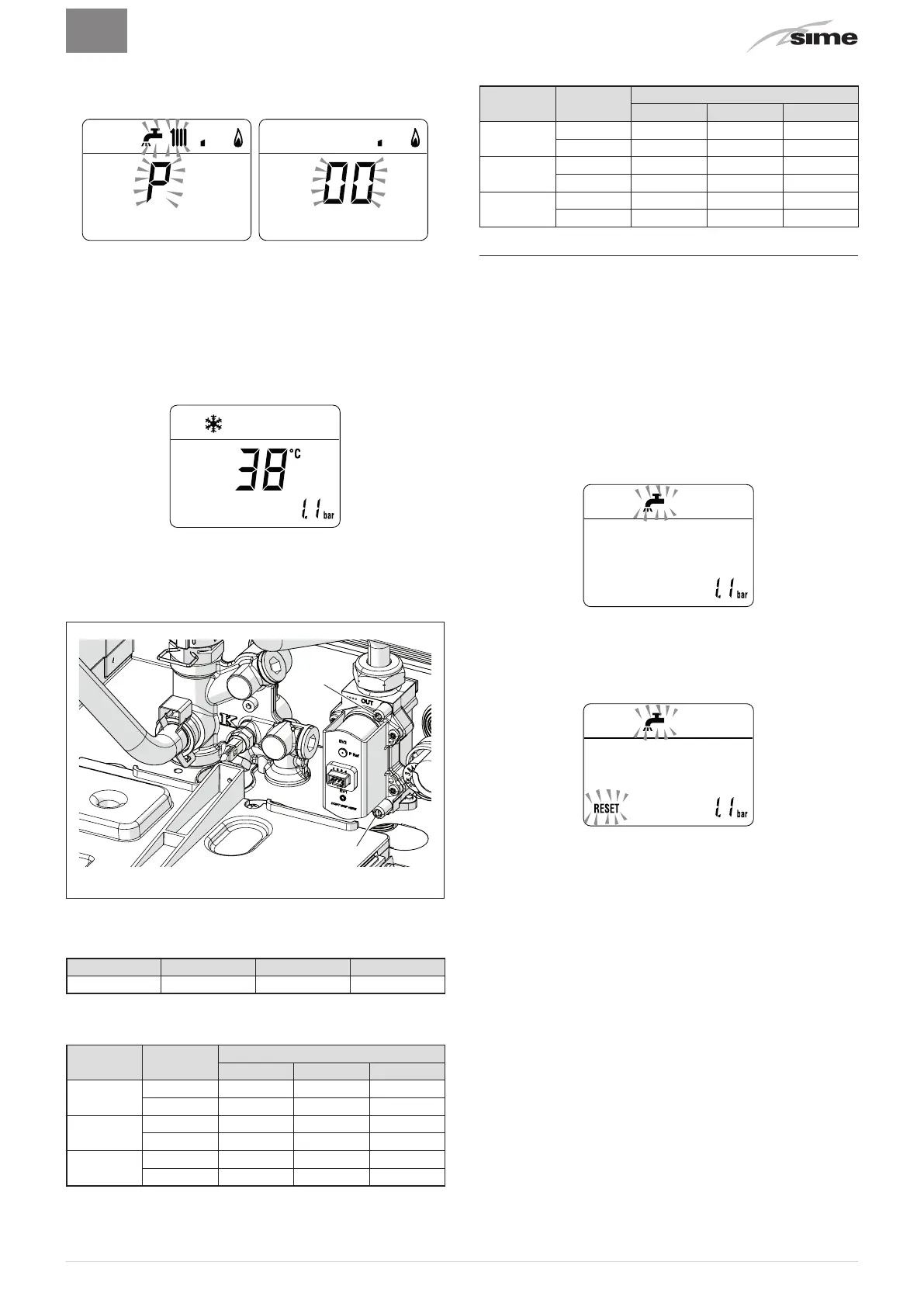
Adjusting minimum gas pressure:
– press the button
r
twice, the message
"P00"
will appear on
the display
– press the buttons
>
or
<
until the pressure value indicated in
the table appears on the pressure gauge
– once the value indicated in the table has been reached, press
the button
y
for approximately 2 seconds to confirm the val-
ue which will then flash once
–
press and hold down the buttons
>
and
y
at the same time
for approximately 6 seconds until the water delivery tempera-
ture appears on the display and the boiler shuts down
– close the valves which were opened previously
– disconnect the pressure gauges, carefully close the pressure
points (6) and (7), put the control panel back to the original po
-
sition and refit the front panel (2).
6
7
Fig. 53
Gas supply pressure
Type of gas G20 G30 G31
Pressure (mbar) 20 28-30 37
Installation with SPLIT PIPE SYSTEM smoke outlet
Model
Heat Out
-
put
Pr
es
sure at nozzles (mbar)
G20 G30 G31
Brava Slim
25 BF
Max 12,2 - 12,6 27,8 - 28,2 35,8 - 36,2
min 0,8 - 1,1 2,2 - 2,5 2,8 - 3,1
Brava Slim
30 BF
Max 12,5 - 12,9 27,8 - 28,2 35,8 - 36,2
min 0,6 - 0,9 2,6 - 2,9 3,4 - 3,7
Brava Slim
40 BF
Max 10,4 - 10,8 26,8 - 27,2 34,8 - 35,2
min 0,5 - 0,8 1,2 - 1,5 2,0 - 2,3
Installation with CONCENTRIC smoke outlet
Model
Heat Out
-
put
Pr
es
sure at nozzles (mbar)
G20 G30 G31
Brava Slim
25 BF
Max 12,5 - 12,9 27,8 - 28,2 35,8 - 36,2
min 1,7 - 2,0 3,1 - 3,4 3,9 - 4,2
Brava Slim
30 BF
Max 12,9 - 13,3 27,8 - 28,2 35,8 - 36,2
min 1,4 - 1,7 3,8 - 4,1 4,8 - 5,1
Brava Slim
40 BF
Max 11,2 - 11,6 26,8 - 27,2 34,8 - 35,2
min 0,8 - 1,1 2,4 - 2,7 2,9 - 3,2
7.9 Domestic hot water comfort function (pre-
heating)
Brava Slim BF
models have a "domestic hot water comfort" func-
tion which ensures the best performance in terms of domestic
hot wat
er, reducing the time necessary for the hot water to be-
come available and ensuring that the temperature is stable.
T
o activ
ate the function:
– select parameter
"PAR 22"
(see "Parameter setting and dis-
play") and set it to
a 1
– exit parameter settings and press button
>
for approximately 5
seconds until the symbol
r
appears on the display and begins
to flash indicating that the function has been activated.
To deactivate the function:
– press button
>
again for approximately 5 seconds until the
symbols
r
and
R
appear on the display and begin to flash
indicating that the function has been deactivated.



 To Next Page