SEL
SEL
SEL
Number of axes
Display resolution
Special mark for
milling machine
We take pleasure to tell you that this machine tool optical digital display
ruler device you are using is the one most popular in Europe.
You will be able to use this device easily after you have read this manual
thoroughly. Thank you!
I. Usage
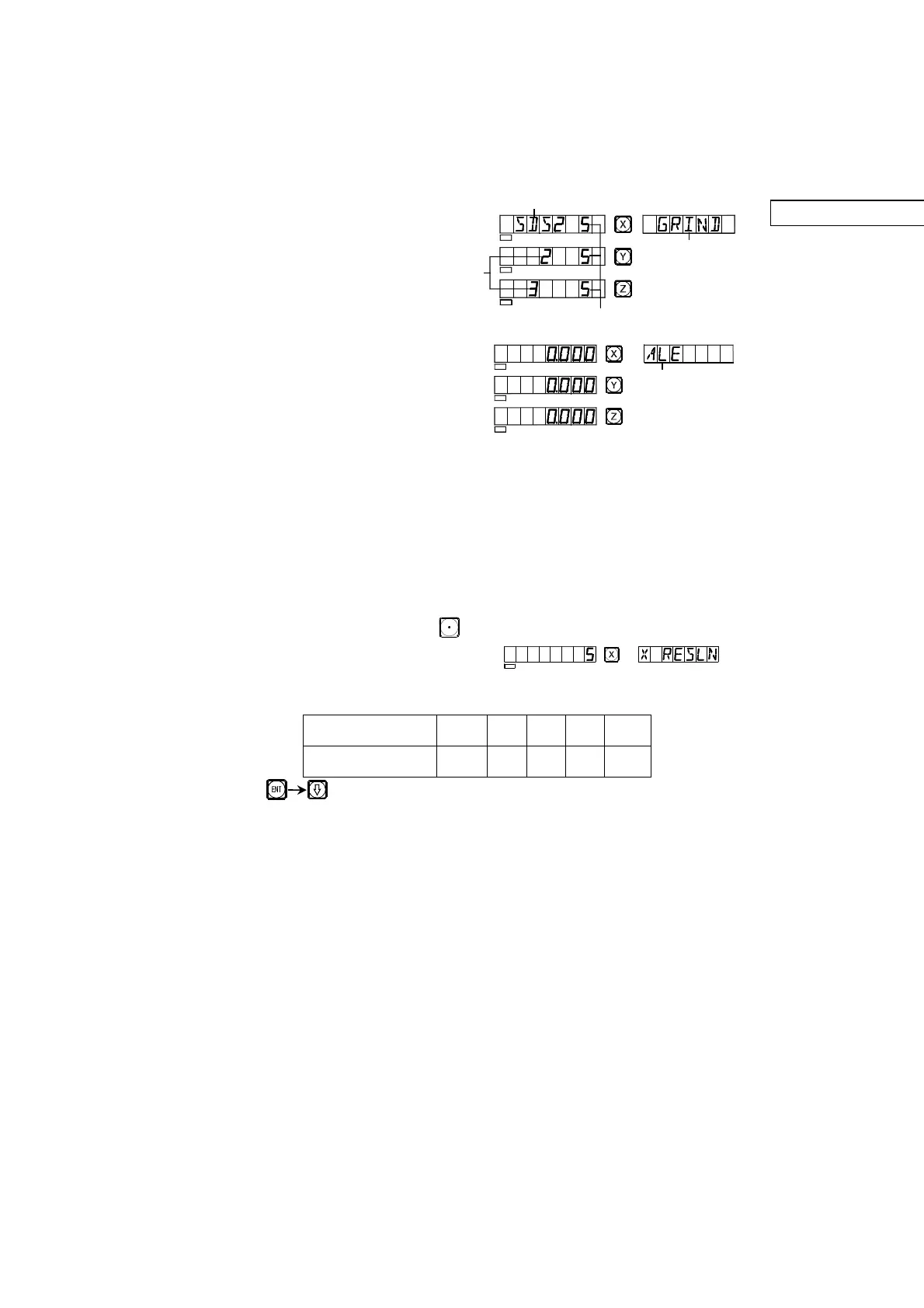
1. Start, Self check
1) Selecting the power voltage,
switching the power on
2) Self check of the meter
3) Self check finished,
enter working mode
Note: Two axial readout only has
X-axis and Y-axis, three axialreadout has X-axis, Y-axis and Z-axis.
The lathe machine readout display “LATHE”; the grinding
machine readout display “GRIND”; the milling machine readout
display “MILLING”; the discharging processing readout display
“EDM”.
2. Setting of System
In process of self check, key , then the system enter setting mode after
self check finished.
1) Setting axis X resolution.
Setting different resolution according to keying different numbers.
Key , next step
Number key 9 1 2 5 0
Resolution(um) 0.5 1 2 5 10
SEL
SEL
SEL
SEL
"ALE" or "INC" or "ZER"


 To Next Page