φ 6
The progressive progressing of rectangular inner chamber
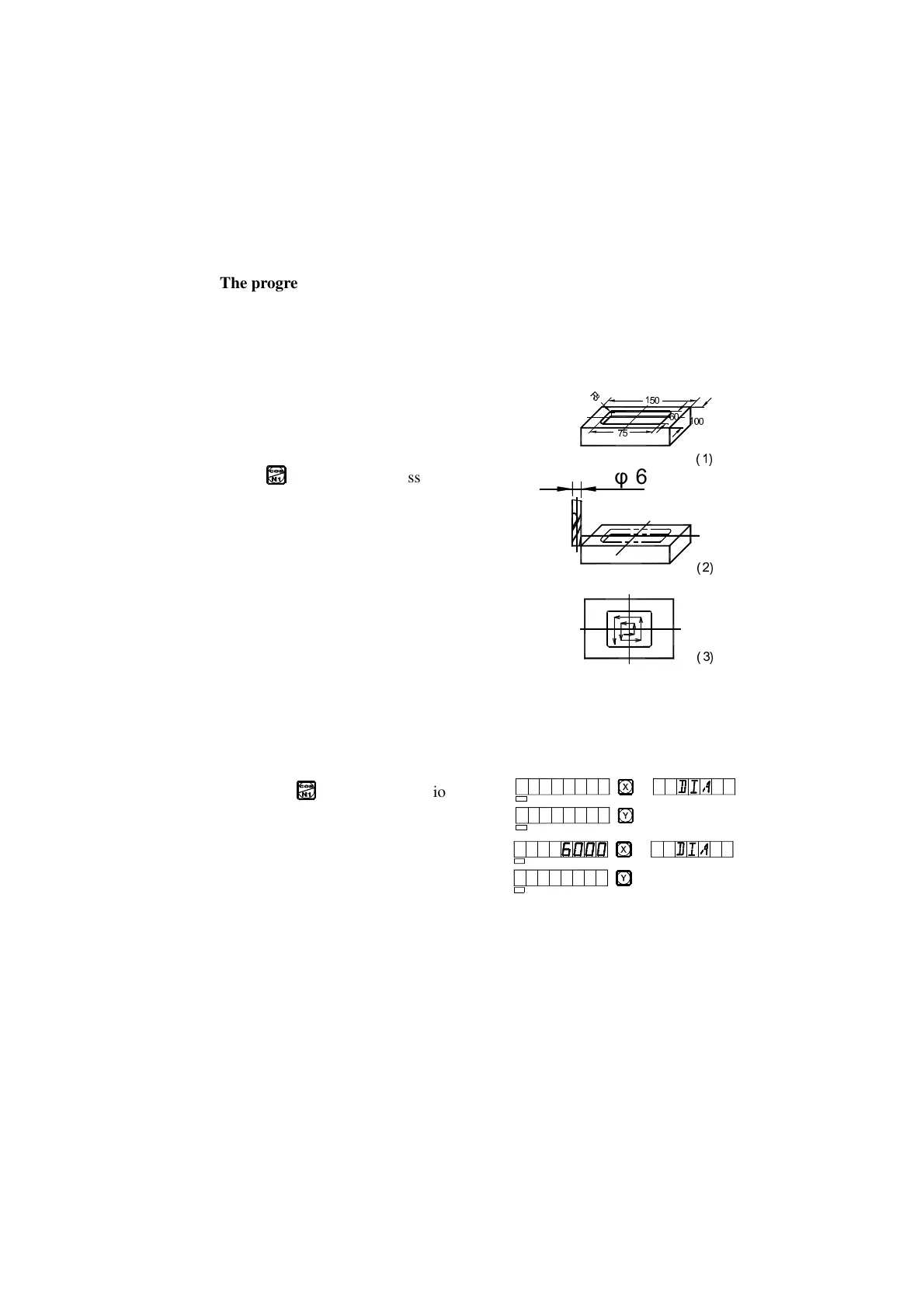
When the job is to process the inner chamber of the fitting shown by the
working drawing of Fig. (1), the progressive inner chamber processing
function may be used; and referring to the prompts the operator can operate
easily. As shown in Fig. (3), the processing starts from the center of the inner
chamber and goes on along the arrow direction.
Operation procedure:
1. Key to enter the progressive inner
chamber processing function.
2. Enter the diameter of the tool (DIA).
3. Enter the position of the inner chamber
(CT POS) (the position with respect to
center of the tool).
4. Enter the size of the inner chamber.
5. Enter processing state.
The operation procedure in an example:
The processing of the inner chamber of the fitting shown in Fig. (1).
1) Finish tool setting as shown in Fig. (2), reset,
and key to enter the function.
2) Enter the diameter of the tool
SEL
SEL
SEL
SEL


 To Next Page