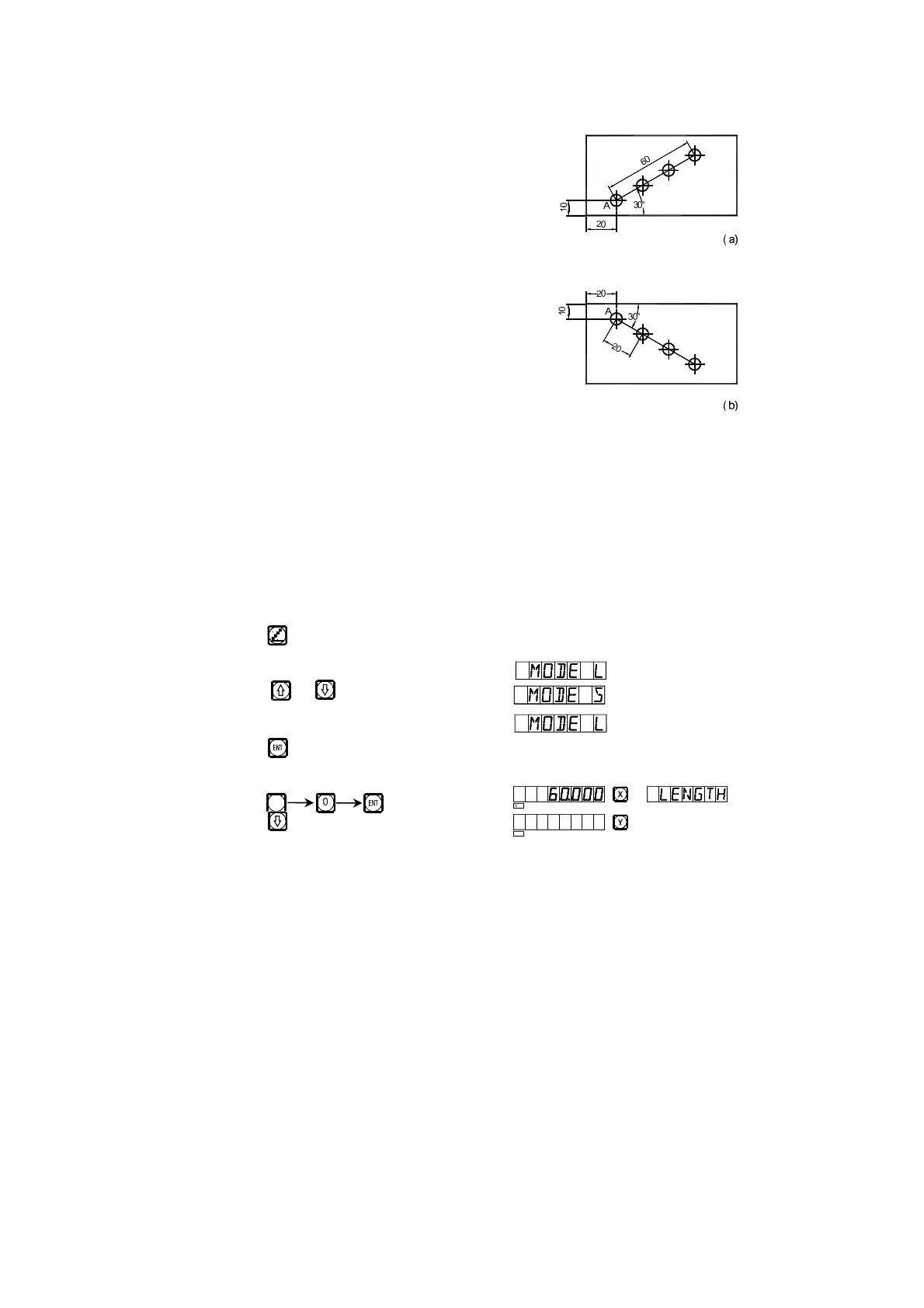
The function of hole drilling along an oblique line
Normally, for processing the working
pieces shown in the right figure the operator
must calculate out the distance between two
neighboring holes in X- and Y- axes; an easy
and quick resolution is provided through the
function of hole drilling along an oblique line.
What the operator shall do is only entering
the following data:
The length of the oblique line(LENGTH)
This is the real distance from the center of
the start hole to the center of the end hole, enter
this data when “MODE L” (length mode) is
selected.
The step length (STEP)
This is the distance between two neighboring
the holes.
This data shall be entered when “MODE S” (step length mode) is
selected.
Angle (ANGLE)
This is the direction of the oblique line in the plane coordinate. The angle
is 30° in (a), so, the plane angle to be entered is 30; the angle is -30 in (b), so
the plane angle to be entered is -30.
Number of holes (NUMBER)
Take the processing of (a) as example
1) At first move the tool to the position of the start hole A.
Key to enter the function.
2) Select Mode
Key or
Select “MODE L”
Key
3) Enter the length of the oblique line
Key
Key
6
!
SEL
SEL
*
*
+,-
+,-
.
/
0
1 2
3
2
3
4
5


 To Next Page