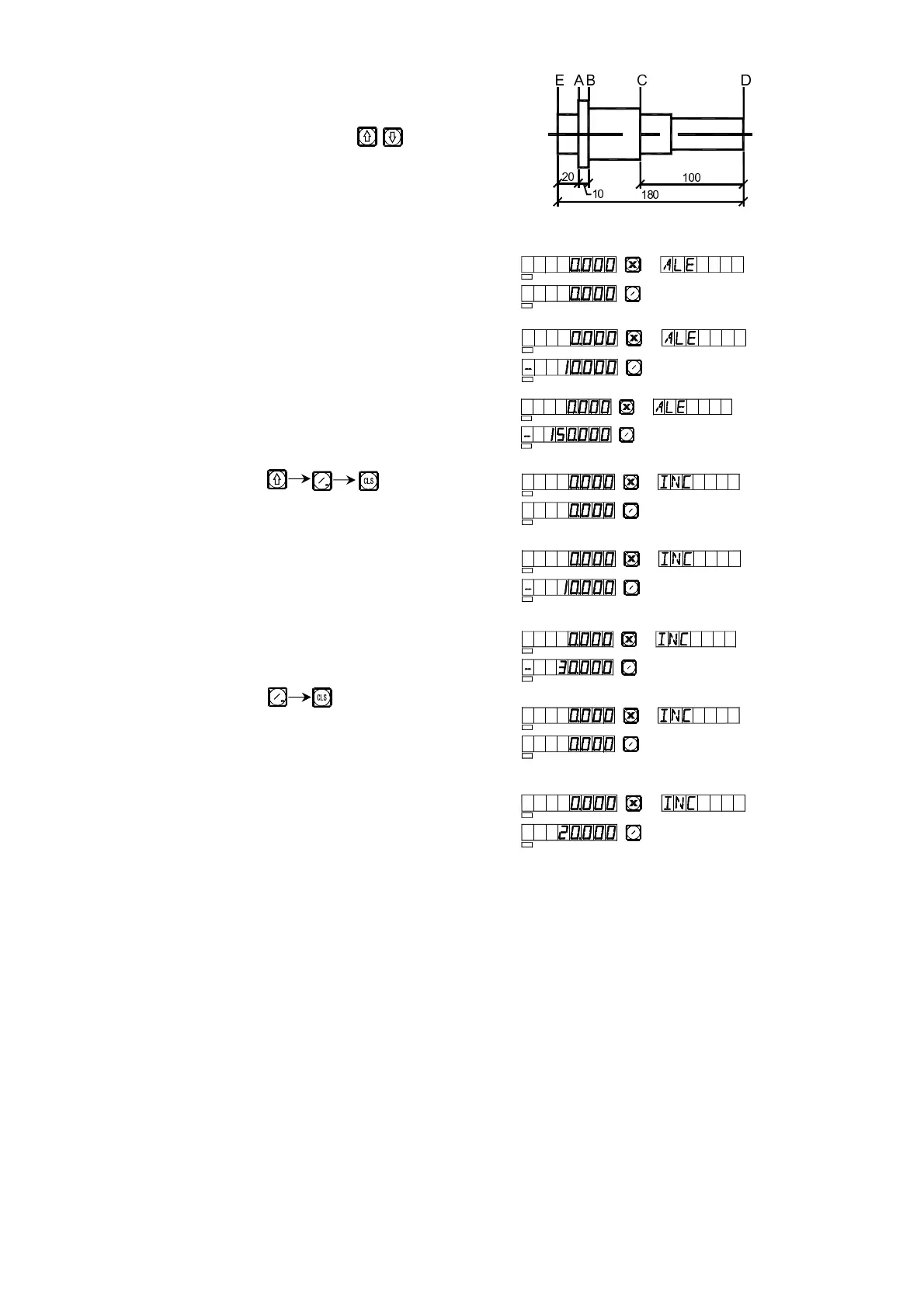
5. Absolute/Relative/ User Coordinate Display
Mode.
Press the buttons , to switch between
absolute display and relative display, as stated
in the operations below. Set the D plane as the
datum plane, under “ALE” state Z/Z
0
axis display 0.
1) Cutting tool on D plane.
2) Move the cutting tool onto C plane.
3) Move the cutting tool onto B plane.
4) Key
5) Move the cutting tool onto A plane.
6) Move the cutting tool onto D plane.
7) Key
8) Move the cutting tool onto A plane.
SEL
SEL
Z
Z
0
SEL
SEL
Z
Z0
SEL
SEL
Z
Z0
SEL
SEL
Z
Z
0
Z
Z
SEL
SEL
Z
Z
0
SEL
SEL
Z
Z
0
Z
Z
SEL
SEL
Z
Z
0
SEL
SEL
Z
Z0
{|
}|
}~|
}||


 To Next Page