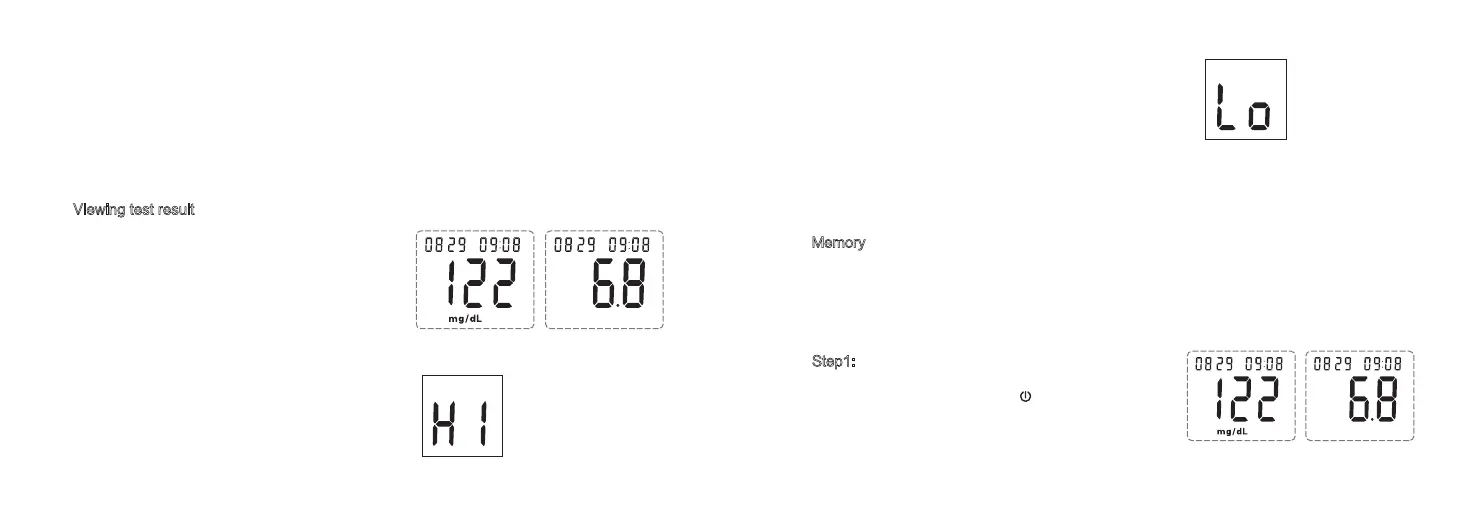
Viewing test result
Memory
The Safe-Accu 2 meter stores 200 blood glucose test results. You can review the individual
results by entering the memory mode. Once 200 results are in memory, adding a new result
causes the oldest one to be deleted. It also provides you with 7-, 14- and 28-day averages
of your blood glucose test results. Recall the test results in memory with these easy steps.
25 26
Used test strip and lancet may be biohazardous. Please discard them carefully according
to local regulation requirements.
If the meter is used by multiple people, use 75% alcohol to clean meter surface after
testing to avoid pathogen infection.
If test result is below 20 mg/dL (1.1mmol/L), the screen
displays LO. Use a new test strip to test again. If still
display LO, please contact healthcare professional
immediately.
Attention: The test result of “HI” or “LO” will not store in memory.
After the blood glucose meter counts down
from 10, your blood glucose results appears
along with the unit of measure. This blood
glucose result is stored in the meter memory.
Turn the meter off by removing the Safe-Accu 2
test strip. Discard the used test strip carefully to
avoid contamination.
If test result is above 600mg/dL (33.3mmol/L), the
screen displays HI. Use a new test strip to test
again. If still display HI, please contact healthcare
professional immediately.
mmol/L
mg/dL unit mmol/L unit
mmol/L
mg/dL unit mmol/L unit
Step1: Enter the memory mode and reviewing the
averages
With the meter is off, press the button for 3 seconds
to turn the meter on. Meter will beep and display the
7-day average of your blood glucose test result.



 To Next Page