27 28
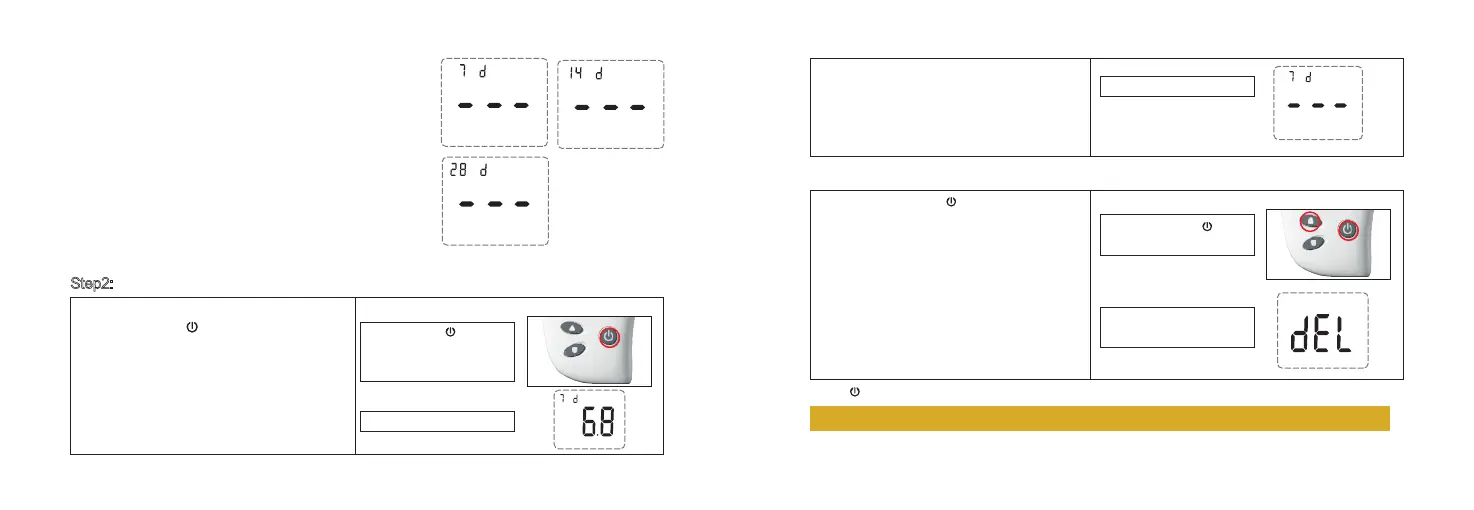
Press ▲ once, the screen will display the 14-day
average of your blood glucose test result.
Press ▲ twice, the screen will display the 28-day
average of your blood glucose test result.
Press ▲ three times, you will see the last test result
displayed.
Press ▼ or ▲ to view all the blood glucose results in
memory.
If no test results in memory, the meter will display 3
dashes with beep.
Step2: Delete Memory
How to delete blood glucose test results:
1. Press and hold for 3 seconds to turn the
meter on. The meter will enter the test results
review mode.
2. Press and release and ▲ at the same
time.
The screen displays 3 dashes and the meter
makes a short beep sound at the same time.
All stored blood glucose test results are
deleted.
Press button 3 seconds to turn the meter off.
Note: You cannot review your test results when the test strip is in the test strip port.
Press and hold for 3
seconds to turn the meter on
and enter the test results
review mode.
Step 1:
Step 2:
Press and release and ▲
at the same time.
All stored blood glucose test
results are deleted.
Test results review mode.
No test results saved.
mmol/L



 To Next Page