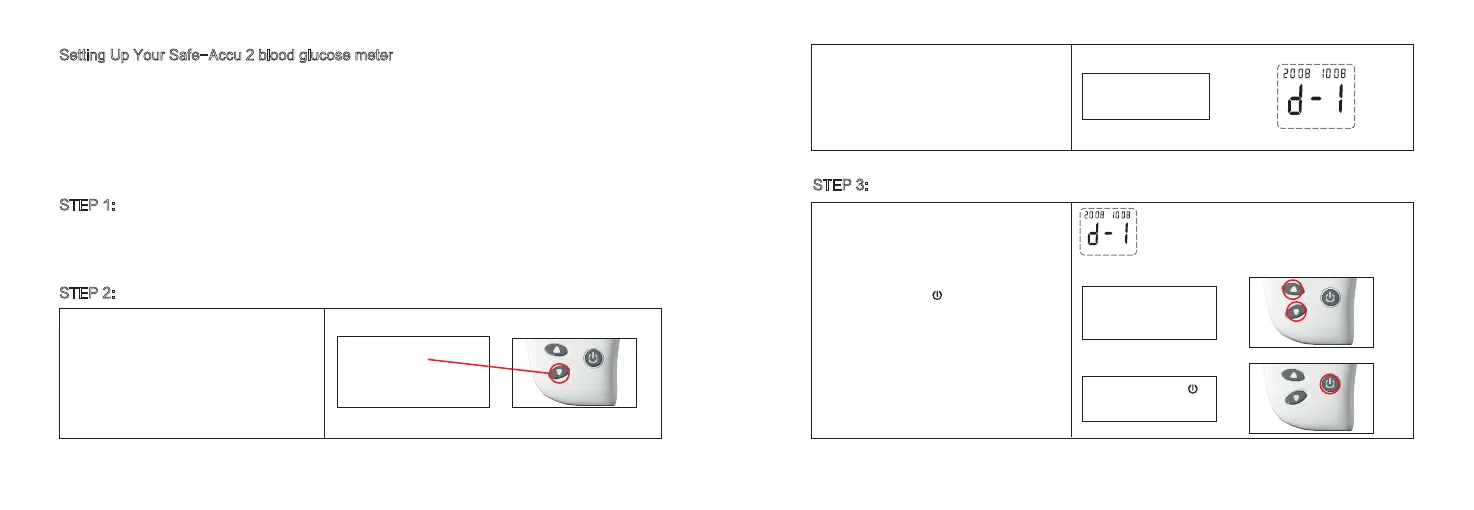
1. Starting with the meter turned off, press and
hold the ▼ for 3 seconds.
2. The meter enters into the Date and time
setting mode. 3. It displays “d-1” and the year
flashes.
The year appears flashing at the top right side
of the meter display.
1.Press and release ▼ or ▲ to increase or
decrease the year.
2. Press and release to confirm the year.
Step 1:
With the meter turned off,
press and hold ▼ for 3
seconds to start Date/Time
mode.
Step 2:
Date/Time Mode
Flashing Year
Setting Up Your Safe-Accu 2 blood glucose meter
Setup steps for date/time
The Safe-Accu 2 blood glucose meter is preset with the date and time. You may need to
adjust it to your local time zone. Check the date and time each time the batteries are
replaced. Reset the date and time if they are not correct.
STEP 1:
Insert the Batteries
Open the Battery Cover on the back side of the Safe-Accu 2 blood glucose meter. Insert
two AAA alkaline batteries as indicated by the “+” and “-” symbols.
STEP 2:
How to Set the Date and Time
STEP 3:
Setting the Year
9 10
Step 1:
Press and release ▼ or
▲ to increase or
decrease the year.
Step 2:
Press and release to
set the year.



 To Next Page