Page 18 901-F3M Issue A www.skcltd.com
Operating the Flite 3 Pump
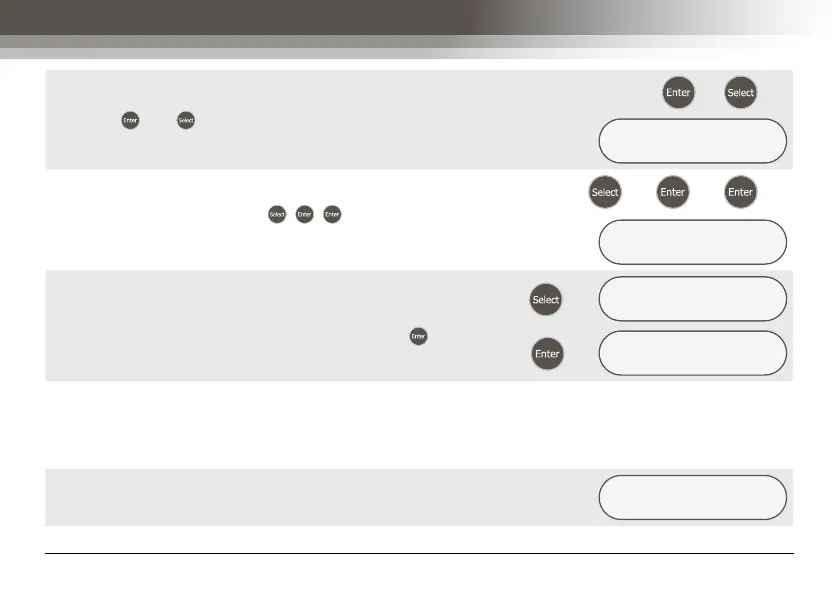
To stop the pump at the end of the required sample period,
press the and keys simultaneously. The LCD screen
will appear as shown.
+
Æ
ELAPSED TIME
001:00:03 STOP
Press the keys in the sequence , , and the ‘CHECK
FLOW ?’ screen is displayed.
Æ
Æ
Æ
CHECK FLOW ?
YES/no
If required the flow rate can be checked to verify that it has
remained within the required tolerance during the sample
run. Alternatively, select the ‘NO’ option and press and
the pump will go into Sleep mode.
Æ
CHECK FLOW ?
yes/NO
Æ
SAMPLING PUMP
SLEEPING
2) Simple Timed Run
Having previously programmed a simple timed run without delayed start and repeat runs, start the pump as
detailed for manual run. On accepting the ‘YES’ option in the ‘START NOW ?’ screen the pump will display the
‘ELAPSED TIME’ screen and the elapsed time will count up until the end of the programmed run time is reached.
At the end of the timed run the pump will automatically stop
and retain the elapsed run time on the LCD screen.
ELAPSED TIME
001:00:00 OK



 To Next Page