www.skcltd.com 901-F3M Issue A Page 7
Getting Started
1) Fitting the Battery
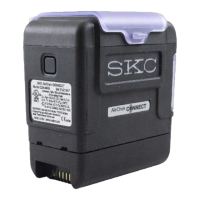
The Flite 3 pump is supplied without a battery. Refer to the instructions supplied with each battery for details
of how to fit it into the pump casing.
Note - The toolkit (Part No. P901203) supplied with the pump is required to fit the battery.
2) Charging the Battery
Prior to first use the battery should be fully charged, ideally overnight.
The Flite 3 pump must only be charged using the correct SKC charger (Part No. 901-310).
The charger is supplied with mains input plugs suitable for use in the UK, Europe, USA and Australia/New
Zealand. Select the correct mains input plug and fit it to the charger.
Unscrew the dust cap from the charging/power socket on the pump and connect the output connector from
the charger to the pump socket. Screw the charging connector into the socket to prevent it from coming
loose during charging.
Plug the charger into the electrical mains supply and switch on the power. The LED indicator on the charger
will illuminate amber to indicate that the charger is charging at full rate.
Leave the pump to charge fully. For a fully depleted battery this will take approximately 5 hours for the
P901301 3.2Ah battery and approximately 10 hours for the P901302 7Ah battery. When the battery is fully
charged the LED indicator on the charger will illuminate green to indicate that the charger has switched to
trickle charge.
When fully charged, switch off the mains power to the charger and disconnect the charger output connector
from the pump. Always fit the screw-in dust cap to the charging/power socket on the pump after charging.



 To Next Page