Page 12 901-F3M Issue A www.skcltd.com
Programming the Flite 3 Pump
Having set the required pump flow rate disconnect the flow calibrator from the sampling head inlet. Remove
the filter from the sampling head and replace it with a fresh new filter. Fit the sealing cap to the sampling head
inlet to prevent contamination of the filter prior to sampling.
3) Manual Operation
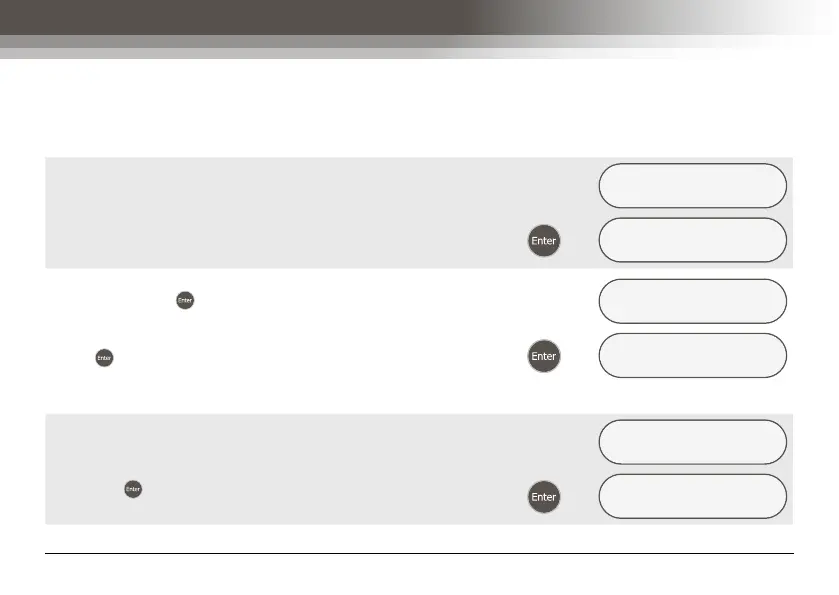
Having set the pump flow rate to the desired level, the ‘RUN
PARAMETER’ menu screen is displayed.
SET FLOW USING ▾
>>>>>>>
Æ
RUN PARAMETER
MANUAL/time/exit
For simple non-timed, manual operation select the ‘MANUAL’
option, and press to display the ‘REVIEW DATA ?’ menu
screen. Refer to section - 5) Reviewing Sampling Programs,
for further details. Alternatively, select the ‘EXIT’ option, and
press to cancel the sample program and return to the
‘SET UP NOW ?’ menu screen.
RUN PARAMETER
MANUAL/time/exit
Æ
REVIEW DATA ?
yes/NO
4) Setting a Timed Run
Having set the pump flow rate to the desired level, from the
‘RUN PARAMETER’ menu screen select the ‘TIME’ option,
and press to display the next menu screen.
RUN PARAMETER
manual/TIME/exit
Æ
ENTER RUN TIME ?
YES/no



 To Next Page