www.skcltd.com 901-F3M Issue A Page 17
Operating the Flite 3 Pump
1) Manual Run
Having programmed the desired flow rate and fitted a new filter into the sampling head, place the pump at
the sampling location, and ensure that the sealing cap is removed from the sampling head inlet.
If the pump is in Sleep mode, wake it and either the
‘REVIEW DATA ?’, or if the pump program has already been
used to take a sample, the ‘USE LAST SETUP ?’ screen is
displayed. From the ‘USE LAST SETUP ?’ screen select the
‘YES’ option and press
to display the ‘REVIEW DATA’
screen.
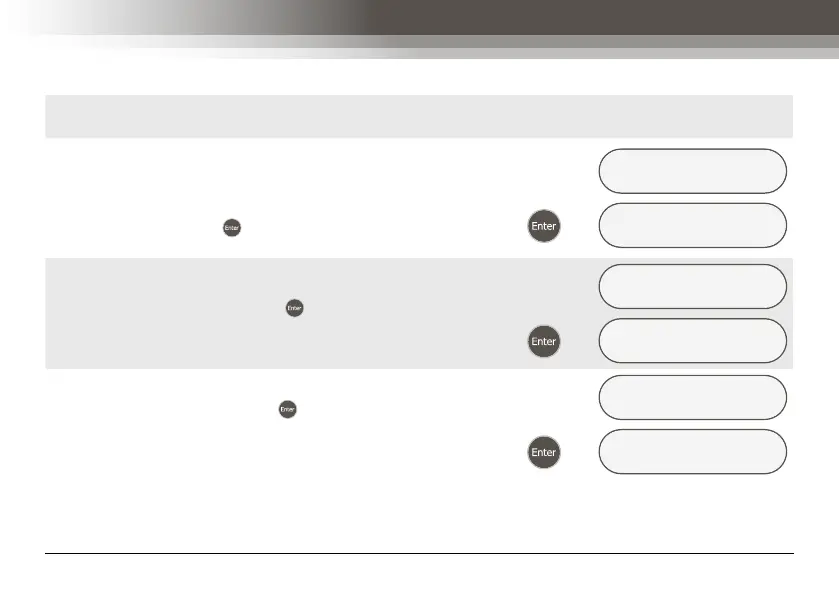
USE LAST SETUP ?
YES/no
Æ
REVIEW DATA ?
yes/NO
Select the ‘NO’ option and press to display the ‘START
NOW ?’ screen.
REVIEW DATA ?
yes/NO
Æ
START NOW ?
YES/no/escape
Select the ‘YES’ option and press . The pump will start and
display the ‘ELAPSED TIME’ screen. This screen displays
the elapsed run time in hours, minutes and seconds.
START NOW ?
YES/no/escape
Æ
ELAPSED TIME
000:00:16



 To Next Page