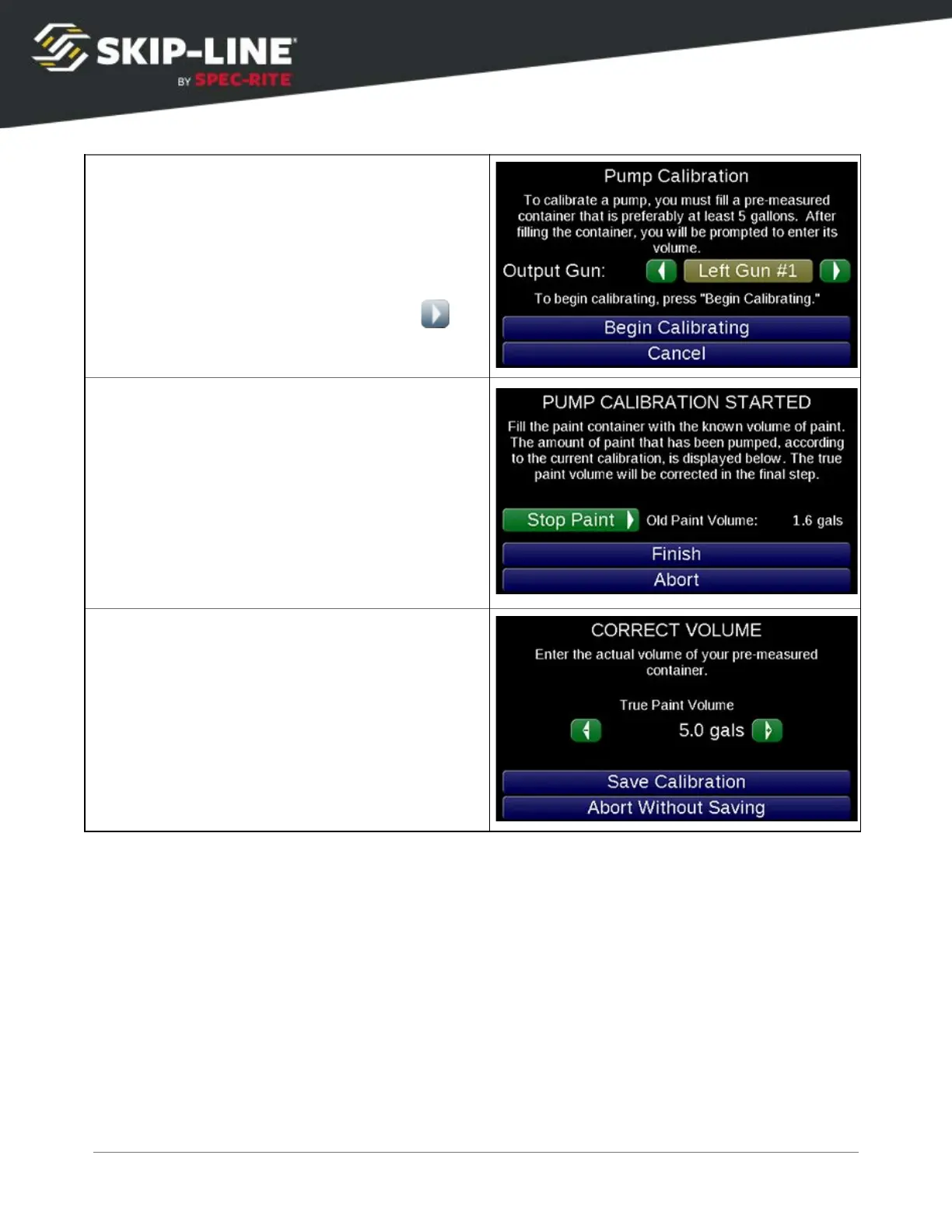
Select a gun to use for the calibration. Only
select a gun that is plumbed to the pump you
are calibrating.
Place a container with known volume under
this gun. Lower pump pressure and disable any
atomizers to minimize overspray. Select
Begin Calibrating
to enter the start screen.
Once the pre-measured container is under the
selected gun, press
Start Paint
to begin the
calibration. The button will change to
Stop
Paint
.
Once the container has been filled to its
pre-measured capacity, press
Stop Paint
. If not
yet filled, use
Start Paint
/
Stop Paint
until paint
level is at the correct height.
Press
Finish
when done.
Adjust the number displayed to match the
volume of the pre-measured container.
If an error occurs, verify the pump stroke sensor is installed and connected
correctly.
4.5.4 Extras
Some features are not part of the standard package, and are organized under
other menus when purchased with the system.
Marker Layout
SC-12 Road Marking Control System - Installation and Operation Manual
38



 To Next Page