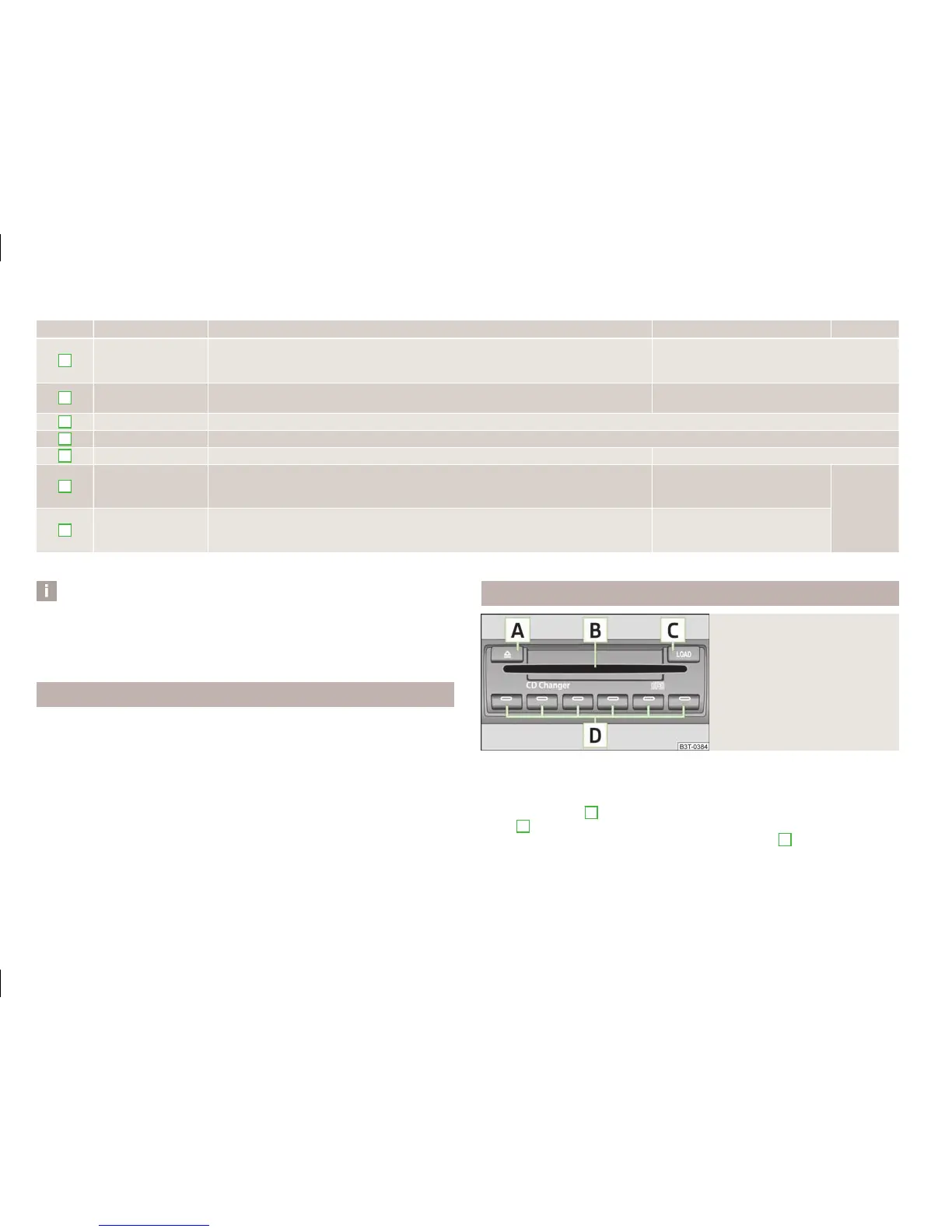
Button Action Radio, traffic information CD/CD changer/mp3 Navigation
3
press briefly
Changing to the previously stored radio station
Changing to the previously stored traffic information
Interrupting the traffic report
Changing to the previous title
3
press button for a
long period of time
Interruption of the traffic report Fast rewind
4
press briefly changing the audio source
5
press briefly Call up the main menu
6
press briefly Interruption of the traffic report without function
6
turn upwards
Display of the stored/accessible stations
scroll upwards
Interruption of the traffic report
Changing to the previous title
without
function
6
turn downwards
Display of the stored/accessible stations
scroll downwards
Interruption of the traffic report
Changing to the next title
a)
Only valid for the navigation system Columbus.
Note
■
The loudspeakers in the vehicle are adjusted to the power output of the radio
and navigation system of 4x20°W.
■
The sound system equipment comprises loudspeakers that are adjusted to the
amplifier power output of 4x50°W + 6x25 W.
AUX-IN and MDI inputs
The AUX-IN input is located below the front armrest and is marked with .
The MDI input is located below the front armrest.
The AUX-IN and MDI inputs are used to connect external audio sources (e.g. iPod
or mp3 player) and to play back music from these devices via the factory-fitted ra-
dio or navigation system.
For a description of use, refer to the operating instructions for the relevant radio
or navigation system.
CD change
Fig. 133
The CD changer
The CD changer for the radio and navigation system is located in the left side
compartment of the luggage compartment.
Inserting the CD
›
Touch the button
C
» Fig. 133 and guide the CD (compact disc) into the CD-
case
B
. The CD is automatically loaded onto the lowest free position in the CD
changer. The indicator light in the corresponding button
D
stops flashing.
£
144
Using the system



 To Next Page