Manually adjusting the front seats
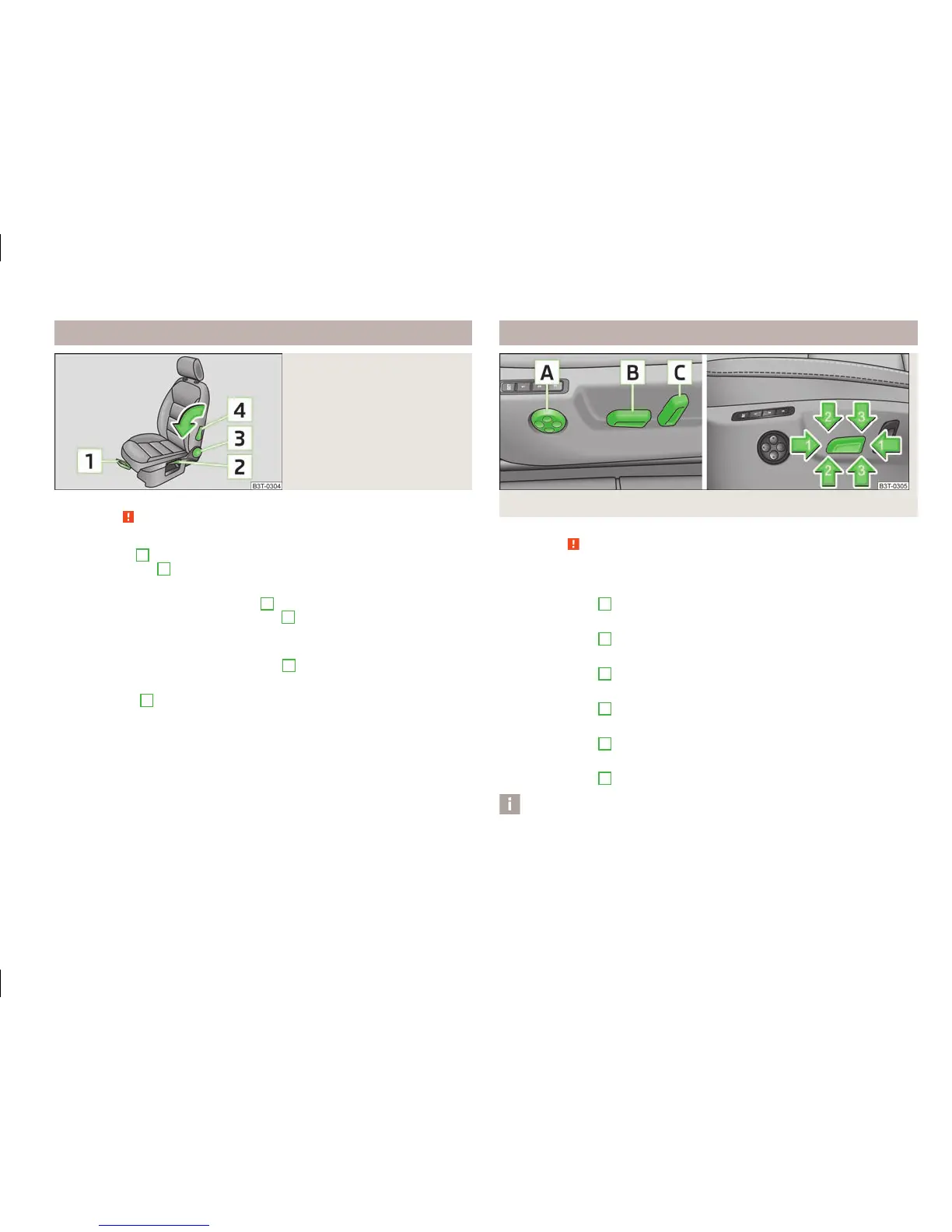
Fig. 54
Control elements at the seat
First read and observe the introductory information and safety warn-
ings on page 72.
Adjusting a seat in a forward/back direction
›
Pull the lever
1
» Fig. 54 up and push the seat into the desired position.
›
Release the lever
1
and push the seat until the lock clicks into place.
Adjusting height of seat
›
To lift the seat, pull or pump the lever
2
upwards.
›
To lower the seat, push or pump the lever
2
downwards.
Adjust the angle of the seat backrest
›
To adjust the angle of the backrest, relieve any pressure from the seat backrest
(do not lean on it) and turn the handwheel
3
.
Adjusting lumbar support
›
Turn the lever
4
until the most comfortable curvature of the lumbar support is
achieved.
ä
Adjusting front seats electrically
Fig. 55 Controls for the electric seat adjustment
First read and observe the introductory information and safety warn-
ings on page 72.
Adopt the correct seated position before setting » page 72.
Adjusting a seat in a forward/back direction
›
Press the switch
B
» Fig. 55 forwards or backwards in the direction of arrow 1.
Set the height of the seat cushion
›
Press the switch
B
upwards or downwards.
Adjust the angle of the seat cushion
›
Press the switch
B
in the direction of arrow 2 or 3.
Adjust the angle of the seat backrest
›
Press the switch
C
in the direction of the desired setting.
Reducing or increasing the curvature of the lumbar support
›
Press the switch
A
forwards or backwards.
Raising or lowering the curvature of the lumbar support
›
Press the switch
A
upwards or downwards.
Note
If the movement of the seat is inadvertently interrupted during an adjustment,
once again press the switch in the appropriate direction and complete the adjust-
ment of the seat.
ä
73
Seats and Stowage














 To Next Page