2
REQUIRED TOOLS:
ALLEN WRENCH TOOL SET
SCREWDRIVER
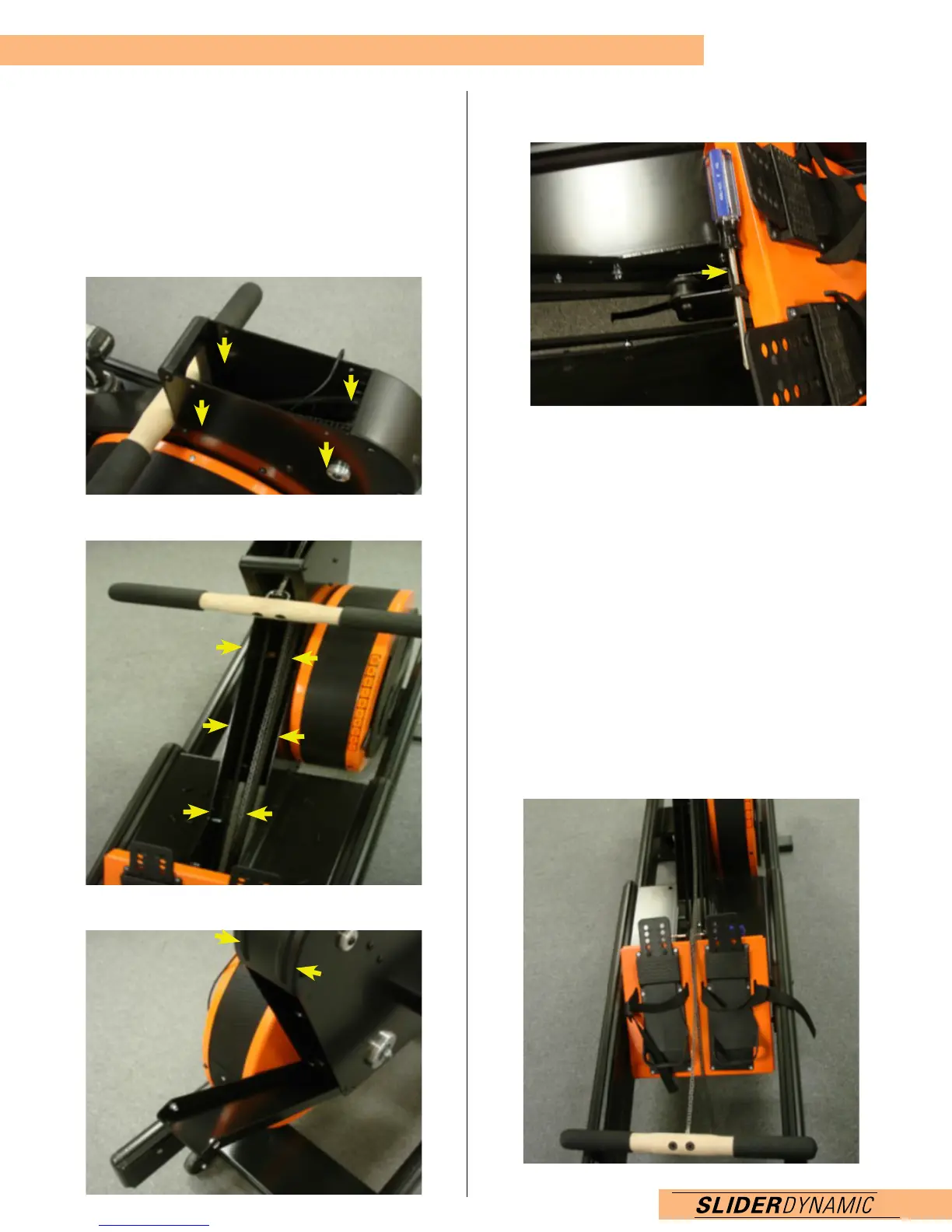
1. Unplug Monitor. Remove the monitor cover bolts (4)
using a 3mm allen tool.
BE CAREFUL NOT TO STRIP THE BOLTS, it is
recommended on older machines to use Liquid Wrench
or WD-40, apply pressure and slowly turn as to not strip.
2. Remove the 3mm bolts (6) securing the front cover.
3. Remove top 3mm bolts (2) holding the rear cover.
SLIDER CHAIN REPLACEMENT
4. Pull the bungee chain block pulley up above the
footplate and secure using a screwdriver.
5. Undo the bolt holding the connector end of the chain.
6. Remove the original chain.
7. Remove the chain from the handle end by undoing the
two socket inserts on the rower side of the handle.
8. Pull the U Bolt from the handle.
9. Undo one insert nut and slide the chain swivel end of
the chain off.
10. Attach the new chain.
11. Thread the insert nut and turn until it is equal with the
other side on the U bolt.
12. Insert the U bolt into the handle.
13. Secure the U bolt with the socket insert nuts.
14. Once attached to the handle, place the handle on the
top rails and straighten the chain out.


 To Next Page