10
ELECTRONIC R PROGRAMMER INSTRUCTIONS
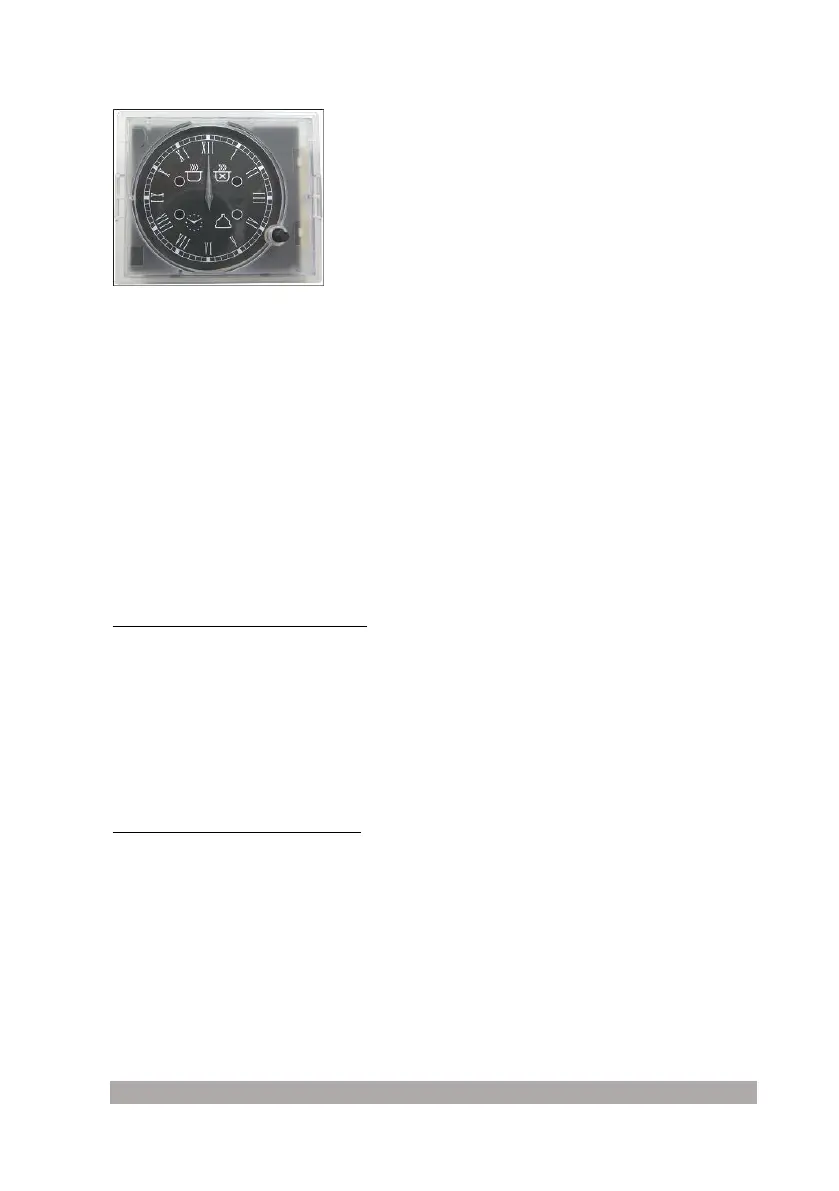
This timer displays the time and operation of the
oven.
By operating on the push knob it is possible: to adjust
the time, program the start and end time of cooking, set the alarm.
Adjusting the time
To adjust the time, briefly press the knob 4 times until the “CLOCK” icon flashes.
Therefore, increase or decrease the time in steps of 1 minute, turn the knob clockwise or
anti-clockwise and the minutes hand moves by 1 minute clockwise or anti-clockwise.
After 10 seconds from the last adjustment, the electronic timer automatically exits the time
adjustment mode.
Manual cooking
At rest, the timer allows manual cooking by operating on the oven master switch (outside the
device).
After having supplied the mains power supply to the timer, wait approx. 2 seconds before the
relay is energised.
Programming the cooking start and end time
Programming the cooking start time: press the knob once briefly until the “START TIME” icon
flashes. Turn the knob clockwise until the desired cooking start time is displayed.
The “START TIME” icon continues to flash for 10 seconds from the last rotation. If the knob is
not turned or pressed within this time, the hands go back to displaying the time and the
program is annulled. If the knob is pressed, the Cooking Start time is memorised (“START
TIME” icon on with fixed light), as long as at least 1 minute of delay has been set and you
pass to setting the Cooking End time (the“END TIME” icon goes from off to flashing). Cooking
will start when "Cooking Start Time Set = Current Time".
Programming the cooking end time allows immediate start-up and to end cooking in an
automatic manner on the basis of the programmed time.
Programming the cooking end time: press the knob twice briefly until the ““END TIME”TIME”
icon flashes.
To increase or decrease the cooking time, turn the knob clockwise or anti-clockwise and the
minutes hand moves by 1 minute clockwise or anti-clockwise.
Flashing of the “END TIME” icon continues for 10 seconds from the last rotation. The
program can be confirmed by pressing the knob as long as at least 2 minutes of cooking
have been programmed.
On confirming the program, cooking is started and the acoustic alarm is automatically
activated. Cooking will end when "Cooking End Time Set = Current Time".
To display the program set, press and release the knob briefly and, at the same time, the
clock hands and icons display the program set. At the end of cooking, the “END TIME” icon
flashes and the alarm emits acoustic signals.



 To Next Page