8| INSTALLING YOUR SMART BOARD 685IX PREMIUM INTERACTIVE
WHITEBOARD SYSTEM (APPLIANCE-BASED)
5. Route the projector’s power cable through an opening in the bottom or side of the
wall mount closest to your wall outlet.
IMPORTANT
Don’t connect the power cable to a wall outlet at this time.
Installing SBA speakers and cables
SMART recommends that you install your SMART Board Audio (SBA) speakers on
the wall on each side of the interactive whiteboard instead of attaching them to the
interactive whiteboard.
NOTES
• You can install the speakers now or after you install the interactive
whiteboard.
• The following procedures show the main speaker mounted to the right of the
interactive whiteboard, which maintains the correct left to right stereo image. If
control accessibility or proximity to a power outlet requires it, you can mount
the main speaker on the left and change the routing of the speaker cables
appropriately.
To install the SBA
speakers and cable
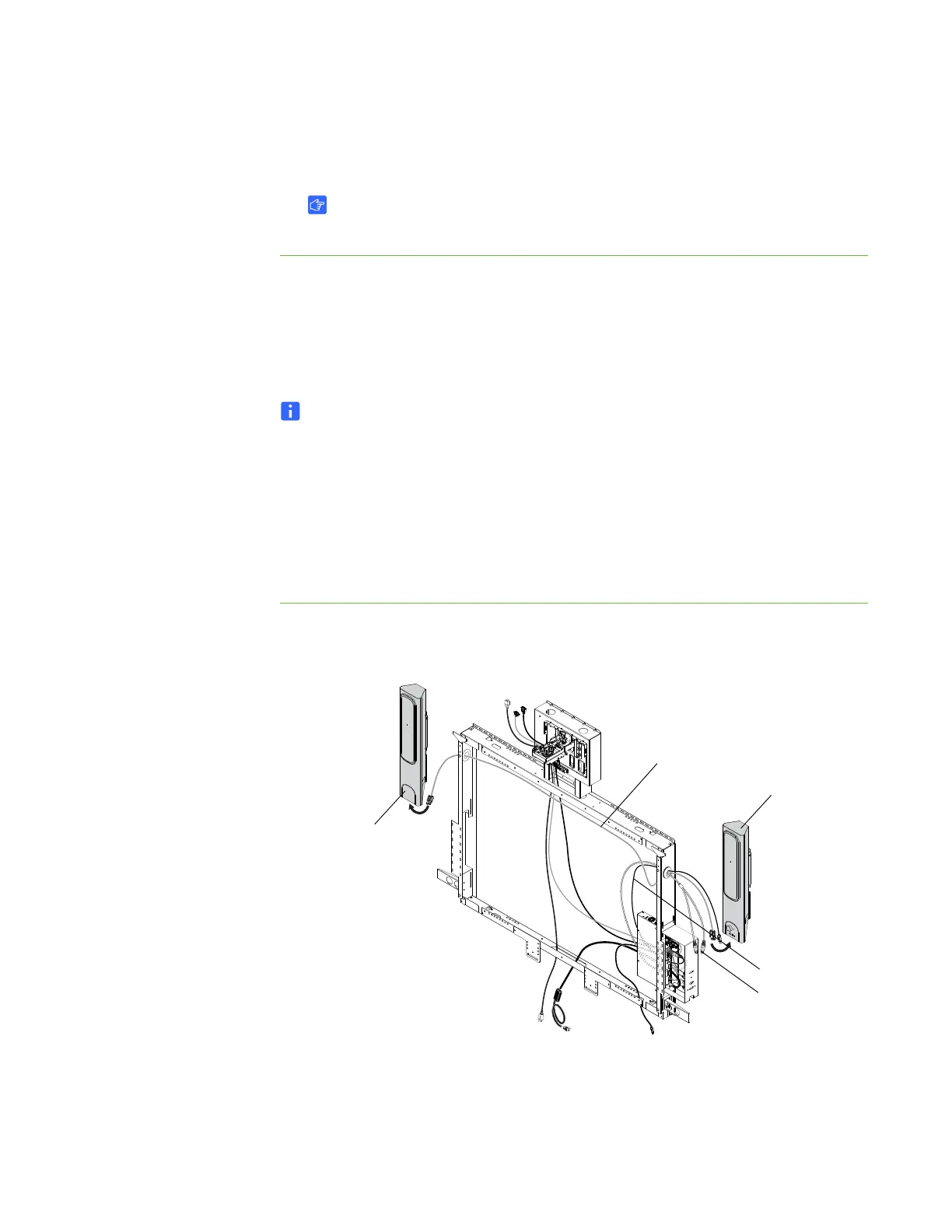
1. Refer to the SBA Speakers for SMART Board Interactive Whiteboards installation
guide, document 99-00949-20, provided with the speakers to install them.
2. Route the speaker cable through the oval openings in the top right and top left of
the wall mount, and then connect it to both speakers.
Main Speaker
Dual RCA Plugs
Speaker Cable
Hub USB Cable
Second
Speaker



 To Next Page